




Deleted Account
Member
-
Joined
-
Last visited
Everything posted by Deleted Account
-
Heya! This is actually the same in the real aircraft. It skips some numbers as those are not assinged to any ILS in the world. As Crabby said, there are only 40 channels in total, and those are all covered.
-
If the checklist form the manual isn't enough for you, I can either recommend the YouTube series we did for the A300 (back in the XPlane days) where everything is meticiously explained or just follow the insim checklist, which shows you where everything is located. If you need more help than that - or rather with something specific - please don't hesitate to reach out here and I'll do my best to help 🙂
-
Heya! Yep, this is a known issue, as some already said, please disable the MSFS damage model for the time being.
-
You can also check out our own YouTube channel, we made multiple video series showing how to fly the plane 🙂 Granted, those were made for XPlane, but they work mostly the same
-
Heya! Could you please be more specific? Which runway and what SID is this happening with?
-
Thanks for the report, will look into and fix it 🙂
-
Heya! Yep, we are aware of the cabin lights not being that visible, thanks for the report tho 🙂
-
Thanks, we will compare with FCOM and change if necessary 🙂
-
Not yet anyways.. But yes, for the moment it is advised to not use the Navigraph navdata when flying the A300 as things like this can unfortunately happen.
-
The unnecessary chippyness aside.. Yes this is already known and we are checking if we can do something about it 🙂
-
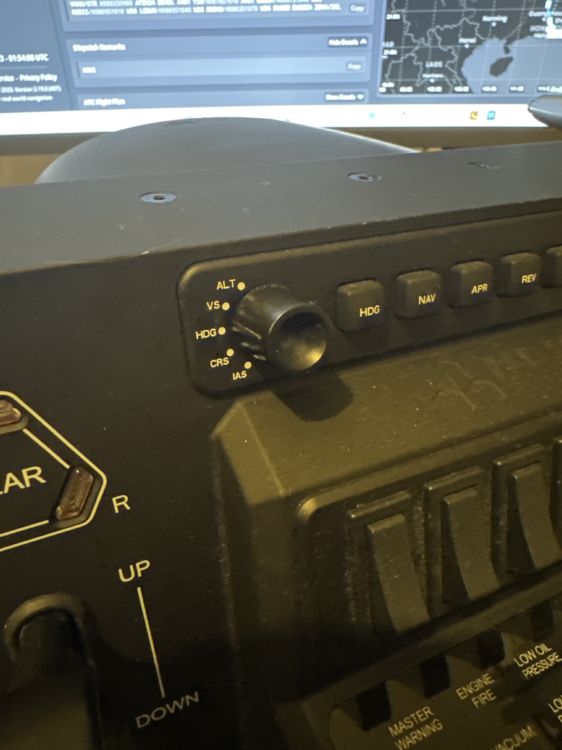
Heya! I'm guessing youre using a Honeycomb Bravo? Make sure this knob isn't on the IAS setting 🙂
-
I personally haven't seen that yet, no. Could you maybe record a video of this happening having the FCTL page open on the ECAM?
-
Thanks, we will look into this 🙂
-
Iirc this should be fixed with the next patch 🙂
-
Thanks, already known and getting looked into.
-
Thanks, forwarded to our sound guy for consideration 🙂
-
Thanks, this is already getting looked into 🙂
-
I am not familiar with the program, so I am afraid I can't answer that question. But if it switches the frequencies as expected, I don't really think this is our fault anymore. I'm happy to be wrong about that tho, if someone knows more than I do.
-
Heya! Please contact direct support for this, they can also provide a chargeback if youre already been charged twice 🙂 https://www.inibuilds.com/contact
-
Low level flight is something we are taking a look at, thanks for the reports 🙂
-
This sounds like a completly different issue. Seeing as this is your first post however, it doesn't seem you ever asked for help before. What is your CPU if you don't mind me asking?
-
Heya! Do you have a VPN by chance?
-
Heya! Just to exclude any hardware bindings from being the cause, could you please remove your Hotas/Stick/Yoke/whatever and try to start up the plane?
-
The KBDL one is fixed for next version, the VHHH one I cant reproduce. Do you have a scenery for it by chance? If so, does it also happen with the scenery uninstalled?
-
Mate I don't know what you're talking about but Microsofts Azure has nothing to do with this. I would kindly ask you to stop spreading misinformation.

