NavyKing1992
Member
-
Joined
-
Last visited
-
Yes, indeed. I do use the aircraft (freighters only) since the release for MSFS 2020 almost every flight. Now the 2024 premium version. The aircraft is very good to fly and to operate, even with the clickspot issue. But if I had a wish....I am still missing this: APU exhaust (I know ini works on it) and brighter red beacon and position lights during the day time. I know this is an Asobo problem in MSFS 2024 in general, but PMDG did it somehow better for their fleet... Anyway, a good aircraft for MSFS. By the way, I am an aircraft technician, I know what I am talking about..
-
Thanks for the quick reply. Good to know it is not my system only. Any chance to get it updated? Chris
-
IniJamir, would you check please "on your PC", if there is a heat blur exhaust effect out of the APU (MSFS 2024 premium freighter, PW and GE) and report back. Thanks in advance Chris
-
Do you see the heat blur exhaust effect out of the APU?
-
As for me, the APU works as it should (v1.0.9) at the PW and GE freighter (cold and dark). I use the freighters only. I did not test the pax version. But there is no heat blur exhaust effect out of the APU after the v1.0.9. Anyway, Ini should check it, even for the other "Captains".......
-
-
-
Thanks for the quick reply. Appreciate it. What do you mean with the "Default NAVDATA"? I always use the newest Navdata from Navigraph. Right now the AIRAC Cycle 2606 rev.3. I also have the A300 compatible version. That FMS works fine. Even LIMC shows no issues... Looking forward to your answer. Chris
-
-
I have the same with the A300 PREMIUM but no solution.
-
Ini Team, First question: Are there any news on an update regarding the FMS as stated above? E.g. I can not selecting SID/ STAR procedure at LIMC. With the A300 compatible version no problems at all. Second Question: Are there any news regarding the EFB Map which is still flickering? This is a known issue since 2024. Any news/ update would be appreciated. Please do not forget the "old" customers. Thanks Chris
-
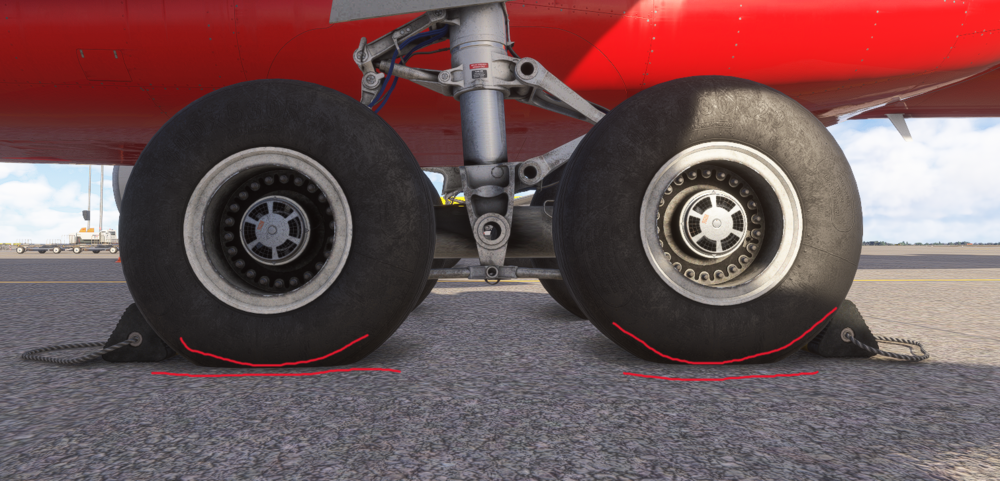
Dear Inibuilds Team, are you able to fix the A300-300 P2F main landing gear wheels as they are sinking into the ground? I mean to slightly raise the main gear wheels. As you did create the aircraft I kindly ask you to do that. If you are not able to do so, please forward my request to Asobo/ MS thru your "channel". Thanks in advance Chris
-
Hello Captains, so far I use the A300 compatible version for the MSFS 2024. I wanted to buy the premium version of the A300 but as I read the comments about the poor performance I did not buy it. What does it mean "disable Freighter inside cabin"? Does it mean the freighter cabin is not more visible? If yes, the whole "immersion" would be gone. Maybe someone could attached a screenshot for me. Thanks in advance Chris
-
Re-install the aircraft. That works for me. And do this after deleting the aircraft.. Cheers, Chris
-
After one year I did the topic, are there any news on that?...the bug still exist!......please see the attached file (even with the answer from ini) Cheers, Chris