



Skip to content
View in the app

A better way to browse. Learn more.

iniBuilds Forum

A full-screen app on your home screen with push notifications, badges and more.

To install this app on iOS and iPadOS
  1. Tap the Share icon in Safari
  2. Scroll the menu and tap Add to Home Screen.
  3. Tap Add in the top-right corner.
To install this app on Android
  1. Tap the 3-dot menu (⋮) in the top-right corner of the browser.
  2. Tap Add to Home screen or Install app.
  3. Confirm by tapping Install.

iniKyle

Staff
  • Joined

  • Last visited

Everything posted by iniKyle

  1. iniKyle replied to GoNavy2002's topic in Other
    Hi, Please update your aircraft to v1.0.1, that should have resolved the cockpit lights on as you return to the flight deck. As for the multi-jetway, I can suggest you ask to transfer your EGLL to the iniManager, through the link attached below. That will allow you to download the multi-jetway tool. Thanks! forms.inibuilds.cominiBuilds Forms
  2. iniKyle replied to Jasonj's topic in Other
    Did you restart the sim after disabling the handcrafted EGLL?
  3. There's no need to be rude. As I have explained, this has been logged by the team. I do not set the priority list or determine how these updates are handled. I simply relay the feedback and concerns that are being brought to me. If this did not make it into v1.0.1, my hope is that the update will be addressed in v1.0.2. Thanks for your patience.
  4. Thank you, logged again with the team for review!
  5. Hi, This definitely does not sounds like normal behaviour. I will forward this to the team for further testing/review. Thanks for your patience!
  6. Hi everyone, If you log out of Navigraph, then log back in, does that prompt an AIRAC update? Thanks!
  7. iniKyle replied to Eurosky's topic in Systems
    Thank you for the detailed feedback! I will send this over to the team for further review. Thanks again!
  8. Thanks for your report. I have logged it with the team!
  9. Thanks, will log for the team!
  10. iniKyle replied to mark75's topic in Other
    Hi, Will test this and report back. Thanks!
  11. iniKyle replied to Jasonj's topic in Other
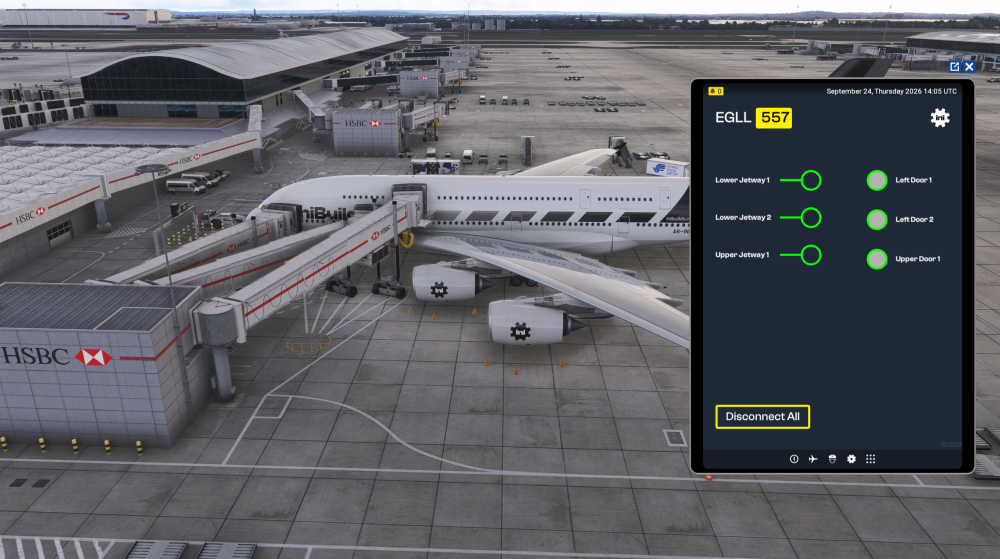
    Hi Jason, I just tested this on my end, using v1.0.1 at London Heathrow, gate 557. If you're using GSX, please make sure you have the latest version installed. You may need to verify the files of GSX. Also, please make sure the default handcrafted EGLL is disabled in your content manager, within the sim. Hope this helps.
  12. Hi everyone, If you're having issues downloading the plane, try streaming it for the time being. This is a server side issue with MSFS. Thanks for your patience and understanding!
  13. Hi, Thanks for your report. I'll forward this to the team for review. For troubleshooting, are you using GSX? Thanks again!
  14. If you have the aircraft downloaded, a simple reinstall should solve the pink texture issue. Alternatively if you stream the aircraft, there will be no issues. Thanks!
  15. Hi, Are you able to test this at a non-populated area? Curious if the initial WASM compile is causing issues in the background when trying to load in. Thanks
  16. Nothing yet, but can confirm we are in discussion with the GSX team. Thanks for your patience!
  17. Hi, If you have the aircraft downloaded, uninstall and reinstall. Alternatively, you can stream the aircraft! Thanks
  18. Awesome, I'm glad you got it working!
  19. iniKyle replied to LeoGui's topic in Systems
    Hi, We have identified the issue, unfortunately it did not make it into the 1.0.1 build. I have been told however, that it will make it into the 1.0.2 build! Thanks for your patience!
  20. Interesting, thanks. I will test this on my end a report back!
  21. iniKyle replied to ISAC's topic in Systems
    You've been a saviour responding to some of these comments for me. As someone who has very limited knowledge of the A380, I appreciate you willing to help not only myself, but fellow community members! Thank you!
  22. Thank you for your kind words! We really do appreciate it!
  23. iniKyle replied to ISAC's topic in Systems
    Hi, I'm not entirely sure about this, I have forwarded it to the team for further clarification. Thanks for your patience!

Account

Navigation

Configure browser push notifications

Chrome (Android)
  1. Tap the lock icon next to the address bar.
  2. Tap Permissions → Notifications.
  3. Adjust your preference.
Chrome (Desktop)
  1. Click the padlock icon in the address bar.
  2. Select Site settings.
  3. Find Notifications and adjust your preference.