




ekosif
Member
-
Joined
-
Last visited
-
It didn't work on first trial for me. I deactivated and restarted the sim and then activated and restarted the sim, it worked without any issue
-
The suggested solution worked for me last time, deactivating and activating from content manager
-
Thanks a lot, will try it! Wish you a great weekend!
-
Thanks for quick response! Not sure we are on the same page :) I don't want to install it, I want to keep it streamed. I was just wondering, how to update it while keeping it as streamed? I never downloaded it, in the content manager it shows 1.0.1 but in EFB it shows 1.0.0. Also for the future, do we need to do something to update it manually if we use it as streamed or will it automatically stream the new version?
-
@iniKyle I have a question regarding the update, normally I use the plane as streamed and it shows version 1.0.1 streamed but when I checked the EFB it still shows 1.0.0. Do I need to do anything to stream the updated version without installing it? Sorry, this is my first plane from marketplace. Thanks in advance!
-
I must confess that I had prejudgment before ordering the A380, because of the A350 experience on my end. BUT, even though bugs, aircraft is pretty much flyable and tbh enjoying a lot to fly with it, with surprisingly good FPS.. So, I just wanted to thanks to the team!
-
-
Hello! Volanta takes the information from Simbrief so it doesn't care if we use time acceleration or not. But the thing is, since time is also accelerated in the sim, it should still match or be close to the estimated arrival time. So as a summary from my side, I am trying to say that when we use time acceleration, we deviate from estimated arrival time a lot, regardless of Volanta data. Normally it should be close and it is the case with other airliners :) Thanks!
-
Hello! I am not sure if this is real bug or happenning only on my end but normally I track my flights with Volanta and generally departure and arrival estimations are on time, or very slightly different because of shortcuts or other reasons. But with A380, I generally arrive ~3 hours early then planned time where total flight time is ~8hours. No jump ahed function is used, only 4x time acceleration. And this happens on all of the flights. Is there anyone else having similar problem?
-
-
Hello! I just completed my first flight and used the jump ahead function two times in the same flight, for both of them, time is also changed and skiped ahead. I revert it back manually each time to sync with current time. Not sure what happened on your end.
-
Aha, visually nose wheel is steering... That's interesting 🙂 Then sorry, I've already grounded my A350 fleet until.. maybe next year
-
There is a pushbutton on top of the tiller control arm, left side of the captain. If it happens again, can you guys check it? I put a screenshot below: Just press the button and check again if it is working.
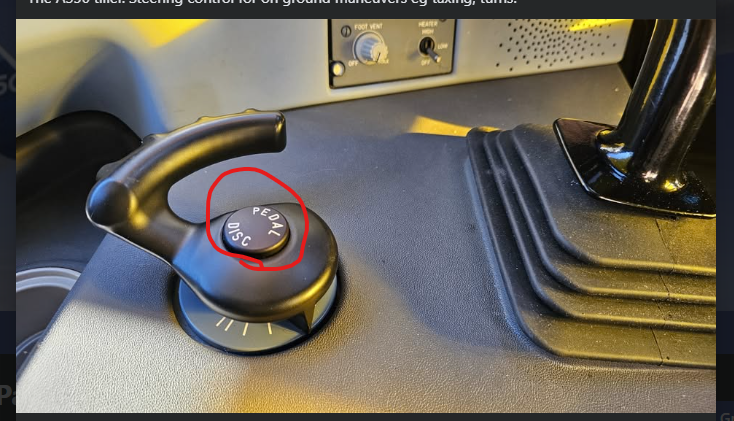
-
I don't remember exactly right now but if I am not mistaken, you can set the controllers depends to aircraft if you don't select apply to all box. Most probably, you individually made the controller settings for each aircraft. My suggestion would be, since you just formatted all of them, reset all the controller configs and make the assignments again, and don't forget to select apply to all.
-

