




mic83hele
Member
-
Joined
-
Last visited
-
Hi, Just to confirm that this issue still appears to be present on Xbox Series X with A380 v1.0.1. When TERR is selected, the terrain display remains almost completely uniform and does not correctly represent the actual terrain below/ahead of the aircraft. I saw that this had previously been confirmed as a known bug and was hoped to be resolved in v1.0.1, but I’m still experiencing the same behaviour after updating. Thanks, Michele
-
Hi, Just to confirm that this issue still appears to be present on Xbox Series X with A380 v1.0.1. When TERR is selected, the terrain display remains almost completely uniform and does not correctly represent the actual terrain below/ahead of the aircraft. I saw that this had previously been confirmed as a known bug and was hoped to be resolved in v1.0.1, but I’m still experiencing the same behaviour after updating. Thanks, Michele
-
Hi , I would like to report a serious stability issue with the A380 on Xbox Series X that started after updating the aircraft to version 1.0.1. Before this update, the aircraft was generally usable and I was able to complete several flights with it. Since installing version 1.0.1, however, the aircraft has become effectively unplayable for me. The issue now appears almost immediately after loading the aircraft in a Cold & Dark state. Shortly after entering the cockpit, I receive the MSFS notification: “Memory resources low – disabling avionics” The avionics are then disabled / the displays go black, even before I have completed the normal aircraft setup or started the flight. This is happening with the aircraft still on the ground and in Cold & Dark, so it does not appear to be related to a long flight, high scenery load, or extended simulator session. My setup: Microsoft Flight Simulator 2024 Xbox Series X iniBuilds A380 version 1.0.1 I have already tried using the aircraft with performance-oriented settings, including: Performance Mode ON FX Performance Mode ON Reduced display refresh rate Reduced/disabled AI traffic and airport traffic Photogrammetry OFF Full restart of MSFS and Xbox, without Quick Resume Despite this, the Memory Low warning can now appear immediately after loading the A380 Cold & Dark. This behaviour is significantly worse than before version 1.0.1, when the aircraft was much more stable on the same console. Could you please confirm whether there are any known memory regressions in version 1.0.1 on Xbox Series X, and whether this issue is currently being investigated? I can provide screenshots/video showing the Memory Low notification and the avionics being disabled shortly after loading the aircraft. Thanks, Michele
-
-
-
Just disabled but the issue is still there. The only light working is the taxy light. Thanks, Michele
-
Hi, I’m on Xbox X and experiencing landing lights issues ( not turning on ) with new version 1.2.4. Any feedback is appreciated. Michele
-
The aircraft is streamed
-
I’m on Xbox X
-
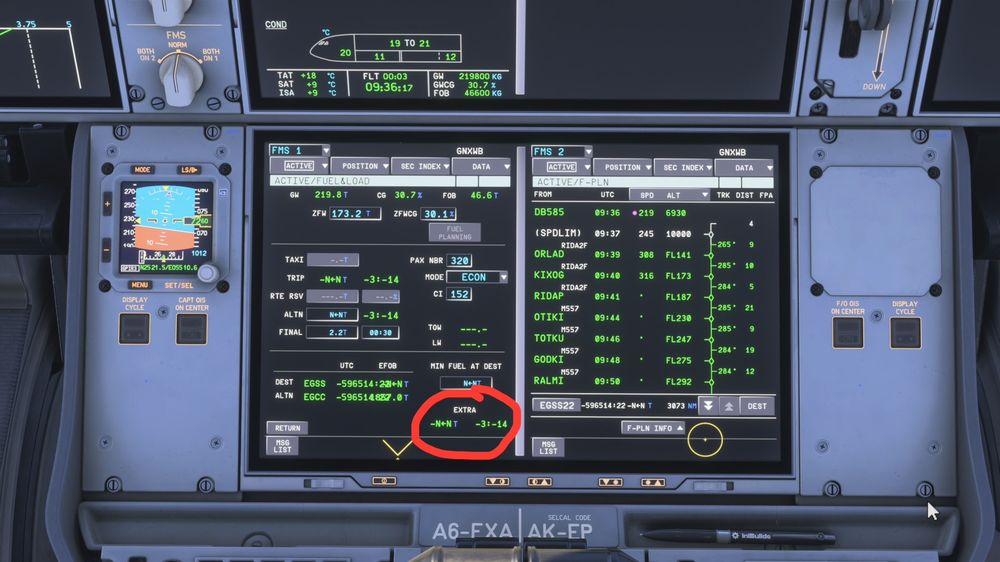
Hi all, Sometimes I encounter this inconsistency ( screenshot attached ) after I insert the fuel and load parameters. It’s something known or I’m missing something? Thanks, Michele
-
-
-
-
-


