





Remy Mermelstein
Member
-
Joined
-
Last visited
-
-
-
Hi @iniKyle this did not solve the issue, but what did solve the issue was downloading the aircraft instead of streaming it on MSFS Store. Then the update button appeard and prompted me to fix the AIRAC thanks!
-
@iniBuilds Team would love an answer :)
-
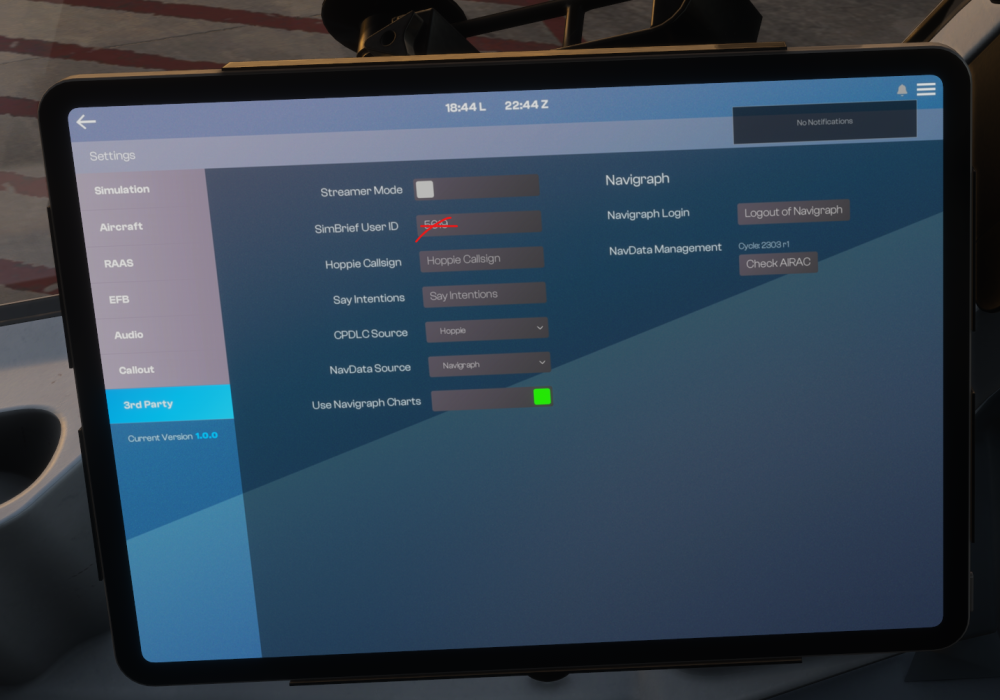
I have an active navigraph subscription, I logged in 2x and tried logging out and resetting, but the update navdata button is missing from here. I installed the latest AIRAC through the navigraph hub as well globally.
-
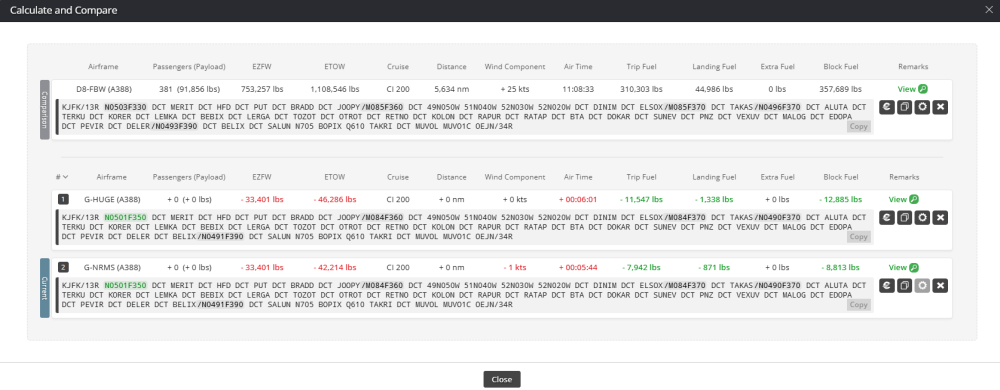
Out of curiosity more than anything else, a quick comparison of the same flight, same payload weight for the three different A380 variants available: FBX, Ini EA, Ini RR, and was surprised to see such big differences in weights and fuel needed. The FBX seems to be way heavier, are the weights that different as modelled? or is one more accurate than the other?
-
-
-
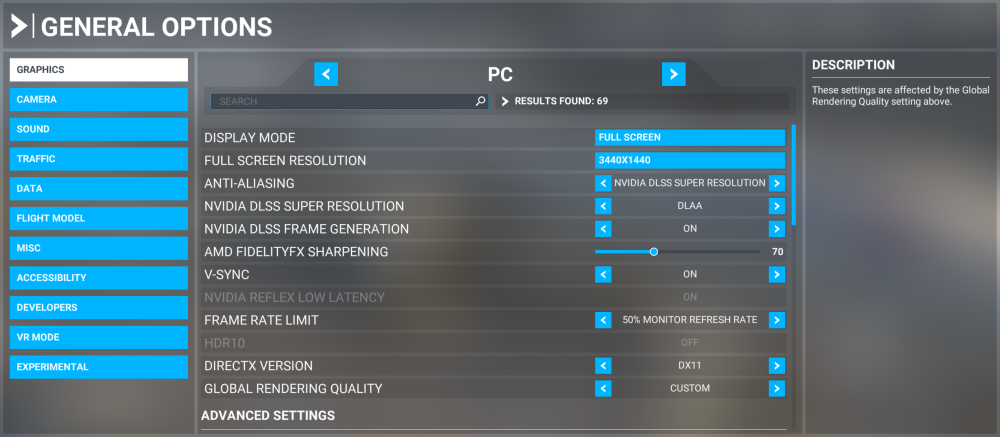
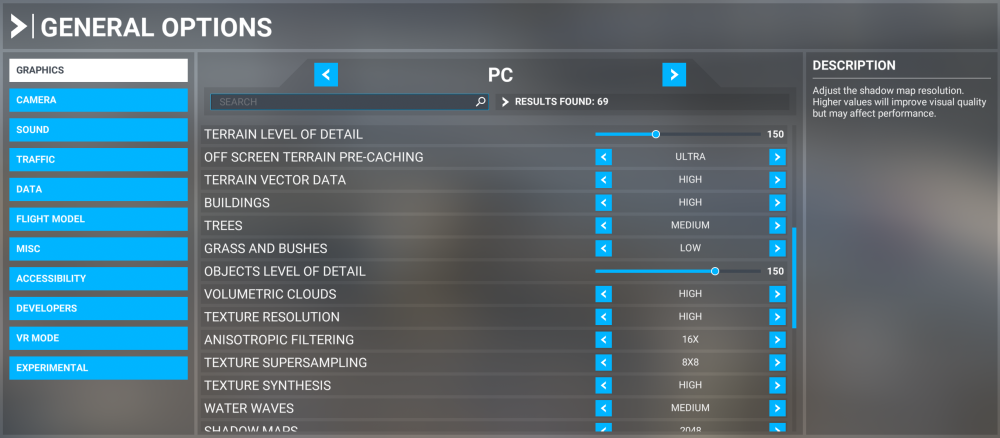
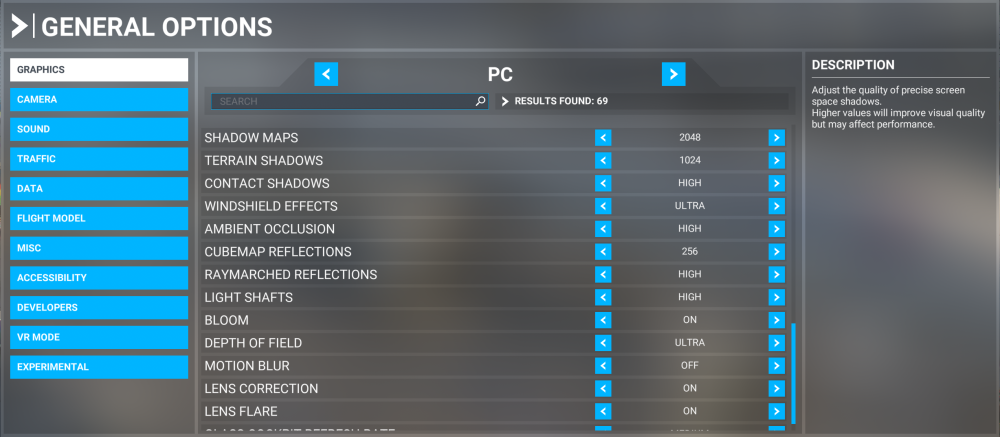
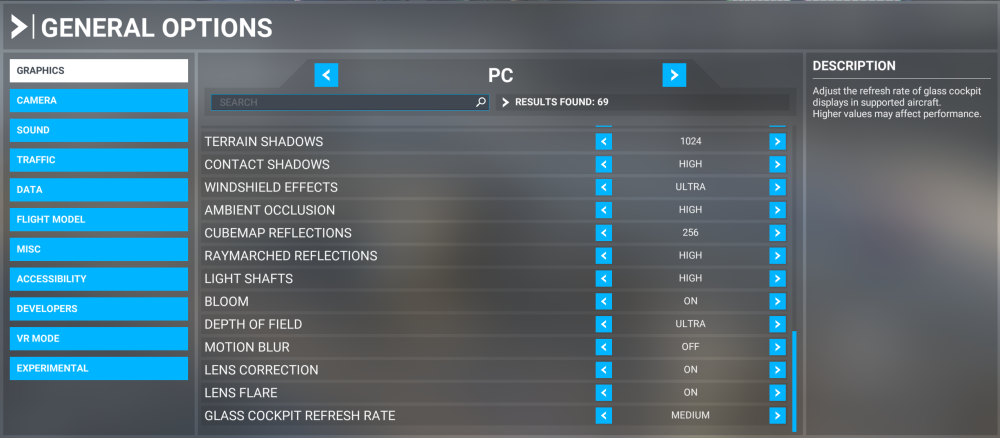
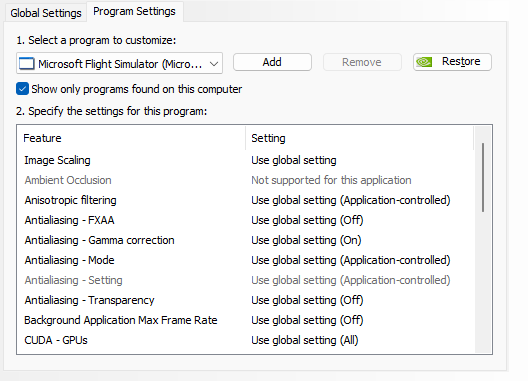
I recently got a new computer build, its pretty good, specs below: Processor: AMD Ryzen 9 9900X3D (12-Core) 5.5 GHz Turbo (3D V-Cache) (Zen 5) Motherboard: MSI PRO X870E-P (Wi-Fi) (AMD X870E) (Up to 3x PCI-E Devices) (DDR5) System Memory: 64GB DDR5 6000MT/s Kingston FURY RGB Graphics Card(s): 1x GeForce RTX 5080 16GB (VR Ready) Power Supply: 1000W Digital Storm Performance Series (Semi-Modular) (80 Plus Gold) Storage Set 1: 1x SSD M.2 (1TB Samsung 990 PRO) (NVM Express) Storage Set 2: 1x SSD M.2 (1TB Samsung 990 PRO) (NVM Express) Extreme Cooling: H20: Stage 3: TRYX Panorama SE 360 Liquid CPU Cooler (Triple Fan) (Fully Sealed + No Maintenance) Operating System: Microsoft Windows 11 Home (64-Bit) I have no issues with the computer, and everything runs really smoothly, I just feel like I could get more performance out of MSFS2020 - I average 30-50FPS, 25-40 at heavier airports. I have a cap set to 75FPS, but it rarely reaches 75FPS - and I am almost positive that this kind of system should have no problem reaching that. So I start this thread hoping to learn a little more what others are running as far as settings. Eventually I will get MSFS24, but not until PMDG/Inibuilds comes out with 747/a380/a350v2 For ref, and some q's: DX11 vs Dx12 - when I run DX12, I notice much more memory usage and stuttering at heavy airports like NYC area. what do you use? For some reason I cannot change the DLSS model preset - if I change from the apps recommended, MSFS crashes. Running latest NVIDIA Game Ready Drivers. Running GSX, and all the popular aircraft addons: inibuild, pmdg, etc. Thx!
-
Hi @IniJamirIve done that and not experienced the issue since but it has only been 3 flights, so maybe it shows up again not sure since it is entirely unpredictable. Will lyk.
-
It seems to be a hit or miss with the interior lights working or not when I load up any flight in MSFS2020. Sometimes I start at the gate and turn on INT lights and they work, other times they do not. A simple restart of MSFS fixes the issue, but there seems to be no rhyme nor reason to them working or not, no one livery or a350 variant that does it or not. This is kind of annoying, and a fix would be welcome. Running latest MSFS2020 build (no betas) and the latest A350 update. Thx!
-
I have encountered this issue only when I pull up rather violently on takeoff. If you pull back slowly, and then keep the nose at 10° or less (as you should) on takeoff, i rarely have this issue. Since the plane usually wants to nose up on takeoff, slight down pressure on the stick helps.
-
I am inputting the step climbs in the PERF CRZ -> STEP CLB page. Thanks for the other input.
-
I just got the A350 last week and have had several very enjoyable flights in it. Some questions though about the step climb logic with auto step climb: A couple of my flights the Auto Step Climb worked perfectly with the imported Simbrief Step Points; however some other flights where the plane also just decides to not step when it gets to the point and deletes it. For eg, right now I am flying NZAA-KJFK. My simbrief FP had an initial CRZ of FL350, but I decided to start at FL330 given performance. So, the steps: CLB to CRZ FL330 [My own added OPT Step to FL350] FMS decided in 300nm from CRZ. Then continued with the planned Simbrief Steps: STEP @ 36S152W FL370 STEP DOWN @ 27S146W TO FL360 STEP @20S144W FL370 STEP @07W40 TO FL380 STEP @01S139W FL390 STEP @BIGBY FL410 The plane correctly climbed to FL350 in 300nm from CRZ. The plane then did NOT descend to FL360, it deleted this step The plane stayed in FL350 past the planned steps to FL370 and FL380 and FL390, the FMS deleted these steps from the STEP ALTS page. The FMS deleted my BIGBY FL410 Step and instead had "OPT 390" in place, with the OPT CRZ showing FL395, the OPT point for CLB to 390 kept going 2nm, 1nm, 0nm, and AUTO STEP would appear as a msg, but the plane will not climb unless I manually tell it to climb. I tried adding new step points to FL390, FL410, and INSERTED them into the active FP, but the FMS kept then deleting or changing them to OPT and not climbing. So mixed bag here, and I would love some answers. I have AUTO STEP climb and Import from Simbrief turned on in the OIS. Question - can the plane handle descent steps and then climbing back up? Is there a way to tell Simbrief not to do descent steps? Should the Cruise alt i put in the MCP be the initial, or the final? I assume initial. Running MSFS2020, just bought the A350 last week, running latest version. Thanks in advance, Remy M.
-
Has happened to me only in Flaps 2 or 3 config (dont ask why i was in a flaps 3 config takeoff ;)) First time I thought nothing of it, but second time I noticed it.


