




iniKyle
Staff
-
Joined
-
Last visited
Everything posted by iniKyle
-
I have spoken to the team, they are investigating this behaviour. Hoping for a fix ASAP. Thanks for your patience!
-
Reinstall the aircraft if you have it downloaded. If streaming, disable the aircraft in your content manager and re-enable it. Thanks!
-
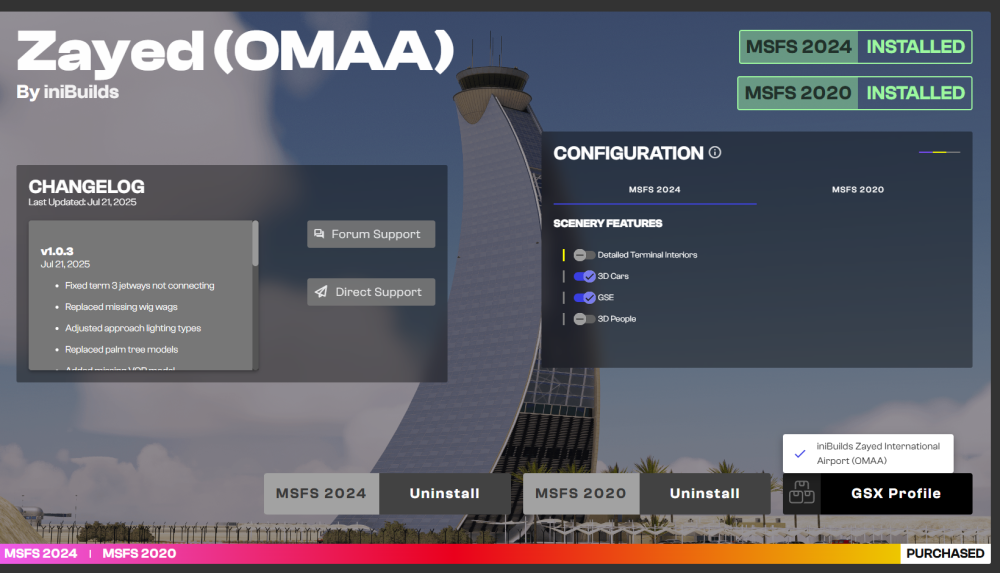
OMAA does not currently support our multi-jetway tool. I am however seeing a GSX profile on the iniManager. I've attached a picture below.
-
-
-
Hi everyone, The team is aware of this issue and is actively trying to re-produce it. Thanks for your patience!
-
-
Hi, Which aircraft are you referring? Thanks!
-
Hi Grant, Unfortunately no news. I am going to forward this directly to see if I can get more info as soon as possible. Thanks for your patience!
-
-
-
-
-
Hi everyone, To complete my report, can you all verify which engine variant you are using (RR or EA or BOTH). Can you also confirm you are using the official inibuilds simbrief profile. Thanks!
-
Hi, Thanks for your follow-up. I will check this on my end. Thanks for your patience!
-
Thank you. Will forward this to the team for further clarification!
-
Ah, my apologies! If you disable the aircraft through your Content Manager and then re-enable it, that should resolve the issue. Thanks!
-
Try uninstalling and reinstalling the plane. That should solve the issue!
-
Awesome, thanks for troubleshooting this with me!
-
You could disable the aircraft from your content manager, then re-enable. That may help, thanks!
-
Great news!
-
Nothing yet. Still unsure why it's not populating for you.
-
Hi, I'm not quite sure I understand your issue/question. If you're trying to update/install the aircraft, make sure the aircraft is not selected on the free-flight page. Thanks!
-
What I like to do is, around 3–5 miles before the descent point, put the aircraft into Managed Descent mode. This should initiate a descent of around -1,000 FPM. Once the descent profile catches up, it should automatically begin following the green dot path. Let me know how it goes next time you give it a try! Thanks!
-
We're currently tracking a few other reports of this behaviour. The team is actively trying to reproduce these issues. Thanks!


