




Eurosky
Member
-
Joined
-
Last visited
-
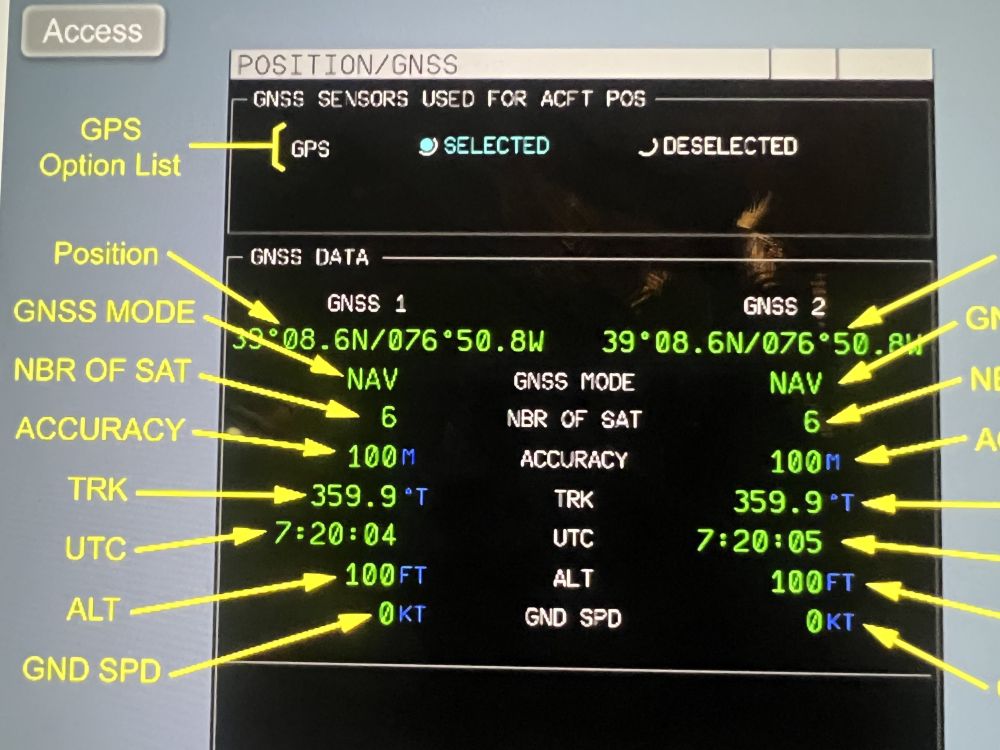
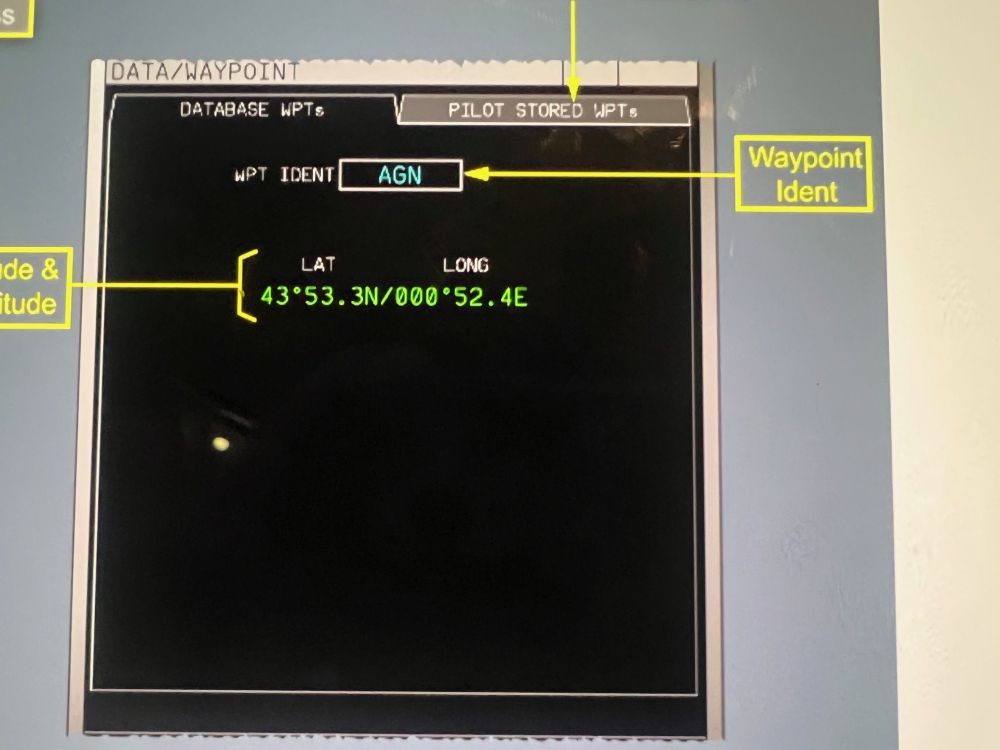
Minor error I just found. The FMS POSITION drop down menu. GPS should be replaced by GNSS (Global Navigation Satellite System) and a subsequent page with a top GPS selection menu and a GNSS Data subsection below. Secondly, FMS Data, Waypoint. Should open up a box where you enter database waypoint. Ex, KJFK31L, enter KJFK31L into the page, will give the lat/long for quick return. Reason for needing this Lat/Long. We insert the landing LAT/LONG into the standby navigation display (SND). Will give a direct distance and direction to the runway for a quick return and situational awareness. Just a few minor details to consider.
-
It is my pleasure, Kyle. As a flight Simulator enthusiast for over 2 decades and an A380 pilot I truly enjoy assisting fellow simmers. I am fairly new to the Airbus family and the A380 so assisting the community is also helping me refreshing my knowledge and understanding of this incredible aircraft. Thank you and to your Inbuild colleagues for giving us an incredible rendition of the A380. You are by the way doing a fantastic job on the forum Kyle.
-
The Notify To ATC drop down box arrow in the real aircraft will give you a list of ATC stations to connect to. You scroll down the list and find the station you want to connect to, if you don't feel like typing it inn. Seems to be stored in the fmc database of some sort. Could not find any documentation about it though in the manuals. Normally we just type in the code, much faster than scrolling down the list looking for the correct 4 letter ICAO code. A nice realism touch if implemented in the sim :). Hope that helps.
-
HI, It is not normal practice to manually transfer fuel on the A380. Only when requested by an ECAM. If deciding to manually transfer fuel without an ECAM refer to the Fuel Man Balancing Procedure. However, Outer tank Man balancing is not possible. Actioning the Outer Tank Transfer push button switch (guarded switch for a reason) , should only be done if the automatic system fails, Fuel Temp Low ECAM (fuel must be transferred to another tank before it freezes) or no automatic alternate transfer is possible. The Transfer is then going to the respective feed tank. The transfer should however stop when turning off the Outer tank transfer push button switch. The transfer pump should turn off. Fuel is normally kept in the outer tanks as long as possible in flight. The lift produced by the wing in flight creates an upward bending moment. Maintaining fuel in the outer tanks as long as possible reduces this wing bending moment. This is why the outer tanks are not completely filled on the ground as the opposite occurs due to the engine weight. Only exception is if all other tanks are already full. This is called Load Alleviation Transfer. When the fuel in the outer tanks reach -35C cold fuel automatic transfer initiates. It transfer the cold fuel from the outer tanks to its respective feed tank without pilot intervention. I have not seen or tested any of this in the Ini A380, so no idea how the sim handles this. Hope this info clears things up a bit.
-
-
FMS, Data, Waypoint page. This page will give you the lat/long to entered waypoint/airport. For departure we normally pick departure airport for a quick return indication on the SND. We normally use that page to enter the lat/long for the SND (Standby Navigation Display) for situational awareness or oceanic ops. We normally enter all the oceanic waypoints as a backup on the SND. Just a minor point for refinement.
-
On the A380 standard practice is to select a BTV runway exit point after the WET line. Not standard practice to set an exit point after the DRY line. The objective of the BTV is to manage automatically the braking application to reach the selected runway exit -65 m at 10 kts. However, if the selected runway exit point is the runway end or an exit point in the last 300m of the runway, BTV targets 10 kts 300m from the runway end. If you select an exit point between the DRY and the WET line the BTV deceleration rate is 3 m/s square. After the WET line deceleration is 2 m/s square. Hope that clears it up a bit.
-
A workaround for that is to swap the FMS nav database. After a few seconds swap it back. That should “reset” the FMS. Not sure if it will work in the sim though. Did it the other day in the real aircraft and it worked just fine. Tested in the sim, and working as advertised.
-
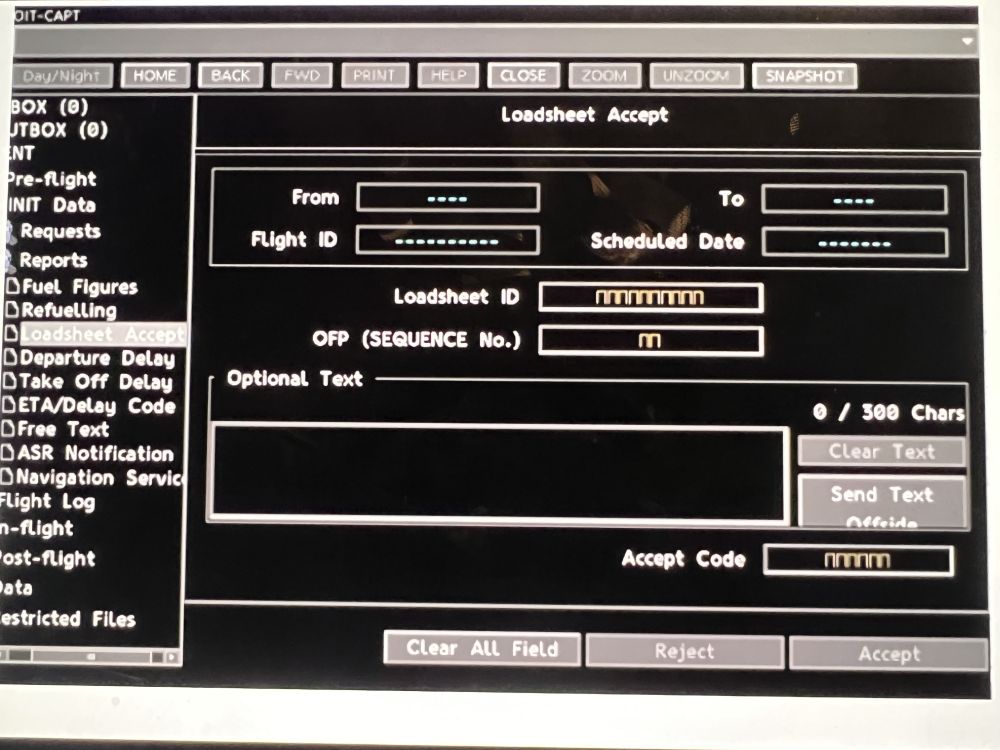
I have Company MSG on EWD, ECAM displayed. Unable to clear it. I have read all messages in NSS AVNCS. 0 messages in the Inbox. They are all read. Is there a way to acknowledge the read messages? Second, during engine start 1 and 2. Done separately, the EGT goes to max. Over 1100 degrees. Cools down after engine start. Starting 3 and 4 together EGT is normal. It would be nice to have a loadsheet acceptance tab under reports in NSS Avionics. After loadsheet review and confirmation, practice is to send a loadsheet acceptance to the company. Minor detail. Lastly, ETP not found. Does not seem to be working on my end.
-
Fantastic aircraft. Very well done. A pleasure to fly and operate. Couple of things I have noted so far. The final Loadsheet seems to be populated without having to send the fuel figures via NSS AVNCS. The final Loadsheet is normally generated after the fuel figures have been sent. Auto GND XFR seems to be targeting 39.9. It should stop transferring when cg has reached 39.5 (39.5% is the optimal CG). When I send the fuel figures (NSS Avncs) with the new trim tank fuel, a revised Loadsheet with updated CG and trim tank fuel is not populated. Lastly the Loadsheet does not have trim tank fuel quantity listed. Minor stuff.
-
Come on guys. It is an A380, TAC, (Taxi Aid Camera) is a HUGE part of ground ops. Aerosoft A340 got that simulated pretty well. Taxi is one of the more challenging parts of operating the A380. The Taxi Aid Camera is a very vital part of operating the A380.
-
Yep, all working now after latest SimApp update.
-
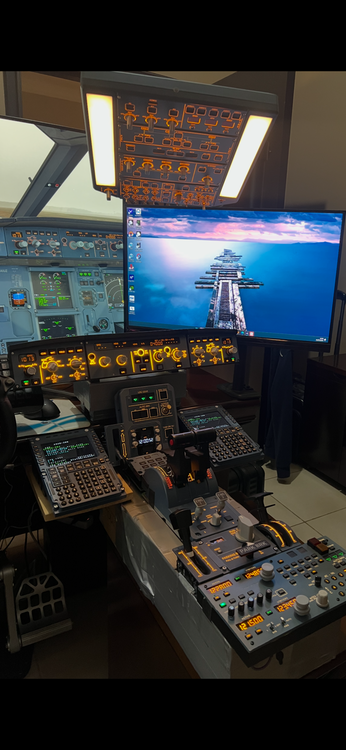
Installed it from the IniManager. Deleted in the Marketplace. SimAPP pro in administrator mode had no effect either. It's strange because everything works just fine in the Fenix with the dual MCDU setup. I honestly have no idea how to get both MCDUs to work with the A340.
-
IniSteave, I cannot get it working with both WinWing MCDUs connected. Got it set up independently as you described in the SimApp Pro. I am on the latest firmware and SimApp version. With both connected none of my Winwing products work. When I disconnect FO MCDU, all good. I cannot understand how you guys got both working.
-
I can confirm that. With both MCDUs connected and correctly configured, none of my Winwing products work (I have pretty much all of them). As soon as I disconnect the FO MCDU, everything comes back to life. Worth mentioning that everything connected from Winwing works flawlessly on the Fenix A320.


