





Eddie
Member
-
Joined
-
Last visited
Everything posted by Eddie
-
Hello, Please have autosave running so you can attach us a file. It is hard to reproduce it based off of this information alone. Guide on how to use autosave can be found here: Apologies for the inconvenience.
-
Hello, ETP arrived with the latest update. We are taking a look at all the other mentioned features. I do have to mention that the reason we excluded the third MCDU is simply for performance reasons. We have however seen the feedback and, while I cannot promise anything, the team will look into it. Thank you 🙂
-
Apologies, meant to tag Roders. I have forwarded your information (09tir98) to our team; taking a look at what could be going on here.
-
Hello Nelly, The default aircraft for MSFS are that of Microsoft property; this means our hands our tied. We are not able to offer any "upgraded/premium version". Your understanding is very much appreciated. Thank you 🙂
-
Hello, Please try opting into the SU4 beta environment and let me know if you still experience this. Thank you
-
Are you all on SU3 or SU4?
-
Hello, As mentioned above, the feedback has been relayed to the team. We'll take a look at what can be done. 🙂
-
Hello, Can you all double-check what the version number shows up as on the EFB when you've loaded into the aircraft?
-
Hello, The "failure message" seems to be a visual bug in most cases. The way streaming works is that it will automatically always stream whatever is the most up-to-date version of a product directly to your sim without you having to do anything manually.
-
Hello, Will forward this feedback to the team. Thank you 🙂
-
Hello, Try restarting the simulator or give it a bit and try again 🙂 Let me know if you're still having this issue later
-
No worries at all!
-
Hello, Awesome to hear. Sounds like not much more trouble-shooting needs to be done here. Enjoy! 🙂
-
Hello, You can upload it to YouTube and make the privacy option as "unlisted"; then post the link here. 🙂
-
Hello, Are you all using any MSFS assistance options? If yes, please make sure they are disabled. Let me know if that solves the issue.
-
Hello, I've forwarded this to the team. Thank you 🙂
-
Hello, We are working with WinWing to bring native functionality. Cannot give an ETA at this time but work is in full swing 🙂 Thank youHello, Please start with clearing your WASM folder. Guide here: It will take a little bit longer to load in again as it has to initialise the WASM module again. Let me know if this resolves the issue! 🙂Hello, For now, the aircraft is only available on the marketplace. Our official statement regarding said decision can be found here: The update should be available very soon. Your patience is very much appreciated! Thank you 🙂Hello, Thank you for the kind words! I'm not sure what you're referring to; rain wipes fine on our end. Could you please grab a quick video showcasing what you're describing? Thank you 🙂Hello, Please ensure your settings look like this: If your settings look like this and you're still having the same issue; ensure you follow this profile guide (linked below). MSFS may be having a hard time reading the already included GSX-profile.
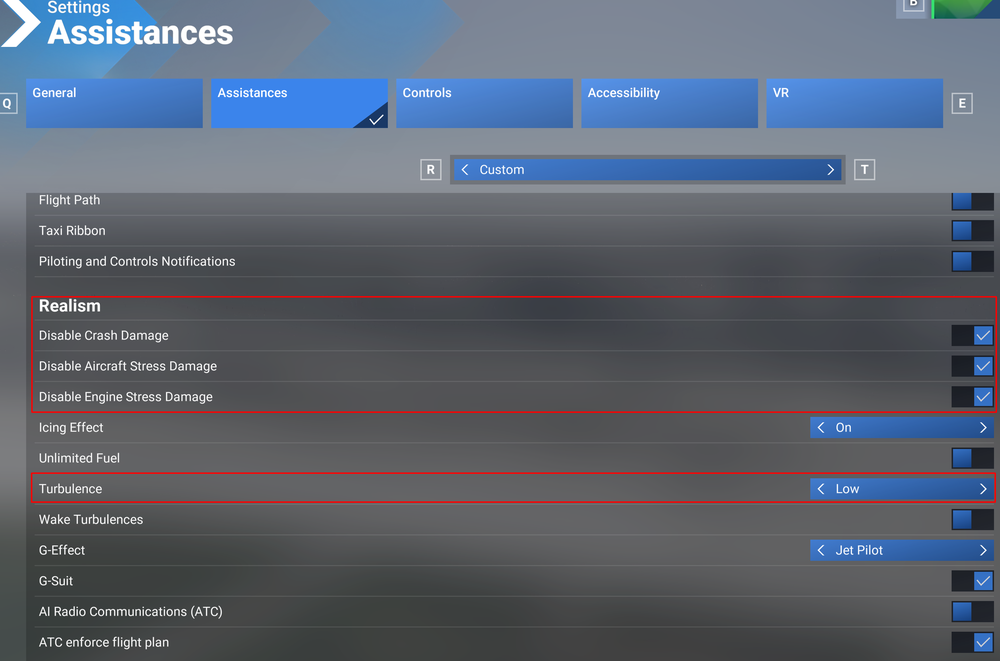 I'm assuming this is part of the UI for the simulator itself; should be able to disable that via the settings. To be sure of what you're referring to, a picture would help.Thank you for the follow-up. Are you able to record us a quick video showing what you're describing?Hello, I have forwarded your feedback to the team. Thank you 🙂


