Skip to content
View in the app

A better way to browse. Learn more.

iniBuilds Forum

A full-screen app on your home screen with push notifications, badges and more.

To install this app on iOS and iPadOS
  1. Tap the Share icon in Safari
  2. Scroll the menu and tap Add to Home Screen.
  3. Tap Add in the top-right corner.
To install this app on Android
  1. Tap the 3-dot menu (⋮) in the top-right corner of the browser.
  2. Tap Add to Home screen or Install app.
  3. Confirm by tapping Install.

Swisspilot1986

Member
  • Joined

  • Last visited

  1. same question for the avionics comp
  2. no deal breaker but why no modelled crew bunks?
  3. I second that. I'm so unsatisfied with the sound that this aircraft is AOG since several months.
  4. now it works... don't ask why, thank you for your help
  5. The livery's creator replied me that he only worked on the exterior and cabin texture.
  6. from a 3rd party livery actually yes
  7. Also the same matter during pushback. The wheel are moving even when the aircraft is still standing. Maybe it's an issue with GSX.
  8. I can't adjust the brightness of this standby gauge (idk the name)
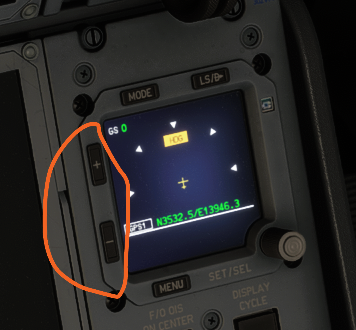
  9. yes, the current path is too long too reach, better to put it directly on the page "flt ops menu" e.g
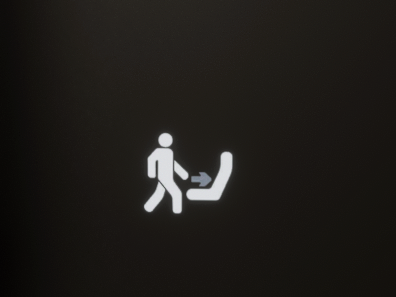
  10. little thing. This sign in lavatories should only be illuminated when the seatbelt sign is on.
  11. I know it was for other users to get the link directly
  12. iniBuilds A380 Airliner Development Update - August 2026 - iniBuilds Announcements - iniBuilds Forum
  13. If the entire reporting from the community was taken into account I'm convinced the majority of users will be ready to pay for an extra mile for your effort.
  14. From the beginning of the taxi the wheels run too fast compared to the way. It's not the charriot-wheel effect.
Account

Navigation

Configure browser push notifications

Chrome (Android)
  1. Tap the lock icon next to the address bar.
  2. Tap Permissions → Notifications.
  3. Adjust your preference.
Chrome (Desktop)
  1. Click the padlock icon in the address bar.
  2. Select Site settings.
  3. Find Notifications and adjust your preference.