richboy2307
Staff
-
Joined
-
Last visited
Everything posted by richboy2307
-
Hmm. Can't say I'm seeing this on my end. Could you please record a video starting from C&D till after pushback when you notice the offset? This will allow us to observe and possibly recreate the issue better. You can upload the video to youtube or Gdrive and share the link here. Just ensure its public / "anyone with link" can access. Thanks
-
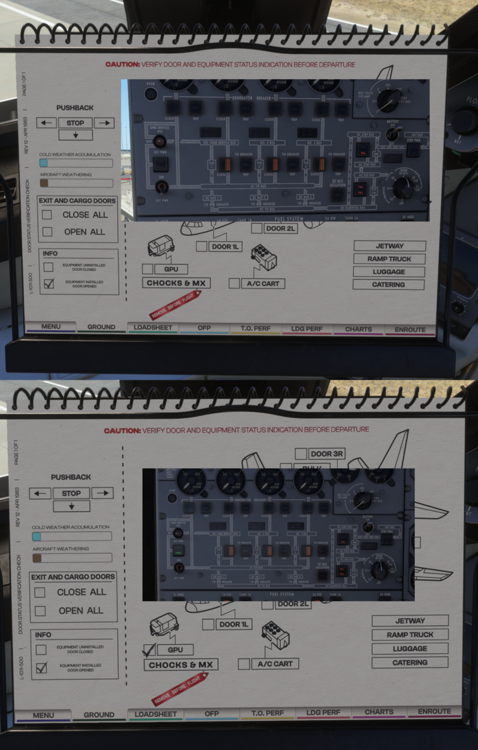
We believe this may be related to an issue some users encountered, where the electrical generator would briefly reset during flight. This momentary interruption appeared to have a knock-on effect on avionics (GPS/INS/PMS) and other electrical systems. A workaround for this electrical issue has been implemented in version 1.0.4. Please let us know if you still experience it after that update. Can you please make all your links public? Currently there is no permission to access. Hmm, can't repro this. It is correctly illuminating with AVAIL only when GPU is connected via the PFB. Tested both with/without GSX (just to see if it was perhaps forcing it avail).
-
HI Did you import the waypoints from your OFP/Simbrief at any point? Or were they all always only manually entered? If auto-import was used, there is logic that wipes the INS in order to import the next batch of waypoints, but this shouldn't trigger from fully manual entry normally. Could you please provide some screenshots showing your active modes + AFCS + configuration (flaps/gear) at the time? The team is working to fine-tune autopilot ALT HOLD behaviour particularly during configuration changes (Flaps or Gear) but if you can provide specific examples we can ensure those are specifically checked too. Again, it would be more helpful if you can provide specific examples of scenarios where it didn't work as you expected? This would include steps taken before intercept, and particularly data such as heading, speeds, altitude, weights etc. Specifically with regards to ILS, you should not intercept at angles greater than 45 degree, preferably try less than 30 degrees to avoid massive overshoots or it failing to follow at all. Thanks!
-
Yes, you entered it correctly, and the current SAT was +40c on the ground. The limitation is that the PMS only knows "current" SAT, not predicted SAT at FL360. Hence its running the OPT calculation with a +40c Temperature, which is way too high at the cruise levels and hence nets in "888" or invalid result. As mentioned above, the PMS references available do not indicate any PMS capabilities to predict SAT at different flight levels, or calculate any ISA deviation on its own. All the logic shows it using "current" temp probe sensor data directly, hence making it unserviceable if temp probes are INOP or malfunctioning even. The SAT entered during pre-flight setup is used only for Takeoff EPR advisory on the ground.
-
-
Hi As of 1.0.3, the PMS behaviour was changed to show "888" when it cannot calculate any valid result. It is also actively using the current SAT value to determine OPT. As such, it will update in flight, particularly when current SAT updates to sensible values where a valid result can be achieved. SAT of +40c at those weights won't net any valid results, hence the 888. Team is still investigating whether you can force a prediction on the ground, references we have are unclear but the behaviour currently is reflecting best the "known" reference logic.
-
Hi, This is intentional. At night (from dusk to dawn in the sim), the PFB brightness is controlled by the Utility Light. There is switch at the center that toggles it on/off, while the outer knob adjusts the intensity. This was added based on user requests to make the PFB behave more like a reflective surface at night. To achieve that effect, its brightness is linked to the Utility Light. Because the PFB is still technically a screen, it reacts to lighting conditions and may dim under direct light (like a flashlight), which is how the sim handles displays. Linking it to the Utility Light is the best workaround to this sim limitation to create the intended effect. 2026-04-24 13-15-38.mp4
-
Thanks team is working on pressurisation system/controller related issues.
-
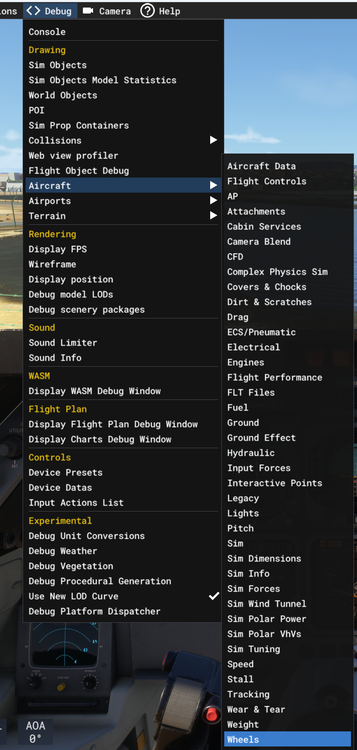
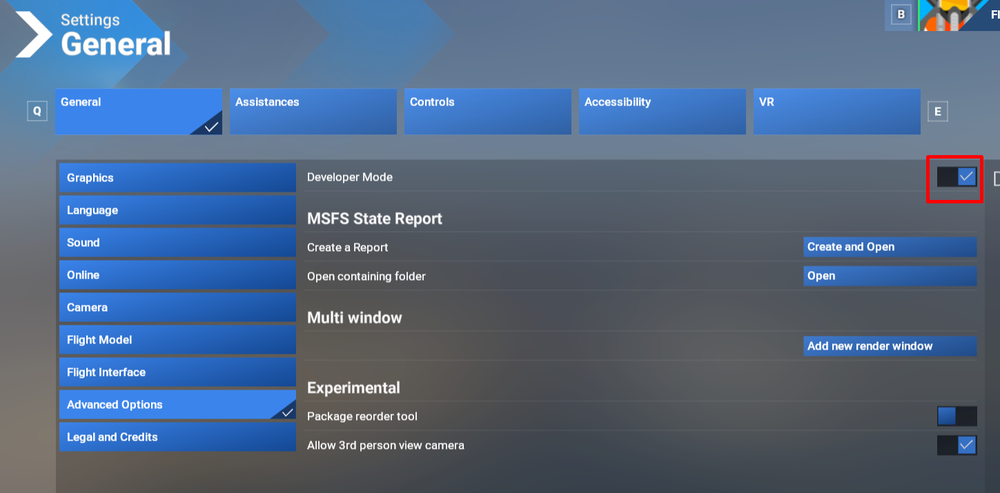
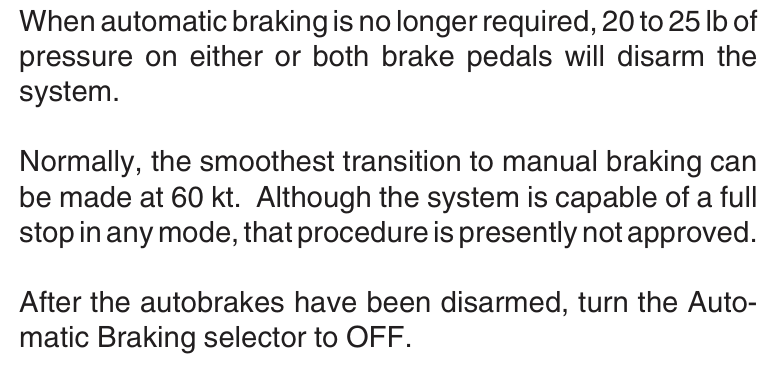
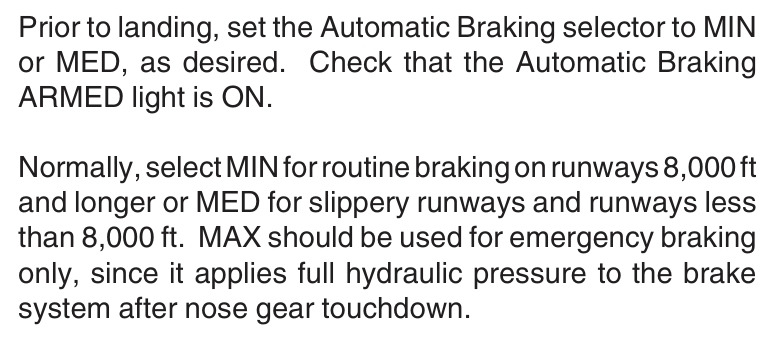
Hey, Yes Brake Temperature is WIP for a future update. As for autobrake, you can confirm by looking at the pedals themselves, they should depress when autobrakes are active. The more objective way to check is via the Debug Aircraft Wheels window. For that, you'll need to enable Developer Mode (Settings > Advanced Options), then navigate via the toolbar at top to Debug > Aircraft > Wheels. (Click to enlarge images) Could you please record a similar video with the Debug Aircraft Wheels Window open? Mainly concerned with the BRAKE INPUT and BRAKE EFFECT fields at the very top. For MIN and MED braking they won't show a constant input, but for MAX or RTO they will. And also mention the Airport, Landing Weight and Autobrake Setting used so we can try to reproduce it. While they have worked every time for me on my previous flights, perhaps there are some specific conditions where its failing. 2026-04-22 15-53-37.mp4 Note 2: Just a quick demonstrative video I recorded by spawning on runway and then conducting a high-speed RTO, please do only try this at home 😅 Additionally, per the documentation - take note that on the L1011 the autobrakes are not a substitute for manual braking. You should not use them to full-stop. The MIN and MED settings are targeting 4 and 6 ft/s² deceleration rate, whereas MAX (and RTO) is giving full application. Thanks!
-
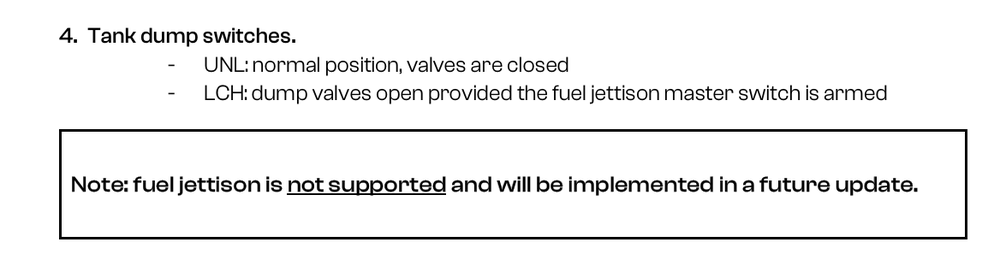
Hey, The fuel jettison feature is currently in development and planned for a future update. It isn’t included in v1.0.3 yet, as noted on page 80 of the manual.
-
Thanks for your feedback, we'll take it into consideration. Users are meanwhile free to adjust sensitivity curves for assigned axis to alleviate this to a certain extent
-
-
Thanks team is actively investigating the electrical issue. Its a bit random as not users have such electrical issues where the GEN FIELDs has gone off/restarted mid-flight. But the INS is a knock-on effect we believe from this electrical gremlin.
-
Hi all Thanks for your report and feedback. The upcoming v1.0.3 update (expected this week) includes further refinements to this logic. We’d really appreciate your continued feedback on these changes so we can keep improving and fine-tuning.
-
Liveries also affect performance. First-party liveries are mostly decal-based, which use VRAM more efficiently by scaling with camera distance. Texture-based liveries, common in community creations, are often high resolution (4K or 8K) to preserve detail up close, which increases VRAM usage. While ours are optimized, community liveries may not be, and that could impact performance. What we're doing We’ve reached a point where further optimisation could mean reduction in visual quality or require removing features (example no-cabin variant). We’re continuing to review incoming reports and are carefully evaluating all options for future updates. So we please ask to include in your reports also the sim settings, along with your specs and the in-sim fps counters. Interim Recommendations If you are suffering from VRAM overruns frequently, try the folllowing settings - Set Texture Resolution to Medium - Adjust Object and Terrain LOD as needed (120 is a good baseline to begin with to then adjust as headroom allows) - Disable Raytraced Shadows - Lower Volumetric Clouds (avoid Ultra in heavy weather) - Keep resolution at 1440p or below on 8GB VRAM systems
-
Hi, Thanks, we’re open to reviewing this further. Do you have any references to support it? Our current understanding is that the smoke occurs before internal combustion, caused by residues and oils burning off after the engine has been sitting idle. So basically during ignition prior to fuel being introduced.
-
Interesting, internal testing reports are exact opposite but appreciate it. We also have further optimisations coming in v1.0.3 (potentially next week). Please check again and let us know. With regards to degraded perf/stuttering, let us know if theres any specific conditions where you particularly notice it. Or any actions taken that trigger it. Thanks!
-
Please upload it to youtube or Google Drive and share the link here. If it is a bug, we'd like to see the video and reproduce it our end to address it. Thanks!
-
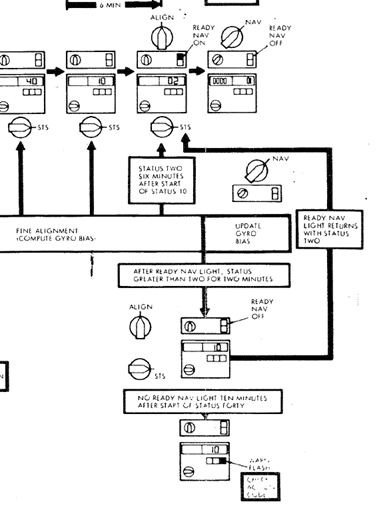
It is already implemented, toggled via the PFB INS Drift setting. But the rate at which it was compounding in certain cases needed further tuning which has been done for v1.0.2 update (expected release sometime this week). Please try again after that update and let us know how you fair. That’s true for a Delco Carousel IV-A (CIVA) INS, but not for the simulated LTN-72. The LTN-72 doesn’t display navigational performance data this way. Its DSR TK/STS page’s right numeric field shows only alignment status, changing in flight only if an alignment error occurs. Otherwise, it counts from 90 to 02, then switches to 01 when MSU is set to NAV. Both systems track gyro bias and reset it during alignment or position updates, but only the CIVA displays it (as PI values); the LTN-72 does not. We’re currently investigating similar “hang” issues and working to reproduce them internally. Could you please provide the following: Your full flight plan (or a SimBrief OFP PDF, if available) Whether you imported SID/STAR waypoints as well (this is an option in the PFB) Thanks!
-
-
-
This is the sim's doing, essentially when VRAM limit or light-source limit is being reached, it starts to cull lights. Have forwarded your report to the team to see if we can reduce the amount of lighting in the terminal to help this but essentially each user will experience this differently depending on hardware. Thanks noted.
-
That is actually correct per the system documentation we have available, and a system quirk we have modelled. The HSI Distance/Time readouts are only driven by the INS computers, as such can only show data from it. For radio navigation you need to use the DME Readout from the RMI gauge to the left of it which does take data from the NAV and ILS receivers.
-
The information provided applies to navigation in general. The key difference is that the Delco Carousel IV-A (CIVA) can perform these calculations automatically, while the LTN-72 requires the crew to calculate positions manually using navigational charts. These updates are usually planned in advance during flight planning. In practice, they’re often done during a VOR-to-VOR segment, where radio navigation is used temporarily while updating the INS. Full flight navigation via random fixes only was very uncommon at the time, so there would typically be a suitable cruise segment to carry this out. Overflying a radio navaid with known coordinates would be the most straight-forward way. Alternatively it would be the procedures detailed in the manual with the help of navigational charts. These days you could use something like SkyVector or LittleNavMap for guidance. There is no OVFLY function as far as I'm aware but I'll ask the developer regarding that too. The way to go about it is manual flight, or reverting to radio navigation / heading hold temporarily during a VORDME-to-VORDME segment ideally. I believe it is the former. You are telling the INS what the *actual* coordinates were for the position which you told it to hold, thereby correcting the drift/error that was present in the system. However, I will confirm with the developer as well. Thanks!
-
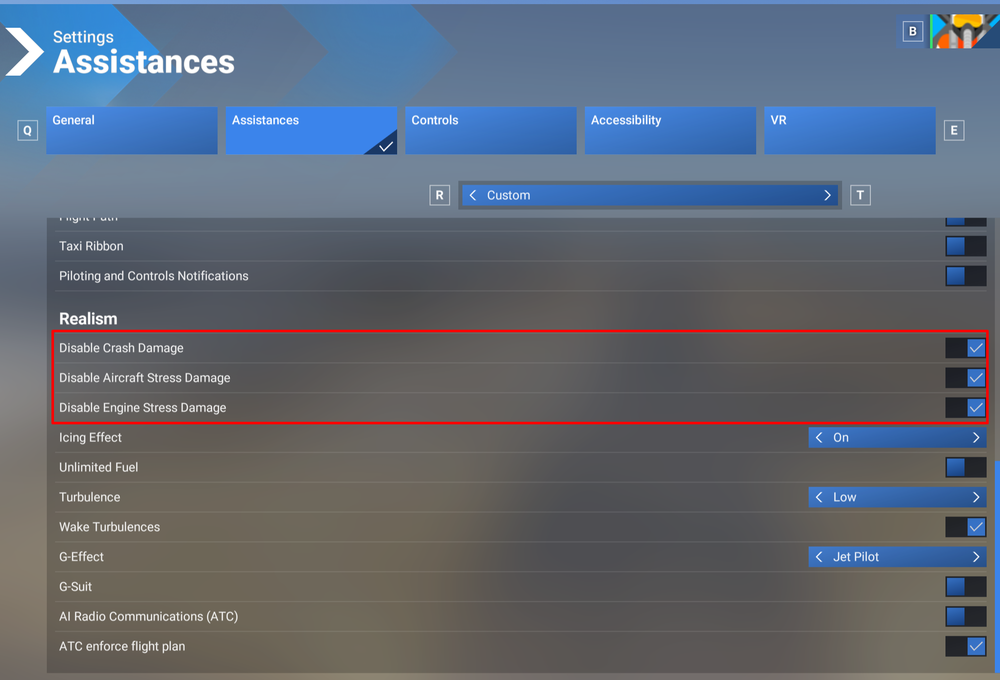
Do you mean if you're spawning airborne somewhere in the sky (instead of on the runway or on a gate?). Could be an issue with the panel state its trying to load in that instance, we'll have a look. I would recommend disabling all 3 crash detection from Settings > Assistances. They usually cause conflict with 3rd party addon systems. Thanks!