




MediumRareBaku
Member
-
Joined
-
Last visited
-
Same issue here. Have uninstalled DFW and reinstalled it No change. Could the missing texture file be shared on the forum here as a stop gap? It seems like you have the correct texture that we're missing, seems like an easy hotfix while you sort out why it's happening as a larger question.
-
The L1011 autopilot still needs a lot of refinement. In my last few flights alone I have experienced: The autopilot struggles to hold altitude during a turn, especially when low and slow, where you may lose as much as 1,000 feet in a deep turn. The autopilot struggles to capture VOR radials and localizers, even when the intercept angle is less than 30 degrees. I have set up to intercept localizers at a very modest intercept angle at places with parallel runways like ORD and ATL, and the autopilot consistently turns so late to capture the ILS that you fly through the approach path of the parallel runway and then it curves back around to try and track the intended runway and may even overshoot that turn, too. When a radial or localizer is captured, the autopilot fails to track it and keep the course needle fully centered. This is especially problematic for ILSes. This behavior is especially bad when there is a crosswind. Sometimes even when centered on a radial/localizer per the course needle, you are off course. I flew the ILS 27L into ATL the other night and when tracking the localizer with the needle centered, with no crosswind and no crab angle, looking straight out the window it looked like I was lined up on 27R until I was maybe a mile out. It is not an offset approach, and if it was, it wouldn't be offset into the approach path of a neighboring runway. The autopilot and PMS routinely struggle to connect to each other. Even when the PMS is properly configured -- I have been through the documentation and know what it needs to work -- the autopilot and TM mode of the autothrottle can sometimes take 5-10 minutes after takeoff before they'll recognize each other and go into EPR mode for TM and VNAV mode for the autopilot to climb via the PMS speed plan. As myself and others have been noting on the forum recently, the L1011 still needs -- and deserves! -- significant attention from iniBuilds so that the add-on can live up to the high potential that it has.
-
Same issue as OP. You can gain or lose as much as 1000 feet in turns down low with the autopilot on.
-
Same behavior as the others here with elevator trim set correctly.
-
Are there additional improvement and bug fixing updates planned for the TriStar or is it just in fully maintenance mode for sim updates at this point? There are still a number of bugs present with the aircraft and there are systems that are wonky or not simulated and I was really hoping to see you guys push farther with this thing.
-
-
Unless I'm mistaken, ini doesn't usually simulate variations between systems to the degree of certain pumps having higher outputs than other pumps, unless the pump for Tank 1 was significantly stronger on the real L1011 by design than the other pumps.
-
Should be an option if implemented. Even on modern aircraft like the Airbus most US operators display all temperatures in Celsius except the cabin temp which is usually shown in Fahrenheit.
-
I think that regardless of whether you import the waypoints including SIDs/STARs or without that, when you import waypoints into the INS from the PFB, that the last waypoint loaded should always be the destination airport and not the final waypoint in the flight plan. Once you hit that waypoint there is still valuable information to be gained from the distance and time to the destination that are displayed, and I am quite certain that all crews of L1011s fitted with INSes would have done the same. You can do it yourself manually, of course, but then that defeats the purpose of using the autoimport.
-
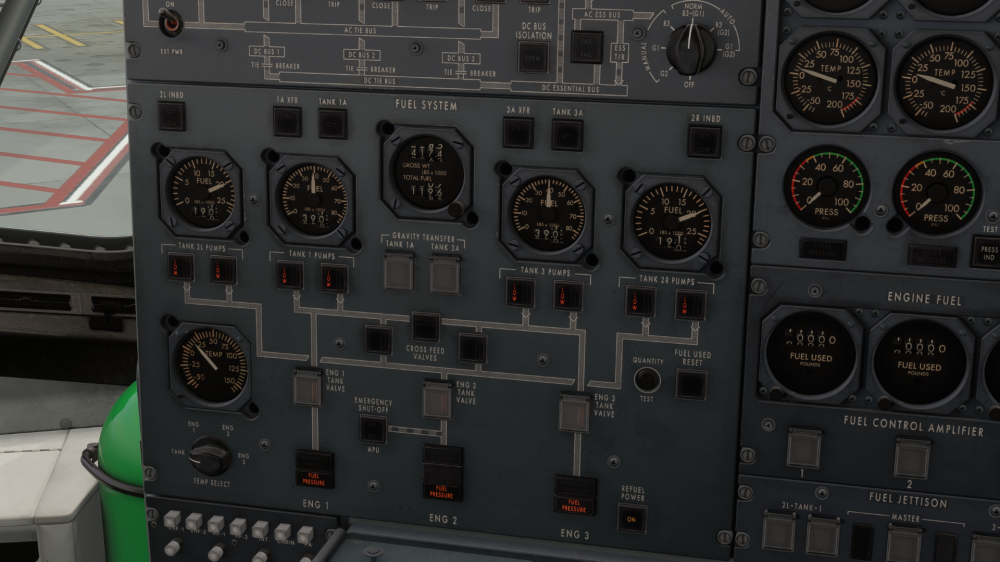
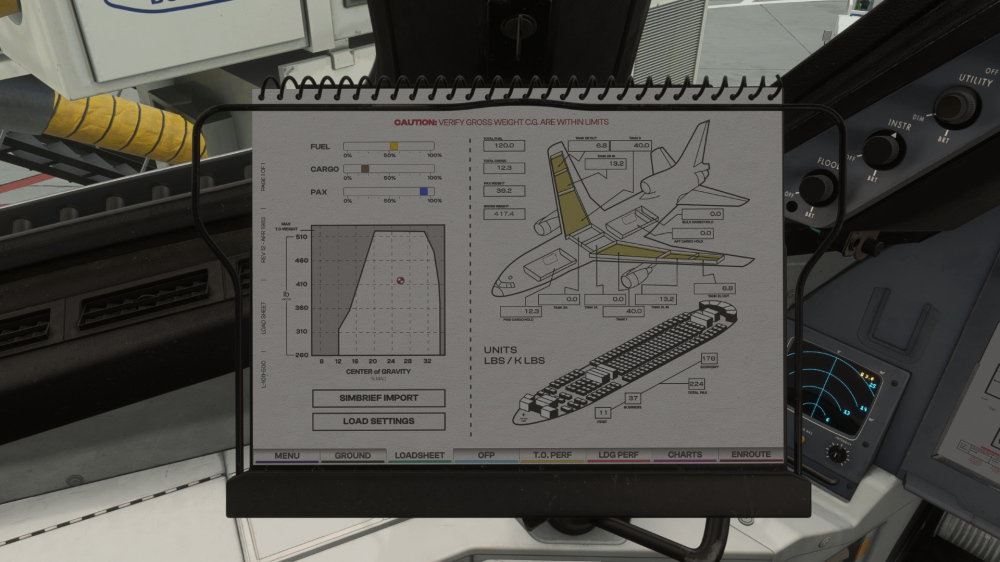
SimBrief fuel imports still seem to be resulting in a displayed 400 lb imbalance. See attached screenshots. The SimBrief OFP has a total fuel amount of 120.0k lbs which is shown in the PFD. However, once loaded, the fuel totalizer only shows 119.6k lbs, and when I add up the fuel shown on the individual tank gauges, I only see a little over 116k lbs of fuel on board.
-
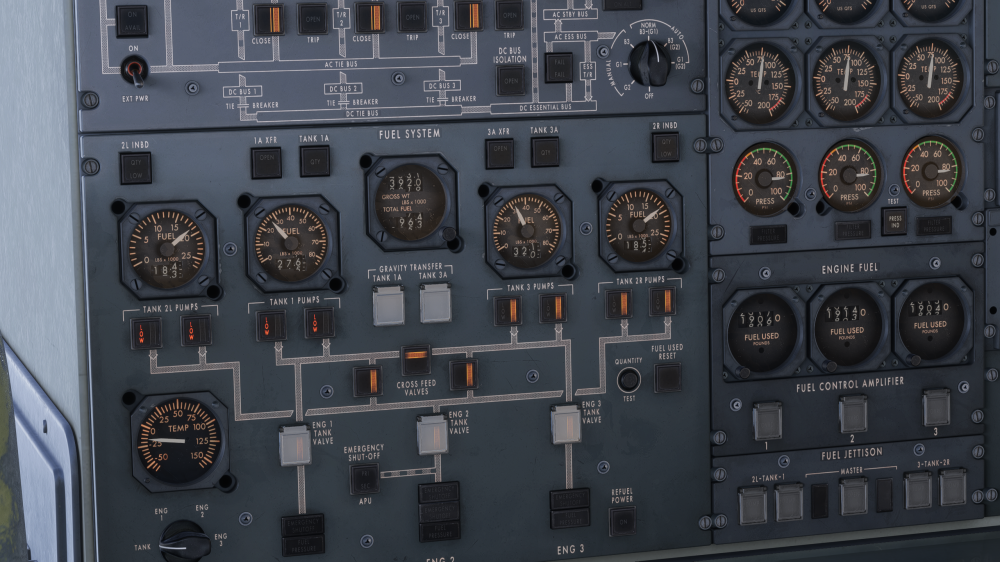
See attached screenshot. This was after running unattended at cruise for nearly 4 hours with all crossfeeds open and all pumps on. I am not using the PFD fuel balance helper (which also appears to not be working correctly, but that's a topic for a different post). In my screenshot I've turned all pumps off but the tank 3 and 2R pumps to even out first the small imbalance in 2R and then I will try to burn tank 3 down.
-
No traction here?
-
Perhaps this is a quirk of the real jet, but I doubt it. I have noticed that if I am flying manually with FDs on and I command a certain vertical speed, if the aircraft has drifted away from that vertical speed when you turn the autopilot the vertical speed target switches to the aircraft's current vertical speed and you have to re-command the prior target. For an extreme example, say I have 2000 fpm commanded in the window but am doing 1000 fpm, when I turn the autopilot on the target immediately switches to 1000 fpm. Happy to capture a video of the behavior if needed.
-
I try to avoid "X is broken" type reports as I know they're of limited utility unless it's something obvious, but I'm not sure what context would be helpful here. I have continued to notice that the autopilot struggles in situations that it very much should be able to cope with. I have observed the following: The autopilot is inconsistent with regards to maximum bank angle and turning rate: When high and fast it sometimes behaves the way I'd expect it to when low and slow -- faster banks to more aggressive bank angles -- but at other times it's the opposite and it will lurch suddenly to the maximum bank angle when high and fast and whip around when changing heading, etc. I assume the actual TriStar autopilot had logic built in to make inputs less drastic at cruise altitude but it seems like if they're represented in your autopilot that they're getting mixed up in different regimes. When intercepting VOR radials or a Localizer/ILS at 30 degrees or less, the autopilot almost always struggles to begin the turn soon enough and turns too slowly to intercept without overshooting. I am not aware of any TriStar quirks that would make this be the case but I am always willing to learn. The autopilot continues to struggle with maintaining course in a crosswind both when tracking VORs and tracking the INS. I am not even talking about significant crosswinds like a 100+ knot wind at a 90 degree angle, even something modest like a quartering tailwind at around 35 knots it will struggle to track the radial. If intercepting a VOR/LOC/ILS radial in heading mode, when the HSI shows even a half dot deflection and you switch to the VOR/LOC/ILS mode, the autopilot will often quickly bank "away" to intercept the radial more aggressively as if you were farther away, and then immediately but more gradually banks back to turn into the radial to track it, resulting in an overshoot.
-
I tried setting the DH to 200 feet on both the captain and FO side radar altimeters. That seems to have cured the flashing but the FO's DH lights stayed on until I clicked repeatedly 5 or 6 times in rapid succession.


