





IniJamir
Staff
-
Joined
-
Last visited
Everything posted by IniJamir
-
-
Should be, what you can do is press "Scan Input" and then just go through all of the buttons and axis on your stick and throttle and see if anything comes up
-
Hey Mats, What type of hardware are you using, are there any duplicate binds on any axis or buttons, do you use SPAD.NXT or any other peripheral support applications that allow you to change bindings and behaviors? Let me know, thanks
-
Hello, if you can try resetting the credentials and then logging back in, might need to restart flight as well, sometimes NG stays signed in but the Token is expired so it leads to this state where the aircraft won't download the data.
-
Hi, I'll take a look into this when I can but in the meantime are you able to provide a video of attempting to use both WX Radars, another user said one was broken and one was working. Feel free to link it to YT or Google Drive here if possible. Thank you.
-
Yes you need to delete it all I've been flying 350 recently and haven't been encountering this issue following SU5. Fully clear the WASM, allow it to recompile in the sim, and then let me know if it's still causing issues.
-
-
Hi, I'll try to take a look into this but in the meantime if you could provide a video either linked through YouTube or Google Drive here, that would be helpful. Thank you.
-
I'll pass this along to the team, thank you.
-
Go ahead and make another request
-
Hi, this is a known issue which is still being addressed, thank you :)
-
Oh yeah I don't think the Captain is possible to remove
-
I'll ask the team for more advice, you could try restarting the PC and then running the Manager in Admin mode and see if that makes a difference
-
And in sim is it showing 1.0.8 now or still .7?
-
Yeah, you beat me to saying you don't have to make it the same as mine as your file setup is designed for aircraft inside of the Addon Linker and not the Sim itself
-
Hi, I'm not to sure that this is aircraft related unfortunately as I have this issue myself with every airplane I fly from the iFlyMAX to the Fenix and our own Airbusses. I haven't checked the FS Forums but I've had this since SU4 so I just assume it's one of those things I just get to live with xD
-
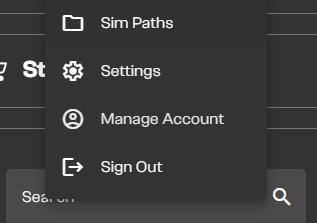
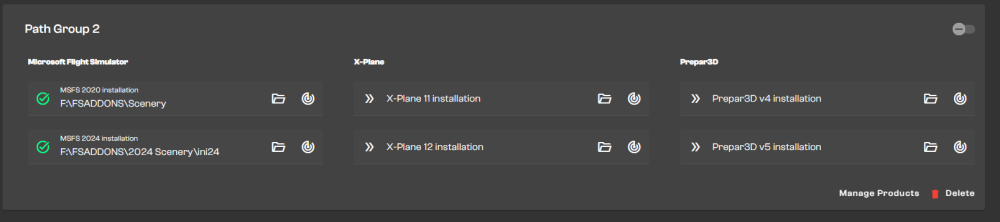
Hi, in the IniManager Settings select Sim Paths and then in there if your path groups are enabled which I assume they are since you use addon linker. Disable it if it isn't already. Let me know if this helps. The way I have addon linker set up requires that I disable the Sim Paths shown in the top right of the second photo since my sceneries are externally loaded and my aircraft in the community folder, whenever I update I have to disable the simpaths in order for the aircraft to update
-
I believe if you navigate to your profile in the main menu, select Customize Identity, choose Co-pilot, and select the empty slot it should vacate the seat on future flights. Let me know if this helps
-
Hi, which product are you attempting to transfer and the developer of said product?
-
Hi, I was able to verify this behavior on multiple flights, thank you and I'll pass this along to the team.
-
I believer currently brake wear is managed by the sim, I'll have to ask about oil as well as clarification.
-
Glad you were able to figure it out, enjoy :)
-
Are you asking for Xbox or PC?
-
I'll reach out and ask about this but please feel free to add a video as well.
-
Sounds good, envious as I could only fly to NZAA and back in the sim :D Enjoy your time over there!


