





Everything posted by IniJamir
-
Roger that
-
I logged it for the team as it was seen happening in one of my more recent flights.
-
Of course, enjoy!
-
You can upload it to Google Drive or YouTube and link it here (I need to look into that upload limit for the forum), I need to hop in 350 for another thing when I have time so I need to remind myself to look at this if I beat ya to it :)
-
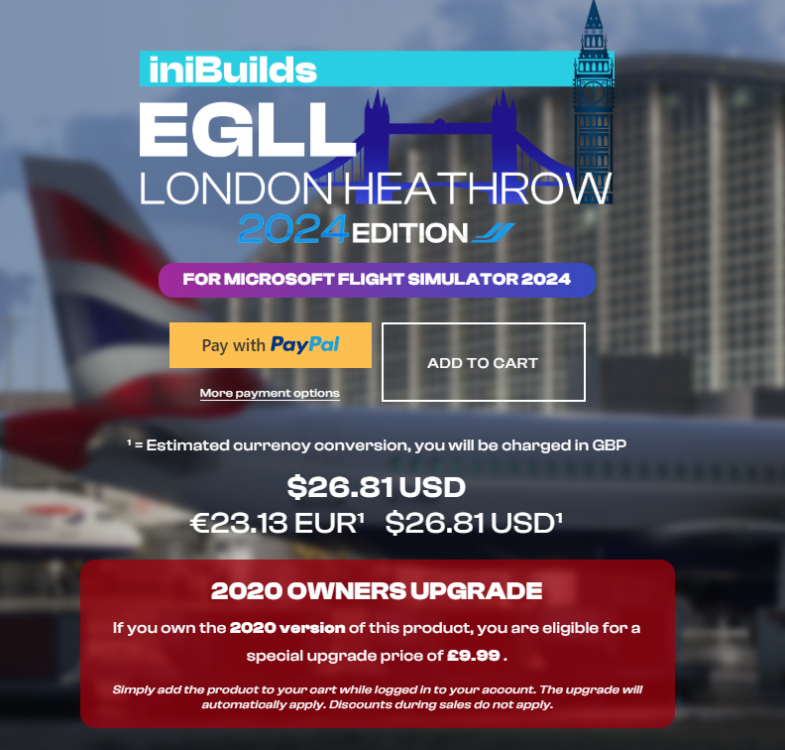
If you are on PC, you can use the 2020 version as it is compatible with FS2024; but can also be upgraded to the 2024 version for owners of the 2020 version as seen in the image below. If you are on Xbox you'll have to upgrade the version via the in game marketplace, let me know if this helps.
-
Roger, I'll give it a look today. In the meantime you can try removing the Hoppie code, restarting the flight from the main menu, and then relogging in and seeing if that changes anything, as well as clearing WASM https://forum.inibuilds.com/topic/24917-how-to-clear-the-wasm-folder/ , let me know if either of these options help while I look into this
-
Sometimes HUES liveries do need updating between updates. I too use HUE liveries (No Core or Cabin Pack Compatibility Mod) and every once in awhile a livery will need to be updated, this goes for all livery makers regardless. Glad you were able to solve it :)
-
These are going to be in order of the way you listed them for ease of recital as it was a lot. 1. In Progress Fix 2. Logged for the team 1. Logged for the team 1. Logged 2. Logged 3. Logged 4. Logged 5. Logged 6. Logged 7. In Progress Fix 8. Logged 9. Logged 10. Logged 11. Logged 12. Known Issue The Flight Model Issues will be raised to the team in a meeting. Thank you again for your time logging these as I was able to observe a variety of them over the week in 350 on my flights and add them to our list of items. I can't guarantee when these will be fixed or the time as this list is fairly extensive but I have logged what isn't known/being fixed already. Thanks again :)
-
Hi, Do you use any mods or cabin packs with Hues Compatibility for Cabin Packs? Usually this is a conflict with aircraft mods or liveries that are outdated/corrupted
-
Are you requesting with VATSIM, SAY Intentions, or BATC?
-
Hi, I'll take a look at this, next time it happens are you able to record it. I want to be able to try to capture multiple instances of itHi, There was a list that was built earlier this month/last month where users requested a variety of missing 350 liveries to be added. There is no ETA at this time regarding the delivery of new liveries but this is known to the team, thank you. https://forum.inibuilds.com/topic/36522-lack-of-liveries-and-such/Known issue already regarding flyover logic, thank you :)Known issue with how the A350 logic is drawing the path, thank youI'll make a note of this for the team, thank youDid you reinstall everything from the previous of version of windows or did you format and cleanly reinstall everything from scratch?Got it, thanks. I'll pass this along to the team.Hi, are you able to record a video adding the issue, I am not as familiar with SLS/FLS unless I'm just mis-remembering. Thank youAlso I am going to be filtering this thread pretty aggressively as to make sure that this thread stays relevant to the topic at hand. Thank you allHey thank you for this, it's gonna take me a little bit of time to parse this, update what we have and add new where new is needed, but this is awesome. Thank you.Thanks, I'll pass it along to the team.I've logged this for the teamI'll have a look into this, did a flight after release and didn't have this issue that I can recall, I'll never say no to hopping into A300 and checking again :)I've logged this for the team



