




iniKyle
Staff
-
Joined
-
Last visited
Everything posted by iniKyle
-
That is correct! The normal panel state selection is essentially designed to get you going as quickly as possible. The default “ON GPU” panel state means the aircraft will spawn cold and dark with the GPU connected. Hope this clarifies things! Thanks!
-
Hi, Forgive me, I thought your reference was regarding MSFS2024 rather than MSFS2020. ON GPU – You will spawn in cold and dark with the GPU connected to the aircraft. ON APU – You will spawn in with the APU running. Hope this helps! Thanks!
-
Hi, Could you upload a photo/video of the issue you've describe? Thanks!
-
-
I’ll pass this along to the development team for future consideration. Thanks for your suggestion!
-
I’m not entirely sure at this time. If you’re in the official iniBuilds Discord, keep an eye out for any announcements there! Thanks!
-
Hi, The A350 does not have an option to set a “Default Panel State.” It will load in a cold-and-dark state with the GPU connected. Hope this helps! Thanks!
-
Hi, Sorry to hear you’re having issues. Are you experiencing the same issues as the original poster? Thanks!
-
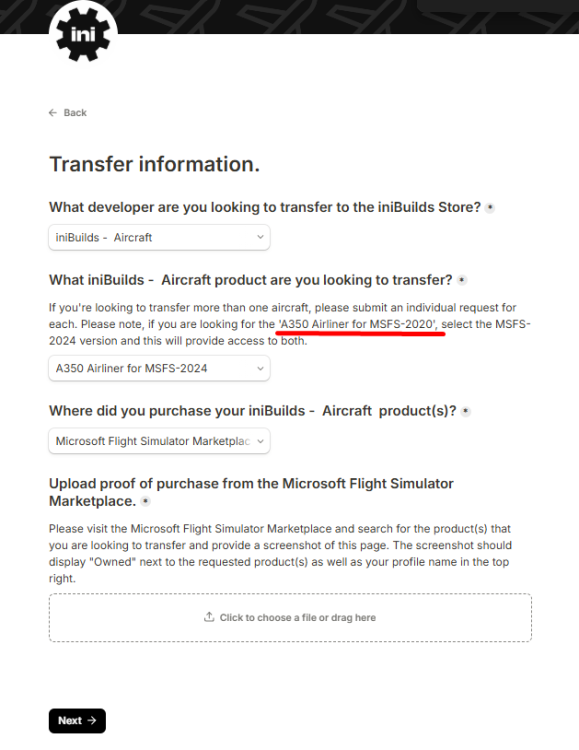
Hi, Please select the A350 Airliner for MSFS2024 and provide your receipt. Thanks!
-
Thanks for your suggestion! I’ll add it to the list for consideration. As for the Commander, while we will certainly take it into consideration, we do have a process for determining what we’ll be working on in the future, which inevitably takes some time. Thanks for your understanding!
-
-
Hi, Thanks for your suggestion! I’ll pass it along to management for further consideration. Thank you again!
-
Hi, Which products are you referring to? If you could provide a picture for reference, that would be great. Thanks!
-
Great news, enjoy!
-
I believe, at least in my experience, you want to have both set. Let me know if this works! Thanks!
-
Tested this on my end and I’m seeing the same issue as shown in your images. I’ve logged this with the Synaptic team for further investigation. Thanks again for your feedback!
-
Hi, You need to disable the default handcrafted scenery. Open the Marketplace from the main menu. Click on My Library. Search for the airport by its ICAO code or name (e.g.EGLL). Locate the specific handcrafted package or world update containing the airport. Select the item and click Disable. Restart your simulator for the changes to apply. Thanks!
-
-
Hi, Yes, if you're using our multi-jetway tool with GSX, there is currently a limitation that prevents passengers from appearing. We've reached out to the GSX team in hopes of getting this resolved, but unfortunately, we have yet to hear back. Thanks for your patience and understanding!
-
Any chance you'd be able to join the Synaptic discord? They may be able to offer further troubleshooting. Thanks!
-
Hi, Thanks for your feedback! I'll test this and report back. I'm also curious to see whether this issue is localized to our liveries or if it's happening with third-party liveries as well. Thanks again!
-
Hi Liam, Thanks for your feedback. I'll test this in the morning and report back with my findings. Thanks again!
-
Hi everyone, I'll make sure this gets passed along to the team. While I can't provide a timeline for any updates, I can assure you that your feedback has been received and will be shared with the team. Thank you!
-
Hi, Within the iniManager app, on the left hand side column, you should see a tab called GSX Profiles. Hope this helps, thanks!
-
Hi Howard, Sorry to hear you're having issues with the L1011. From what I can gather, this sounds like it may be a hardware issue, as I haven't seen any other reports of this behaviour. If you run into the issue again, I'd recommend unplugging and then reconnecting your throttle hardware to see if that resolves it. Thanks!


