




iniKyle
Staff
-
Joined
-
Last visited
Everything posted by iniKyle
-
Hi, Yes, I can updated this thread if we decide to make the Turbocommander. Thanks!
-
Hi, Thanks for your suggestion. I'll pass it along for future considerations. Thanks again!
-
Hi, Thanks for bringing this to my attention. I’ll speak with the team and try to replicate the issue on my system. Thanks again!
-
Hi, As per your other thread, it is our goal to bring as many of our products as possible to the PS5 Marketplace. Thanks for your patience and understanding!
-
Hi, Unfortunately, I’m unable to provide any details on that at this time. Please stay tuned to our social channels for any future updates! Thanks!
-
-
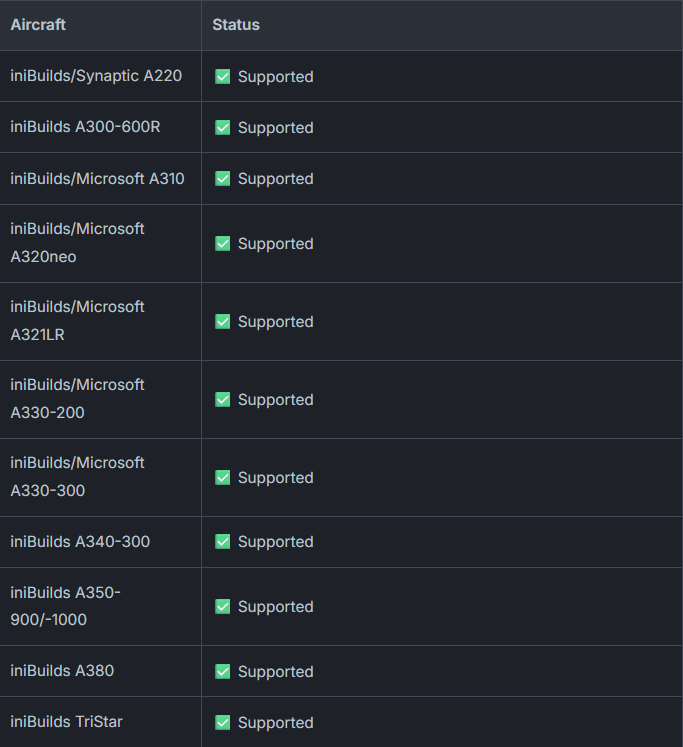
You would indeed be correct! The system is not currently working with the -200ER. I believe this is due to a limitation with how the doors are handled on the 200 variants. I’ve attached a list of the fully compatible aircraft with our multi-jetway system for reference. Thanks!
-
Hi, While it is our goal to bring as many of our products as possible to the PS5 Marketplace, I’m unable to share any details regarding release dates or pricing at this time. Please keep an eye on our social channels for any future announcements regarding our products coming to PS5. Thanks for your patience and understanding!
-
Hi, Thanks for your inquiry. Unfortunately, I don’t have any information to share on this matter at this time. However, please keep an eye on our social channels for any future updates and announcements! Thanks again!
-
Hi, We have Xbox beta testers on the team, unfortunately we are not looking to fill any positions at the moment. Thanks for your understanding!
-
Hi, Unfortunately, I cannot give any timelines. Thanks for your patience and understanding!
-
-
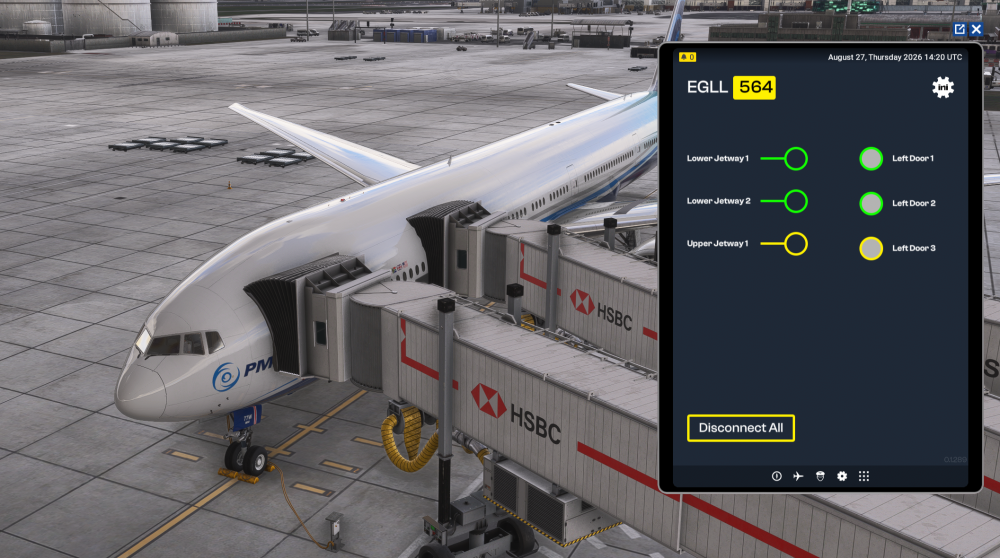
Hi, Everything seems to be working correctly on my end (see attached picture). Could you please confirm that there isn’t another GSX profile running for London? As an additional step, could you also confirm that the default handcrafted London scenery has been disabled? Thanks!
-
Hi, Yes, the aircraft we develop alongside Microsoft are available in the sim. Currently, none of our third-party aircraft have been added to PS5, but we are hopeful that we’ll be able to bring as many of our products to the platform as possible. Thanks!
-
Hi, Well that's odd... Working perfectly fine on my end! If you're able, try the troubleshooting steps below to see if this solves the issue. Thanks! Close iniManager: Make sure iniManager is completely closed. Check your Windows system tray/taskbar to ensure it isn't still running in the background. Open the Run dialog: Press Windows Key + R on your keyboard to open the Run box. Clear Local AppData: Type %localappdata% into the Run box and press Enter. Locate the folder named iniManager and delete it. Clear Roaming AppData: Press Windows Key + R again to open the Run box. Type %appdata% and press Enter. Locate the folder named iniManager and delete it. Restart iniManager: Relaunch iniManager. It should start fresh and rebuild its configuration files.
-
-
Thanks! We're still investigating on our end, appreciate the continued feedback.
-
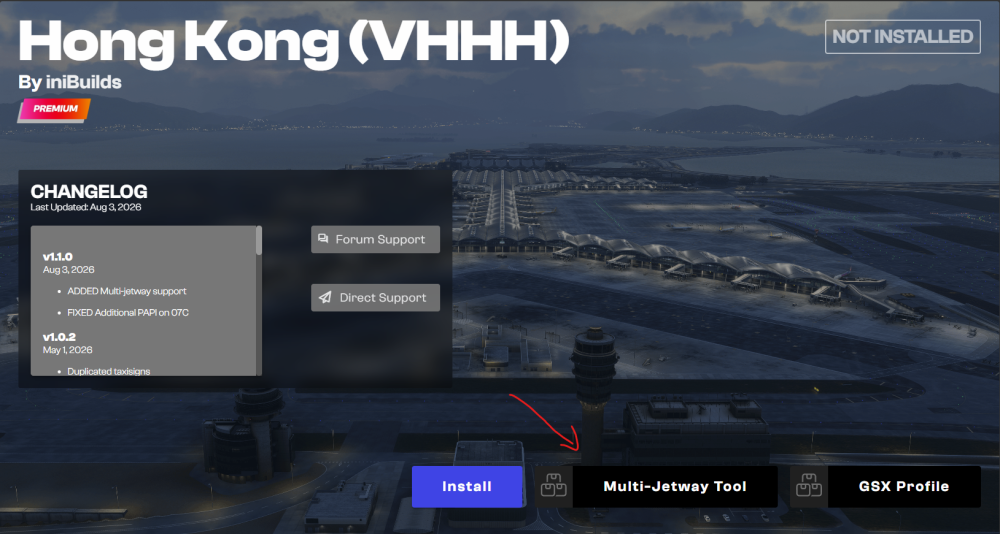
Hi George, If you’re looking to use our new multi-jetway system, you’ll also need to install the Multi-Jetway Tool through iniManager. I’ve attached a screenshot for reference, along with our “How-To” guide to help you get it set up. Thanks!
-
Hi, Thanks for the detailed feedback. There’s a lot of information to go through here, so I’ll do some investigating on my end and report back once I have a better understanding. Thanks again!
-
Hi everyone, I appreciate your feedback and suggestions! Have you considered sharing these over in the official Synaptic Discord? That would be a great place for the team to see and discuss them directly. Thanks!
-
Hi, Most likely, the reason it isn’t showing on the FMA is because your throttles are not set to the correct detent. Please ensure your throttles are in the FLX/MCT detent. Thanks!
-
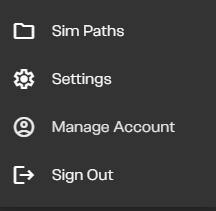
Hi George, If you purchased through iniManager, go to the top left, beside your username, where you should see a gear icon. Click this, and a small dropdown menu with four options should appear. The first option is labelled “SimPaths.” Click this to open a new screen where you can select which folder the scenery installs to. I’ve attached a few screenshots to help guide you through the process. *Note Do not copy my file structure, as yours may be different. Simply locate your community folder Thanks!

-
Noted and logged with the Synaptic team! Thanks again for your attention to detail, we appreciate your feedback!
-
Hi, Have you done the throttle calibration in the EFB? Thanks
-
Great news, enjoy Dubai!


