iniKyle
Staff
-
Joined
-
Last visited
Everything posted by iniKyle
-
Hi, The only place to get accurate news is straight from the source, iniBuilds' official social channels, the website, or announcements here on the forum. Thanks!
-
-
-
Hi, Can you test with a different livery? Thanks!
-
Hi, I don’t have any timeline to provide at this time. We’re aware that users would love to see our products on PS5, and we’re hopeful to bring as many of our products over as possible. Thanks!
-
Hi, As I mentioned above, we’re hoping to bring as many of our products as possible over to PS5. However, I’m unable to comment on which specific aircraft or sceneries may eventually make their way over. Hope you understand. Thanks!
-
Hi, While I cannot provide any timeline, our hope is to bring as many of our products over to the PS5. Thanks for your patience and understanding!
-
Hi, Thanks for your feedback! I believe there are plans to bring both the Terminal C and Terminal A extensions, although I’m not able to provide a timeline for when this update may be released. Thanks for your understanding and patience!
-
Hi, The aircraft currently available for PS5 were made in collaboration with MSFS and are not part of our third-party projects. Hope this helps clarify! Thanks!
-
Hi, I’m wondering if there may be something in your Community folder causing the issue. If you’re willing to troubleshoot this with me, please try the following: Make sure the simulator is completely closed. Rename your current Community folder to community1. You will not lose any of your add-ons. Once we’re finished (if not fixed), you can simply delete the newly created Community folder and remove the 1 from the end of your old folder’s name. Launch the simulator. This should create a new Community folder. Once you reach the simulator’s home screen, close the simulator. Place your A350 inside the newly created Community folder. Update the AIRAC accordingly. It should automatically detect your new Community folder. Let me know if this helps resolve the issue! Thanks!
-
Hi, Please make sure a different aircraft is selected in the Free Flight section of the simulator’s home screen, then try updating again. It should work after that. Thanks!

-
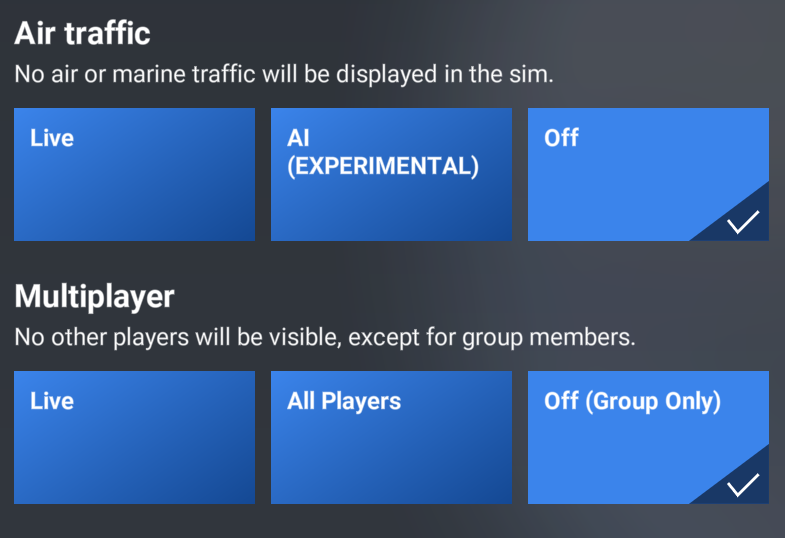
I've attached a screenshot above, which suggests that should be turned off. Thanks!
-
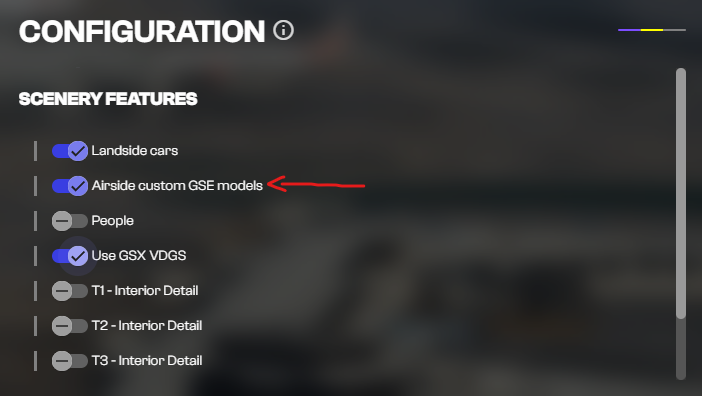
Hi, If you’re using GSX, I suggest switching Airside Custom GSE Models off. This is a toggleable option within the iniManager configuration and should resolve the issue with the tug placement. Thanks!
-
No worries! If the issue still persists on your next flight, feel free to update me here, and I’ll do my best to troubleshoot it with you. Thanks!
-
Hi, Definitely something to consider, and I’ll pass this along to the team for future consideration. Just a note: I’m not sure if this is possible on Xbox due to platform limitations. Thanks!
-
Hi, If you haven’t already, I highly suggest turning on the Autosave feature located in the OIS. While I understand that WASM issues can be frustrating, we’re always looking for ways to make our products more stable and improve the experience for our users. If you’re planning a long-haul flight, I can also suggest emptying the WASM folder beforehand. Thanks!
-
Hi Joe, We’re not entirely sure what is causing the nosewheel to appear crooked, but we’re investigating the issue on our end! Glad we were able to get you up and running and that you’re enjoying the aircraft. Thanks!
-
-
-
-
-
Hi, Thanks for your suggestion! While I can’t promise anything, I’ll be sure to pass it along to the team for future consideration. Thanks!
-
While we haven’t announced anything just yet, our goal is to bring as many products as possible to PS5. Thanks!
-
I appreciate you taking the time to provide such a detailed message. As mentioned above, I’ll certainly pass these along to the team for further consideration. Thank you again for your time and feedback!
-
Hi, Thanks for the detailed report back. I've attached a few screenshots showing some other potential settings to try. I also loaded into OMDB on my end and confirmed that I do not have any static aircraft present. Thanks!