




Kwsk121
Member
-
Joined
-
Last visited
-
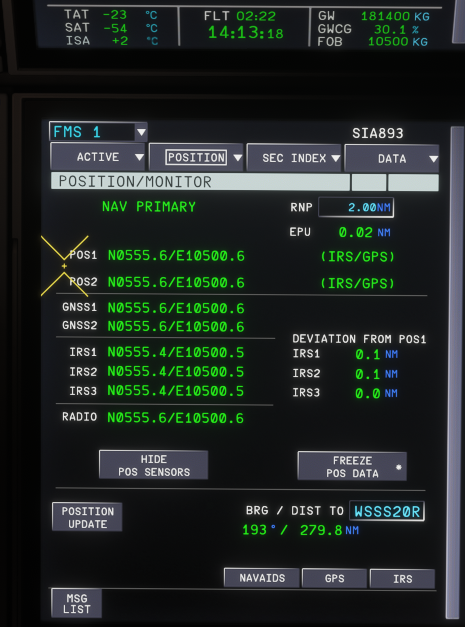
Hi, I would like to report a possible issue with the IRS/ADIRS position simulation on the A350. I am currently flying the iniBuilds A350, and after approximately 2 hours and 20 minutes in the air, the IRS position does not appear to have drifted at all. I expected to see some degree of position drift over time, especially during a longer flight, but the IRS position still seems perfectly aligned with the aircraft’s actual position. Could you confirm whether IRS drift is currently modeled in the iniBuilds A350? If it is supposed to be modeled, this may be a bug. Thanks.
-
Hi iniBuilds team, Could you consider adding scroll acceleration to the L-1011 TriStar cockpit knobs? Especially the AP control panel (Not sure what its called, FCU?) At the moment, using the mouse wheel can feel quite tedious because each scroll input only changes the value slightly (500FT for altitude on the legacy mode). This is especially noticeable when adjusting knobs that require larger changes, such as altitude, heading, radios, or brightness controls. (Increments are in single digits for the knobs, extremely annoying to tune for new HDG/CRS) Scroll acceleration would make these adjustments much smoother and less repetitive while still keeping fine control possible. Thanks.
