





IniJamir
Staff
-
Joined
-
Last visited
Everything posted by IniJamir
-
Thanks for the feedback, I'll pass it along to the team.
-
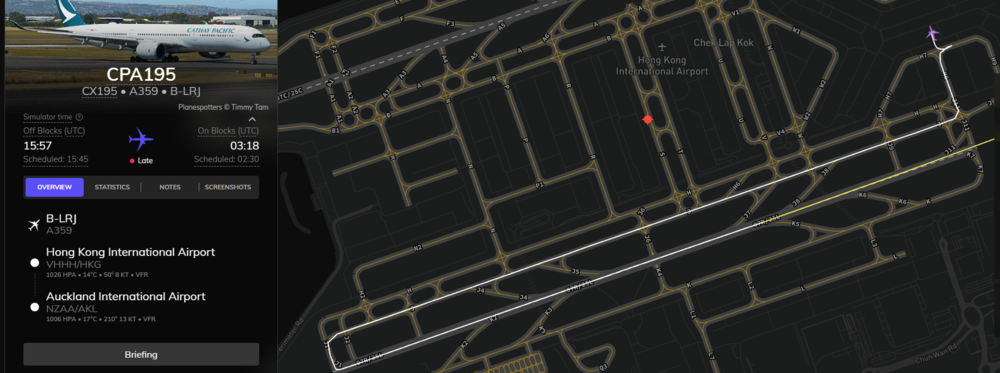
Hello, I have tried it, This is my Volanta track taxiing down Juliet to RWY07R I have 0 deviations on the taxiway
-
Hello, I will pass this along to the team.
-
Hello. We have various SMEs that have verified the feeling of the aircraft during varying stages of flight. It is possible that you might have to make adjustments on your hardware's end to compensate for this. Thank you.
-
Hello, Yes occasionally this can occur with extra noise inputs from peripheral equipment and conflicting keybinds.
-
Hi, Thank you for submitting this, I'll pass this along to the team.
-
Hi, I'll pass this along to the team and see if there is anything that can be done about it. Thank you.
-
Hi, Reports of the callouts and quality have been noted. Thank you
-
Hello, The aircraft are products that were created by Inibuilds FOR Microsoft, making these products Microsoft Products which require all bugs and reports to go through the Microsoft Forums where they are then pushed along to partners, as such we do not own these products and ultimately follow a chain process for updates regarding stock products from the Sim. Thank you for understanding.
-
Sunshades conflict with the HUD when installed.
-
You can try reinstalling the IniManager and Relogging in and that could allow you to direct the path back to the community folder. Let me know if this helps.
-
Hi, I will pass this along to the team, thank you for the suggestion.
-
Hi I will pass this along to the team, thank you for the suggestion, however the A340 doesn't have any random failures/faults modeled.
-
Nothing in the SU5 Beta can be expected to work on initial launch.
-
Hi, I'll pass this along to the team Thank you.
-
The Cabins have been depreciated following the release of update 1.1.7 of the A350 and are no longer supported. Thank you for understanding.
-
Hi, Thank you for the video, very well narrated and makes it easy to see what's going on. That being said a potential fix to this issue can be to reinstall the aircraft and liveries (update liveries if need be) as well as clearing the WASM folder. If this still continues following these options let me know, thank you.
-
Hi, Can you please upload the video to YouTube and then link it here, it's not that I don't trust your media, it's just a preference of mine that I don't download anything. Thank you
-
Hi, So ultimately HCF functions where it remember the last heading before the user ceases inputs to the NWS/Rudder Inputs, what can override the heading control in sim is anything from noise coming from input devices, weather. If possible attempt to view the input devices when the aircraft is taxiing in clear, calm winds, to see if there is any ghost inputs that could be occurring. Thank you.
-
Hi, Have you attempted a reinstall of the aircraft? Additionally you can clear WASM folder via steps below; Let me know if this helps, thank you.
-
Hi, I'll bring this up with the team, thank you
-
-
Hi, Sorry you are having these issues, have you tried uninstalling and reinstalling the aircraft. If so and that hasn't worked then try clearing the WASM folders and then relaunching the aircraft so it can recompile and that could resolve this issue. You can find the steps for that below, let me know if this helps.
-
Hi, Thank you for this clarification, I'll make sure this is left as is.
-
I'll pass this along to the team.


