





Everything posted by IniJamir
-
Hello, I checked some of my liveries to see their values and they are indeed changing and dynamic so it isn't something that is broken our end as far as I can tell. I can recommend to you that you clear your WASM but I am not 100% sure if it will rectify the issue here. Let me know if this helps, thanks.
-
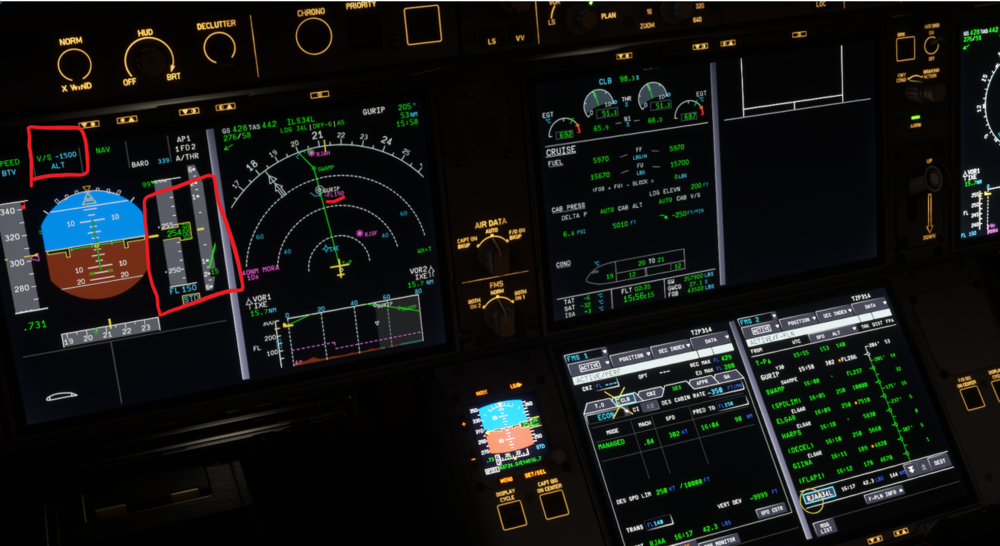
Hello, Since you are in V/S Mode as indicated by the PFD, the aircraft will not follow Altitude Constraints but instead maintain the V/S. Constraints are only managed automatically when the aircraft is in Managed/Profile. The Altitude Band on the Left Screen shows the FL150 is selected in Blue indicating that the aircraft is operating outside of managed altitude modes, when it is Magenta than the aircraft will obey the constraints as published.
-
They will be able to assist you in more advanced aircraft issues as well as a refund should nothing there work https://inibuilds.com/pages/contact
-
Hi, I will pass this a long to the team.
-
My apologies, usually I link the WASM instructions
-
Hi, Sorry you are experiencing these issues, it's possible that something corrupted during the first time launch of the aircraft if not during the download and installation of the aircraft itself. Instructions can be found for clearing WASM below. Let me know if this helps. Thank you.
-
Hi, Sorry, but the model is different between 2020 and 2024. Additionally the seat do that as lighting hits them at an angle, verified that the semi-gloss (best way to describe it), happens on my end and shifts as camera aspect changes.
-
Not a waste at all, glad you were able to get it resolved!
-
PC or Xbox, if you are on PC you can attempt to clear the WASM folder and make sure all the liveries are up to date in the IniManager
-
Hi, Are you using any mods or the cabin packs for the A350?
-
Hi, I will pass this along to the team.
-
Hello, If you haven't done so already you can attempt to clear the WASM folder as something may have occurred during initialization to have caused this; as for the click-spots that issue has been raised. Thank you and let me know if this helps.
-
Hi, Are you on Xbox or PC?
-
Hello, This will be answered within the manual and forum FAQ posts as well as additional video content that will be showcasing the L1011-500.
-
-
-
I can't answer that at this time as SU5 Beta is something we all get to explore together initially but I will make sure this gets to the team, thank you for the notice and if you have any attachable video that would be greatly appreciated. Thanks
-
-
Are you still having this issue following the updates have come since the original post was made?
-
I'll pass this along to the team Thank you.
-
-
Also for future notice the forums are English only please and thank you.
-
Hi, I recommend contacting support as they have more knowledge to issues of this nature, thank you. https://inibuilds.com/pages/contact
-
Do you have a controller that you can plug in and use, if so on Xbox the default command to enter the aircraft is LB + B, let me know if this works, thank you.
-
Noted, Thank you.



