





limbo
Member
-
Joined
-
Last visited
-
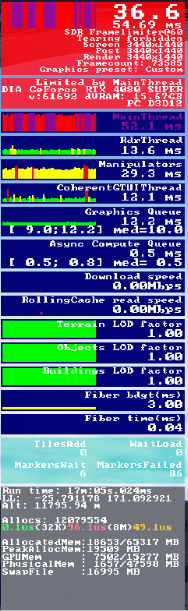
I haven't tried doing this yet unfortunately. (I just haven't bothered plus haven't had time) However doing KLAX to YSSY in full real time my FPS degraded to about 15 and not sure if it could be caused by BATC with traffic although I have lowered some of the traffic settings. After being fed up with it after going to bed with about 11 hours elapsed I have just restarted the sim. I just clicked somewhere near New Caledonia and clicked ready to fly, then after stabilising the plane cause it acts a bit wonky I loaded the autosave, I immediatley noticed that my performance degraded and you can see in the graph the frames are fluctuating (FYI the FPS is post frame gen) however I am only getting about 5 fps more on average, so 20. Not sure what causes it, and loading this autosave is without BeyondATC loading anything in. Maybe it's time I contact you guys over email... can't access the Discord cause I got banned for something that I won't get unbanned for Not sure if there's anything PERF related items on 1.0.3/2 however that would be great. I've heard the SU7 beta I think it is has better memory management avoiding degradation however I don't use Beta's having done so in the past. IIRC I have not experienced any degradation in the 350 so i'm really not sure. I might try downloading the aircraft instead of streaming and see if that helps at all, doubt it'll have any effect
-
What's the changelogs, cause everytime you guys put changelogs in Emails and it doesn't cover everything. It'd be great to see changelogs in advance like Synaptic does, if they have already been submitted to the marketplace.
-
-
It's a 3 month exclusive to the MSFS marketplace. So we sadly have to wait.
-
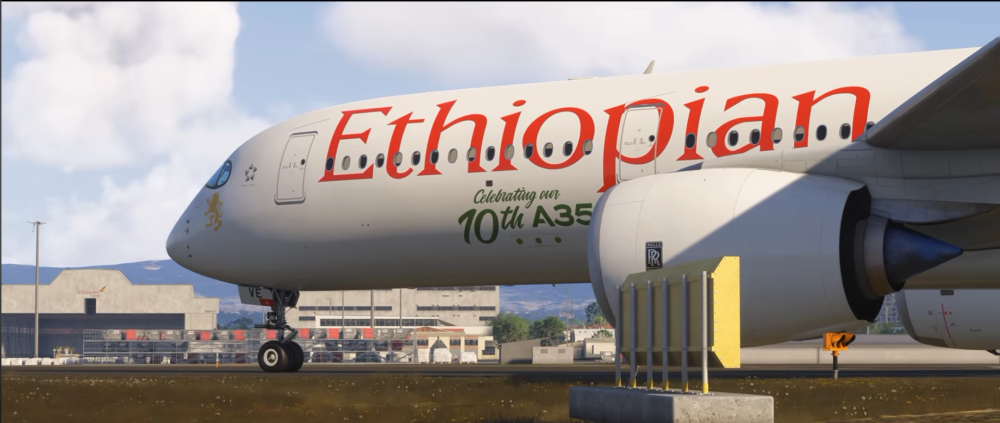
Timestamp here, the a350 in this trailer looks a bit to close to the a350 v2 So to point out the obvious (I was about to point out the window shades but I realised there is nothing new there) Anyways.. we can see that the engine nacelle or inlet cone is entirely blue, we can compare this to a picture on the product page below, I think we can all notice how it is far less blue than what we see in the official a350 v2 shot and the trailer of this new airport So naturally based off of this I have a question: Will the a350 systems and performance update be scrapped in favour for just releasing the A350 V2? Because honestly I'd prefer it to be like that (and I truly stress that). If the a350 V2 doesn't just include art refinements and minor tweaks to the flight model I would far prefer this ships in one massive cumulative update then split in half like the Fenix A320 with Block 2 update 1 and update 2.
-
We need random MBTF not just yup set it all to Dynamic and expect a few failures in your flight. That's not how I like it every other high fidelity aircraft uses MBTF or allowing you to choose your chance or number of failures (like in PMDG) that you can get during a flight. This needs to be changed ASAP
-
Would like to ask what this is? As the FAQ still hasn't been updated to tell us how to use our own announcement packs? Or is this just a feature coming soon which would be a bit odd
-
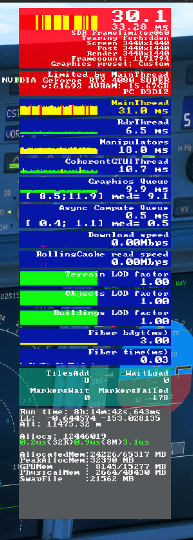
This is probably just majority of the sim being a pain in the ass although is there anyway to fix performance degradation in this aircraft, I experience it in the 3 flights I have done so far, using jump ahead and not time compression (very handy feature by the way) I'm currently doing KDFW-YSSY which will be my first full long haul I have done in the sim for once. And so far I've been flying for 7 hours and 37 minutes Atleast in this point of time I am getting about 25-30 FPS, yes still playable however I should be getting far more FPS and it'd be hard to pinpoint whether this degradation is a result of something the a380 is doing or it's just the sim being awful
-
If you start up Rex Atmos before fully loading into a flight this is what occurs, and that's even if you don't touch the weather option inside it. That's what causes TAT at ground temps even at high altitudes.
-
Given multi jetways is not supported at OMAA this is relatively self explanatory The external jetways in a GSX profile won't be present at this airport for GSX cause well it doesn't have multi jetways And yes, we can assume it will be added in a future update because well A380's fly in, out of Abu Dhabi to. A different setup wouldn't be required either, that one is also self explanatory.
-
IniBuilds needs to add compatibility for multi jetways to their airports it won't 'just work' because you have the multi jetway tool.
-
We don't need more iniBuilds monopoly. While they are probably the largest dev team, I'd much prefer they focus on one aircraft for a while and after a few updates go to the drawing board and figure out what's next. It's silly to release an a380 then tease an aircraft which is already probably 50% complete which we have seen. Nor is capitalisation like iniBuilds doing a good thing, it'll benefit us (the end simmer) but not anyone else who wants to take a jab at xyz the company's management is probably just straight marketing and not passion. The devs however do good work, it's a passion for them.
-
Yes, this is the a350 update that I mentioned that will come before V2
-
-
I'm at OMDB and my aircraft is deciding to do the pull up GPS jamming stuff, however I am on the ground. Wouldn't the aircraft theoretically sense that, not once have I seen in cockpit videos atleast GPS jamming happening on the ground and I am not sure if it's realistic. Of course on flightradar24 there has been spoofing with planes teleporting all over the ground although I doubt they are getting pull up. I do feel the current GPS jamming is a bit bland as well, it would be nice if we get terrain ahead pull up with terrain popping up on the ND, as it's the same thing everytime.


