





Everything posted by IniJamir
-
Hello, I appreciate you providing reference and I can admit when I am wrong so I appreciate the correction. That being said the L1011-500 being modeled is based off a real reference that we were able to obtain. Thank you.
-
Yes, that was me and sorry I never got back to clarifying last time you asked, at the time I was under the impression at the time that there were separate logs for Xbox and PC since the issues can vary uniquely. It turns out that the logs are one combined log with specific mentions. That one is on me and I apologize for any confusion caused by my mis-statement. They should apply to both as we are version syncing them here on out (provided no other unique breaks happen); Xbox users and PC alike will just have to read for specific mentions to PC or Xbox in regards to fixes in the main Community Log found here on the forum whenever those updates are published.
-
Hello, So we aren't able to include a changelog on Xbox, however whenever the community posts go out regarding major aircraft updates; e.g. A350 v1.2.3, there will be a full log since that will apply to both Xbox and PC. In this instance with Xbox v1.2.2, the lighting fix had to be addressed, ingested, and is required to have a new number even for a hotfix and as such pushed the Xbox from 1.2.1 which was shared with PC Version, onto v1.2.2 Ultimately all major changelogs will come in the form of Community Updates and any minor hotfixes/changes to Xbox require a new version number and don't get formal logs Hope this helps, Thank You.
-
Hi, Thank you for this detailed explanation, one piece of information I do need as I presume this is a livery from the IniManager, what is the Registration of this aircraft, Thank you again 🙂
-
Hello, Sorry to inform you but no there won't be an option for the Taped Gauges these weren't present on L1011-500, and even for non-500s very few early builds had these tape style. The image you posted is from another variant as the -500 has the DDU as seen below. Thank you
-
You can, you just need to use "Manual" and reference charts to find the correct distances
-
Hi, If possible, enable Developer mode in the Game Settings, then access this menu below and unclick the Override Light System option. Let me know if this helps.
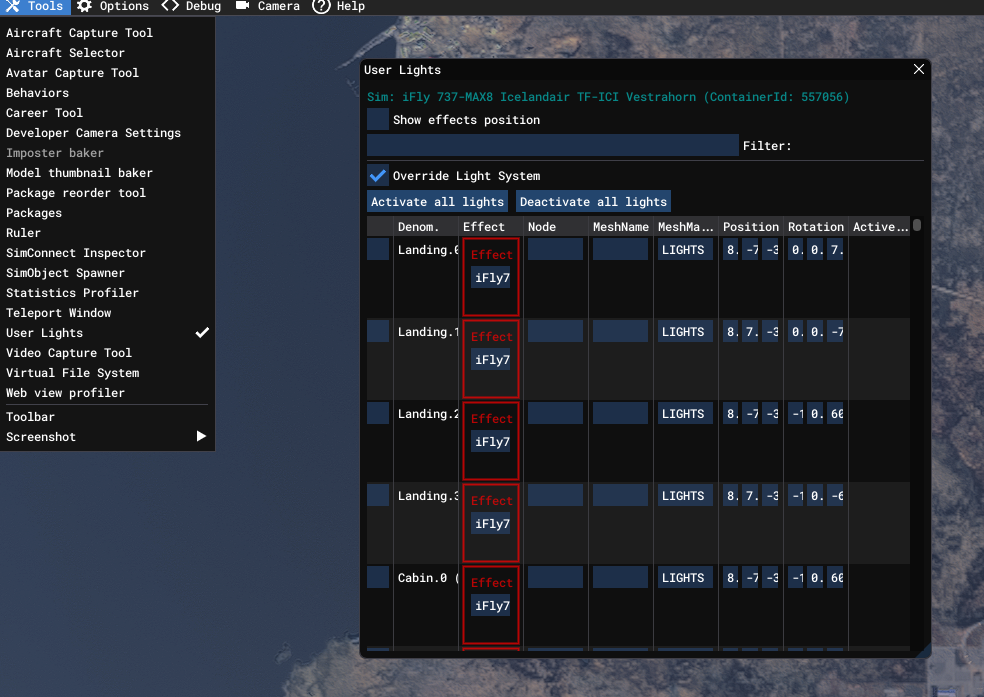
-
Hello, While I can't attest to it being related to Marketplace or Manager issue, you can request a transfer from Marketplace to the IniManager and then disable the scenery in sim as it will remain present, and install the scenery from the Manager. I do not have these issues on my end as I fly in and out of LAX with the statics enabled frequently and no one else was able to replicate the issue on the team. Hope this helps and sorry for the inconveniences had.
-
It fixes the lighting which was broken following v1.2.1 I'll look into this.
-
The lighting is fixed
-
Hi, This would have to be addressed by Barelli as they are the owners and developers of LIMC. Thank you.
-
Hi, If saves aren't working you can try clearing WASM and if that doesn't work try fully reinstalling the aircraft. Let me know if this helps, thank you.
-
I can't answer to Xbox side of things, ultimately when the update that pushed broke lighting, it broke internally. The way these fixes work for Xbox is in 2 parts, Inibuilds and then Xbox Ingestion. We can't control how or when these fixes get pushed on the Microsoft side. This problem is known about, the issue was identified on our end, but I cannot attest to how it will come out for Xbox and when. Thank you.
-
Hi, thank you for the correction as I hadn't realized that this was the nose gear upon first look.
-
Hi, I will pass this along to the team, thank you for the information.
-
Hello Thank you for the video; you mentioned lighting as well, are you on Xbox?
-
Hello, As per our aircraft SMEs, they have confirmed that when the A340 is near empty the central bogey will slightly float off the ground
-
If you call the refueler again they do indeed close the panel, however I can pass the suggestion of a click spot along to the team, Thank you.
-
-
-
-
Hi, Sorry for the inconvenience, I will push this issue to the team.
-
Hi, I will pass this along to the team.
-
Hi, If this is a livery from the IniManager have you checked that it's been updated, another user had a similar issue on the SAS liveries and that resolved the issue seen here. Let me know if this works, thank you.
-
Hi, Thank you for this imagery, is there anyway I could get you to record a small clip, sometimes click spots are wonky at certain angles, regardless of that fact it will help pinpoint for the devs where click spots can be improved from a user's perspective since everyone positions themselves differently. I will pass this along to the team, thank you.



