




richboy2307
Staff
-
Joined
-
Last visited
Everything posted by richboy2307
-
The TOGGLE PUSHBACK button only calls for the default MSFS tug, same as you would through the ATC menu. It may take some time for the pushback to spawn (though sometimes it may not show up at all visually.) Make sure chocks are removed, and parking brake is released. To actually start the pushback you need select AFT, LEFT or RIGHT buttons on the EFB. This will then connect the tug to your wheels and begin pushback in the desired direction. When you are finished with the pushback, click the STOP button. Thanks!
-
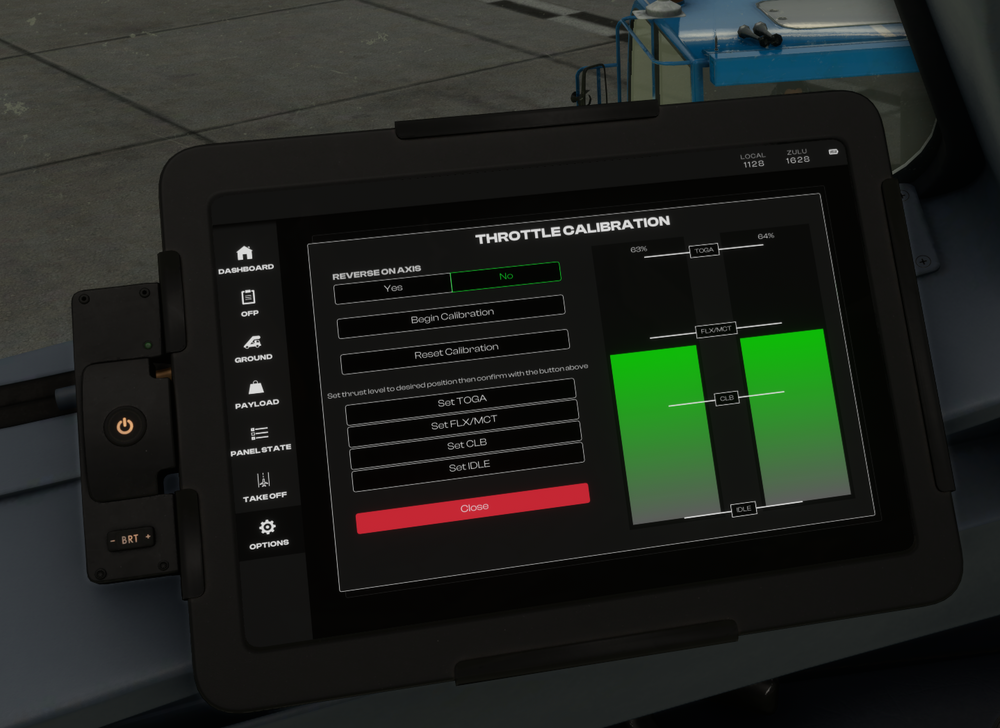
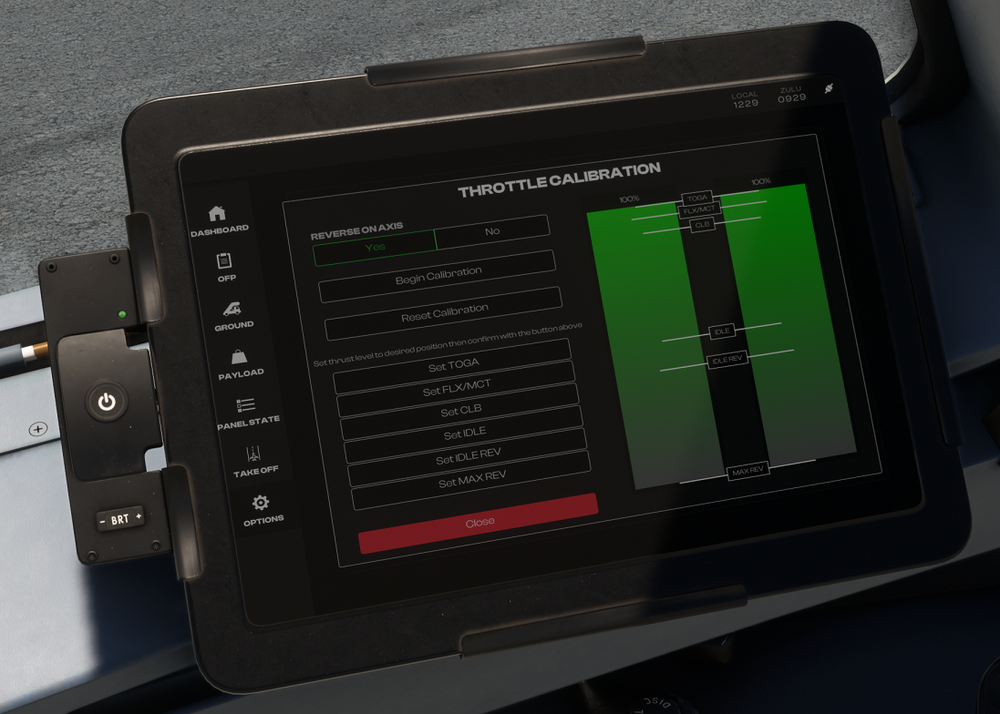
The calibration is done entirely on the EFB itself, using either the actual throttle axis on your hardware, or via buttons if you're using a controller. You move the position of the green vertical bars using this hardware. Some things to note: The "SET XXX" buttons on the EFB define the detent position. The green vertical bars indicate the current position of the axis (0 to 100%). The white horizontal bars with IDLE, CLB, FLX/MCT, TOGA written on them show the currently configured position of that detent on the throttle lever. To calibrate hardware without a reverse axis (e.g. Xbox Controller* or Honeycomb Bravo TQ): Select REVERSE ON AXIS = NO Click 'BEGIN CALIBRATION' Keep the green bar at the very bottom (close to 0%) and click SET IDLE (it will replace the BEGIN CALIBRATION button) Move the green bar to where you want the next detent (normally ~70%) and click SET CLB Move the green bar to where you want the next detent (normally ~80%) and click SET FLX/MCT Move the green bar to where you want the next detent (normally ~100%) and click SET TOGA *Note: For XBOX users, some users have reported that you may need to restart your sim after the calibration is done in order for it to take effect. To calibrate hardware with a reverse axis (e.g. TCA Quadrant): Select REVERSE ON AXIS = YES Click 'BEGIN CALIBRATION' Keep the green bar at the very bottom (normally ~0%) and click SET MAX REV (it will replace the BEGIN CALIBRATION button) Move the green bar to where you want the next detent (normally ~40%) and click SET IDLE REV Move the green bar to where you want the next detent (normally ~50%) and click SET IDLE Move the green bar to where you want the next detent (normally ~90%) and click SET CLB Move the green bar to where you want the next detent (normally ~95%) and click SET FLX/MCT Move the green bar to where you want the next detent (normally ~100%) and click SET TOGA Thanks!
-
Hi @Мартыненко Борис Always glad to help! If you are only using your Rudders to steer and do not have an axis assigned to the Tiller function, then please select YES for RUDDER CONTROLS TILLER option on the EFB > OPTIONS page : Thanks!
-
This is normally done using the tiller located on the side console. The tiller can be controlled via the 'NOSE WHEEL STEERING AXIS' binding. For simulation purposes, this can also be linked to the rudder pedals for easier use. To do this, go to the aircraft EFB 'Options' tab, then select 'YES' for the 'RUDDER CONTROLS TILLER' option.

-
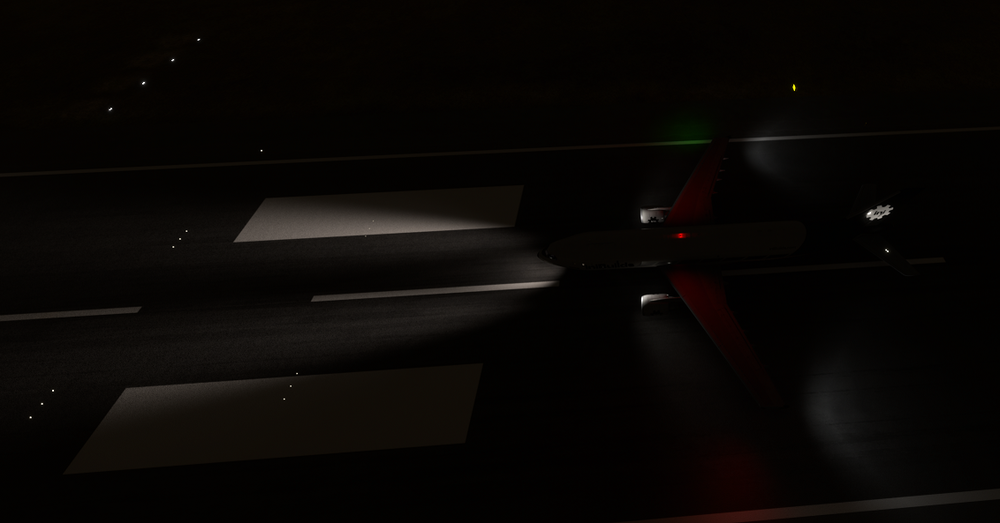
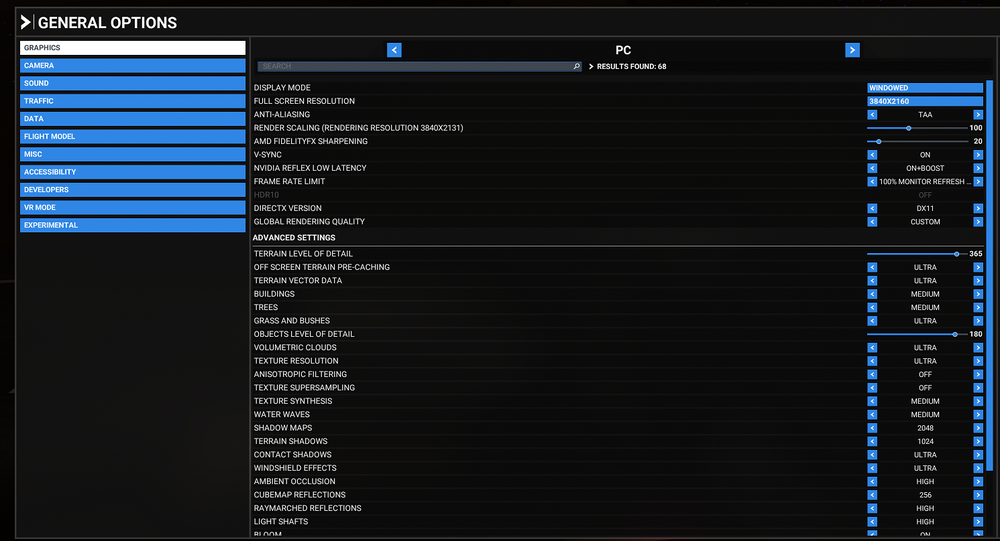
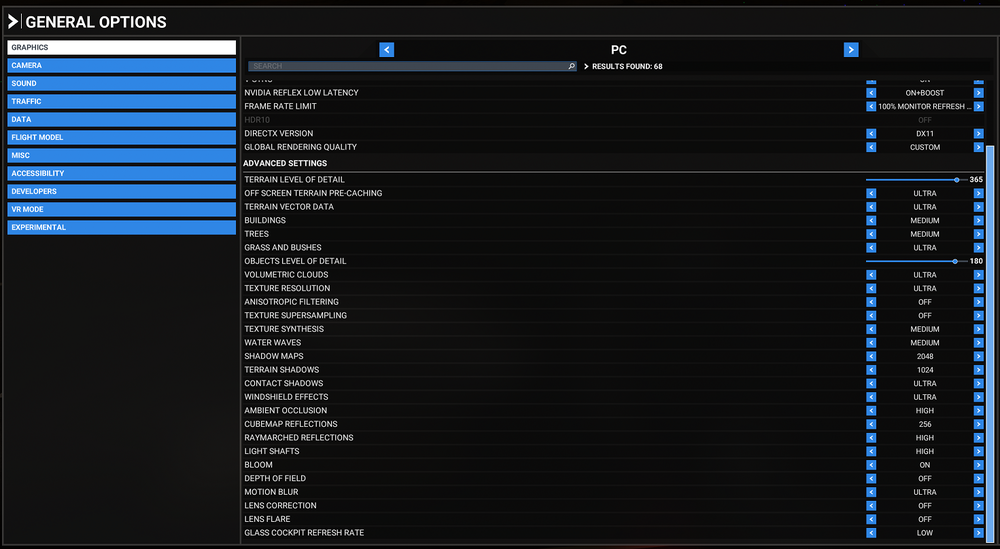
Hi @Felipe Lobo What display settings are you using? Can you try changing your Antialiasing settings? Also DX11 vs DX12 to see if theres any such setting causing conflict? I'm not seeing such issues on the A300 with DX11: Here are my settings: Also try with an empty community folder, to rule out any conflict with another addon. To run with a blank community folder without losing your addons: Rename your existing community folder to ``_Community`` Create a new ``Community`` folder in its place. Copy only the ``inibuilds-aircraft-a300-600`` folder inside it. Run the sim and see if same problem persists. If yes, then you can close the sim, and restore your original folder as follows: Copy the ``inibuilds-aircraft-a300-600`` folder back to ``_Community`` Delete the new ``Community`` folder you made Rename the ``_Community`` folder to ``Community`` If no, then that means there is some other addon conflicting with the ini A300. Usual suspect is bad liveries, so you could try by adding only some of the other a300 liveries in until you can reproduce the problem. Same process for other addons till you find the culprit. Thanks!
-
Hi @DutyDollar Hmm. Not seen that personally or reported by anyone else before. Could you please record a short video clip of it happening, also please include screenshots of your control setup for the rudders & tiller, as well as EFB settings page? Personally I use TF Rudder Pedals + Bravo TQ + Logitech Yoke + TCA Airbus Stick (for tiller), also configured to not link up in the EFB, without issues on the A300 so far. Thanks!
-
Hi @Bazz The plane used the default sim navdatabase, unless you install navigraph on top (for the whole sim, not any addon-specific one), in which case it will use that instead. That being said, as for NZQN, the issue is with the way in which the code is implemented. Ours uses the internal MSFS WASM API, which has been known to skip some data. I'll share this quote from one of my colleagues that was posted on discord, discussing a similar issue: So that is something for MS/Asobo to resolve. Other addons get around this by using their own custom navdatabase set compiled by Navigraph. However with this being a Microsoft product, that is not possible. Thanks!
-
Should be resolved in the next update already as I'm not able to reproduce that in the testing build. Thanks!
-
When you're in cruise, on the MCDU hit MODE button, then you'll find DES FORECAST> on LSK 5R. Click it to go to the DES FORECAST page where you can enter the winds at desired altitudes, and also the destination. As for this data, you'll find it from your OFP's WIND INFORMATION section: Please checkout this helpful interactive guide to the OFP for more information: https://dispatch.simbrief.com/guide#interactive-ofp-sample Thanks!


-
That is the plan, yes. If all goes well, might even make it into the next A300 update.
-
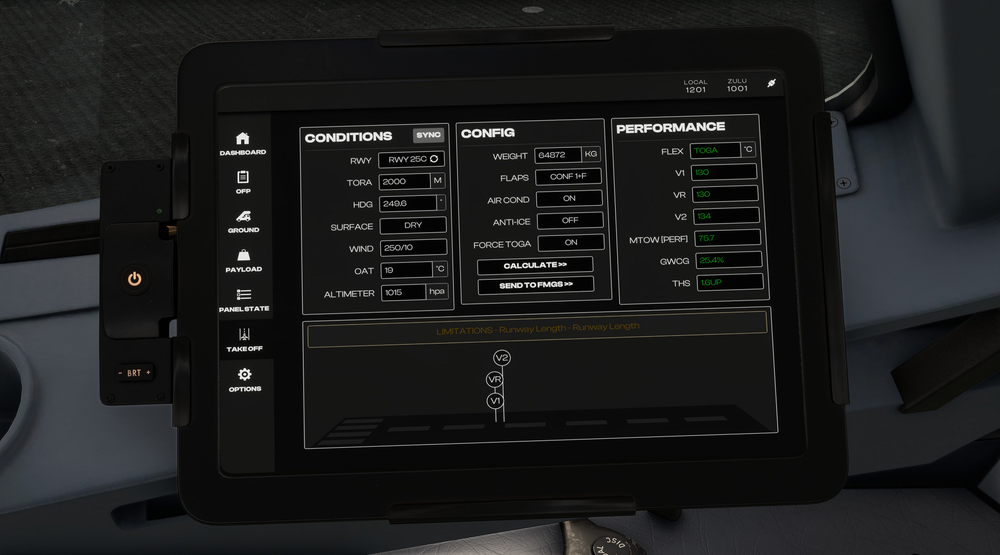
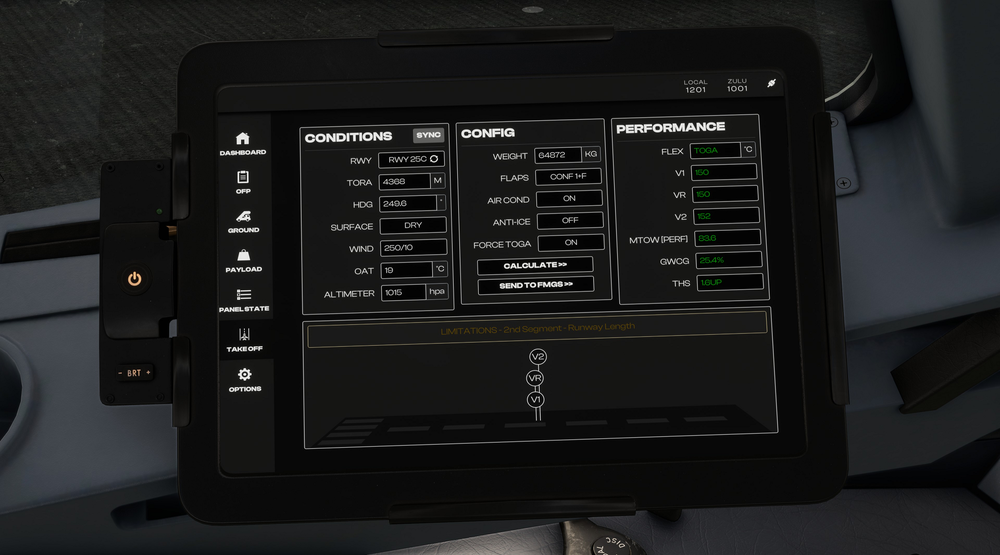
Hi @NebraskaFarmer Shared your findings with the team, which includes real world pilots of the type, with access to real tools for this same type of stuff. The results seem as expected, the speeds shown have margin built-in and are way above the minimum take off speeds anyways, and are valid as long as they are not below VMCA & VMCG. Also remember, these are "optimal" speeds, as opposed to "absolute minimum" speeds for the aircraft to takeoff (or not stall in takeoff configuration). So coming back to your EDDF Rwy 25C scenario, I've run it through the A20N EFB, see screenshots below (click to expand): TORA 4368m: TORA 2000m: You'll note the difference in the limiting factor for the speeds on the yellow band. TORA 4368m - the speeds are limited by '2nd Segment' climb gradient primarily. TORA 2000m - the speeds are limited by 'Runway Length' primarily. With a longer runway, with nothing else "limiting" (aka deciding) the calculation, it will normally optimize for a better (than bare minimum 2.4%) 2nd Segment climb gradient, taking advantage of the extra runway till it achieves the best speed for it to do, whilst still maintaining proper stop margins etc. Having a 20 kts difference in this case is totally normal then as it starts to bring the speed back to accommodate the shorter TORA, so it will sacrifice the climb gradient after takeoff instead (target the bare minimum 2.4% one instead). Hence the runway length becomes the "limiting" (aka deciding) factor, as opposed to the 2nd segment climb gradient. If the computed values end up being less than the "minimum" speeds, then it will return 'UNABLE TO FIND SAFE PERFORMANCE DATA' alert instead. So assuming proper technique is used, the aircraft shouldn't be stalling even on shorter runways, as even the bare minimum values it will push out has some margin built-in to them, and if it couldn't retain that margin, it wouldn't calculate any speeds for you in the first place. So if you're noticing issues, please record a video clip of your takeoff and initial climb, and share here so I can show the team to understand if something else might be the issue. Thanks!
-
Hi @meierblom Apologies for late reply. It won't go into managed (---) mode if information is missing on the MCDU. You need to fill in the following required info: INIT B page (Weights, CG and Payload) INIT A page (Route, CRZ FL, CI) F-PLN Page (Waypoints with an active RWY/SID selected) PERF Page (V-Speeds, Flaps/THS) See below 2 videos of the behaviour when information is filled in, compared to when the information is missing. F-PLN, INIT B, PERF info all filled in: 2024-07-02 17-30-33(1).mp4 F-PLN, INIT B, PERF info missing: 2024-07-02 17-31-09(1).mp4 Thanks!
-
Hi @Peter ESSA You can lower it using the following volume knob on the radio operators station (behind captain' seat) 2024-07-02 16-20-50(1).mp4 Thanks!
-
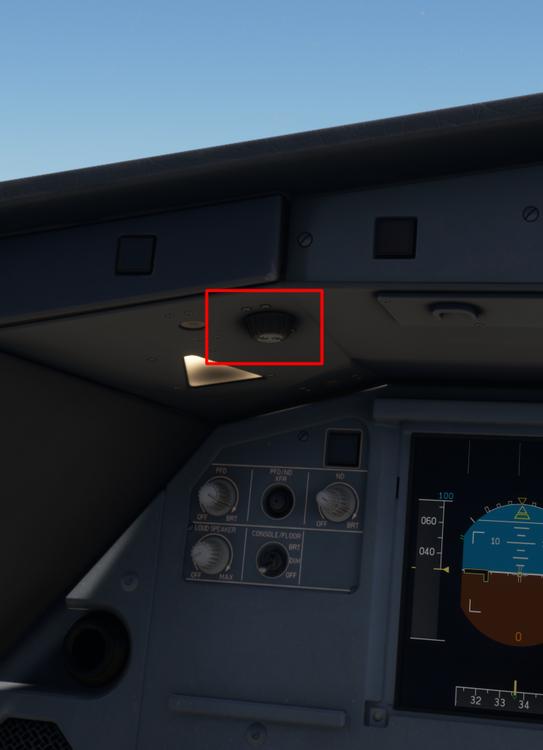
Hi @Haseen Can you make sure that Aircraft Lights Assist is set to OFF in the assistance options? Otherwise you can do things like zoom in on the displays, or turn up the panel floods to improve lighting. Thanks!


-
Hi, welcome. Please try to calibrate using the guide provided here (also remember to restart the sim after saving the calibration, as some xbox users have reported that to work better) :
-
As explained on discord and on the other posts. There is an upcoming update that will hopefully address more of these WASM crashes. It is currently under testing and the reports have been positive so far from the testers. So please do try with that update and report back. It is an ongoing process. That being said, I'll repeat the response I gave to this exact statement on the discord: Thanks!
-
Hi @Alan Fernandes It is entirely for situational awareness, and not necessarily something you need to input into the MCDU in order to conduct these flights. But if you really must, then you can create custom waypoints using their LAT/LONG. To define custom waypoints: Find the LAT/LONG of the point you want to plot onto the MCDU (e.g. Entry Point, ETP, Exit Point etc). You'll find this info typically from your OFP. On MCDU press REF > Next Page > Defined Waypoints (L1 LSK) Here if you have already defined a waypoint before, it will show up its ident, and let you create a NEW WAYPOINT (R5 LSK). If you haven't made any before, then simply give it a name (E.g. ETOP1 / ETOP 2 / ETOP 3 etc) an then enter its LAT/LONG (L2 LSK) in the format DDMM.MB/DDDMM.MB (E.g from above OFP, ETP 1 = 3402.5N/14001.1W) Note the displayed format will vary from what you've entered, but then click STORE (R4 LSK) Then return to F-PLN page, and insert your desired waypoint where you want it (.e.g from OFP above, I'd insert ETOP1 after CORTT) Remove any F-PLN DISCONTINUITY that you don't need, and if you step through on the plan page, you will now see your defined waypoint. Thanks!


-
Feedback is noted. Thanks!
-
It takes the AVG/CRZ wind, but for individual waypoints you have to fill it manually on the FPLN page: Hit the Next Page button Click on R LSK for the waypoint you want to enter the VERT REV B page Enter the Wind & Temp data for your expected level at that waypoint (you can find the data on the OFP normally) Thanks!
-
-
Hi @kutak11 Thanks for your post. The team's aware and working on a fix.
-
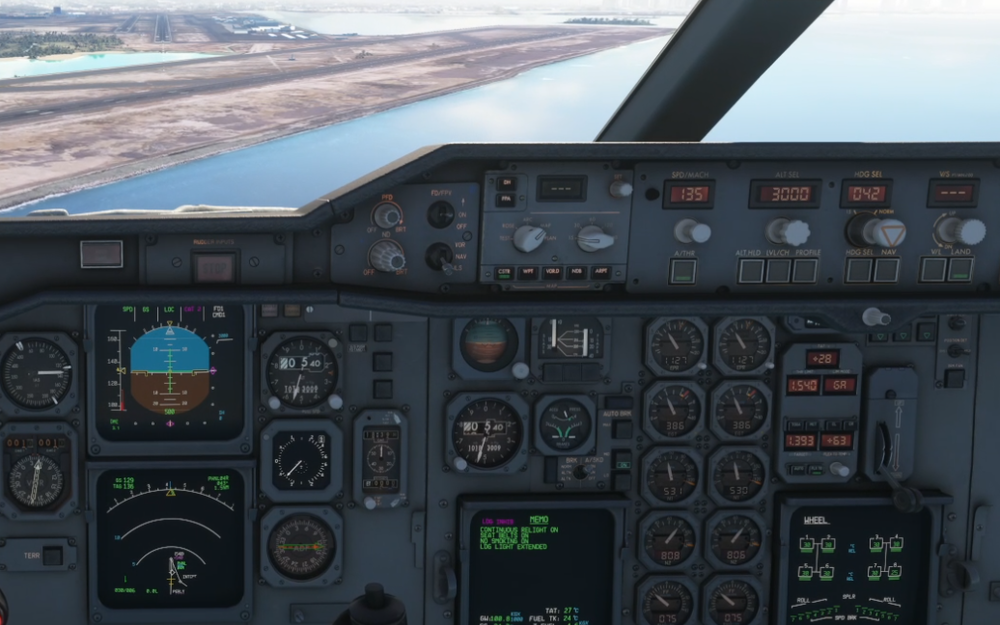
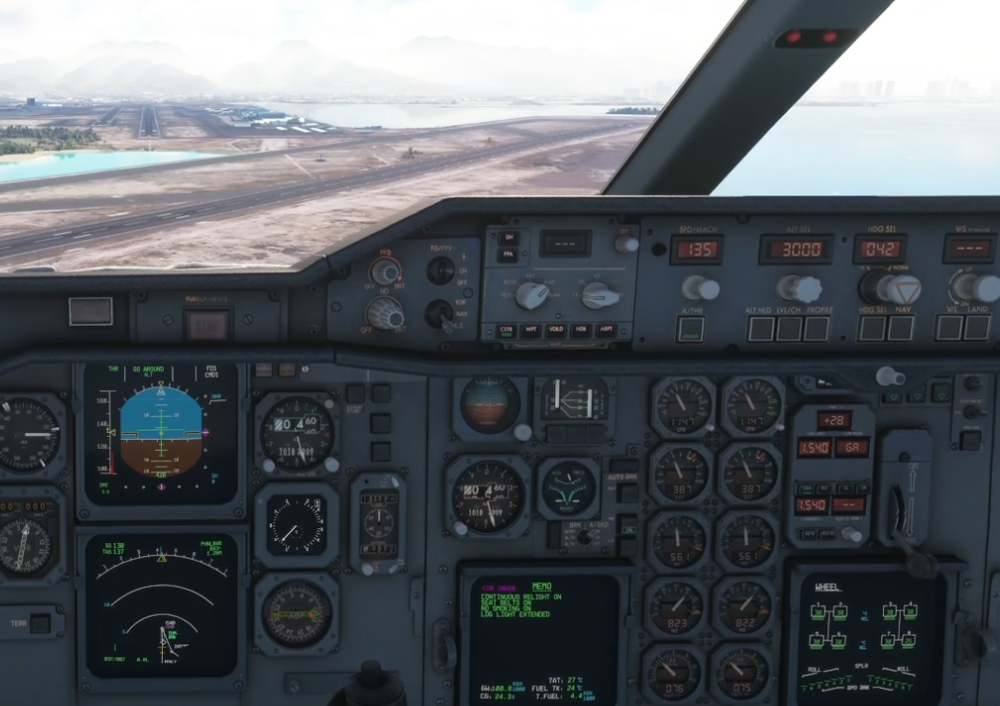
Hi @LukeFF Could you record a video of you going through this process, start just before the go around, till your second attempt at re-establishing? I just tried in the PW F at PHNL ILS Y 4R, and had no issues with establishing again on second attempt. Also on go around the FCU reverted to just ATHR only, having to re-arm desired modes after. So LAND on FCU should not remain ON after go-around anyways? Just before G/A triggered: G/A Triggered: Thanks!
-
Hi @Moose53 Team's working on a list specific to these aircrafts, but in the meanwhile you could do as suggested in this post to find what you need. Thanks!
-
I've provided a useful guide a few posts above, that you may use to get the information you need, using tools at your disposal in the sim itself in order to setup your hardware and get flying in the absence of any such list. There are also some publicly available at https://hubhop.mobiflight.com/presets/ if you want. As for our own list, team's working on it and as mentioned above, we'll post when its ready. Thanks
-
Hi @skypilotYTS I'd recommend either spawning on the water runways themselves, or if you are amphibious then you'd more than likely take off from a paved runway, then land on the water where necessary instead. Last option being what you've highlighted. HNL is not really an airport for such operations, and even the seaplanes that operate here, as far as I can see, are largely found parked near this dock (Dock 1 or Dock 2 parking in scenery near the helipad) instead, where 'Island Seaplane Service' operates charters/tours from.


