




richboy2307
Staff
-
Joined
-
Last visited
Everything posted by richboy2307
-
Hi @Opsgoon I understand your frustration and will raise this internally with the team. For this one though, unfortunately the pathing controls are just binary - either it is defined as a usable taxiway/runway or not. Similar story for aircraft gate assignment, and we can't fully control what those addons will spawn where. Either way, will log these issues and see if can be improved upon. Thanks for your feedback!
-
The user never responded to the question, so we would never know what was the issue. But if you see the parking brake handle moving, but no brakes engaged, its possibly due to a lack of hydraulic pressure for the brakes. Press the 'Parking Brake Accu Press' pushbutton on the center pedestal: Secondly, if you are unable to pushback after turning off the parking brakes, please check that the chocks have been removed from the EFB > Ground Equip app. Thanks!


-
Hi @dc10boy Are you referring to these OIL LO PRESS warning lights? They shouldn't come on during engine shutdown as they're inhibited when 'HP Fuel Valve Lever is in off position' per the FCOM.

-
Hi @LeeH Yes I'm seeing this too. Bug is reported, will be fixed via an update in the iniManager once done. thanks!
-
It would be advisable if you could provide a short video clip of when you are noticing this issue. Also please provide following additional info: Are you seeing the small "arrow" indications when hovering over these switches? Are they animating when you click them? Is the mode simply not switching? Is this happening on every flight? Are the other systems working at the time this is happening? Thanks!
-
Hi @PierrotLalu Can't say I've seen such reports from other users, nor has it been their experience throughout testing in Su15beta or since release. Are you noticing a FPS loss or only the mouse itself becoming unresponsive? Please toggle the "Reverse on Axis" to ON, then back OFF to reset the calibration. Then run the calibration again. After you save the calibration, please restart the sim. We're not sure why but some users have reported the calibration to work better after doing so. Follow the instructions here on how to calibrate: Can you confirm if you are still having these issues without any livery pack installed? Just to rule out some conflict, delete those additional liveries from your content manager and see if you can reproduce the issue. We're not noticing any such issue on our end but do not have any 3rd party livery packs. Ensure all AI Assists (e.g. Autorudder) are disabled under Assistance Options in the sim. These are known to cause issues with the autopilot. If that doesn't resolve it, you'll need to give more specific examples with screenshot/video clips of when you are noticing such "Crazy" behaviour. The A320neo v2 does not use the default sim flight planner, as such if you want to use ATC service, you need to import/setup your flightplan in the World Map before the flight. Filling/importing it in your MCDU/EFB will not import it into the default ATC. Thanks!
-
Hi @MattyHed Both Luton and A320neoV2 on Xbox are already optimised for memory as far as practicable, whilst maintaining a good balance with quality. MS/Asobo are working on GDK update that would bring more memory headroom to Xbox users in a future update, but in the meanwhile perhaps you may be interested in a product like "Taboo" by Parallel42, which is marketed as providing better flexibility for Xbox users in this situation. I cannot attest to the effectiveness of that product, it is by no means a recommended solution, but am merely making the suggestion based on your request and the marketing information I have seen so far. Thanks!
-
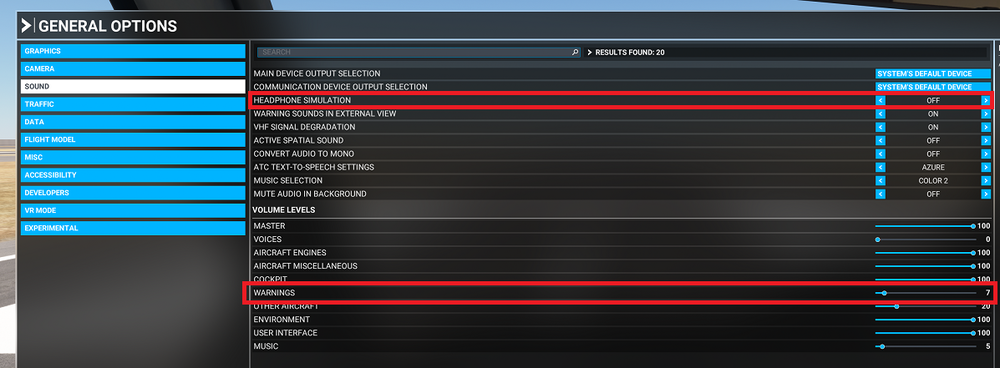
Hi @Manchild Please try to adjust the volume of 'Warnings', as well as play around with the 'Headphone Simulation' setting to your preference. Thanks!
-
No estimates but the team is working on an update, which is currently under testing. Primary focus is improving stability and performance, but will also include a slew of other fixes. Thanks!
-
Thanks, logged for further investigation!
-
Hi @Nimrod Team's aware and working on this. If all goes well these fixes might make it to next public build. Thanks!
-
Hi @flyer23 We do have a new update for the A300 which will hopefully address the issues you are facing. Enclosed is a post shared on our discord. Please try that update (once available) and do report back if you still face such issues. Thanks!

-
Team's still working on it. Thanks!
-
Thanks, taxiway sign bugs are logged.
-
Hi @BottleCap LAT/LONG waypoint entry is not yet possible on the FPLN page in the current public build but will be added in the future. It is also a customer option IRL, meaning not all a320neos would be able to do it. The definitive way is to do it via the "Waypoints" menu. Thanks!
-
Hi @akloz Please try to delete the contents of this folder. On next launch it will regenerate these files: Steam: %APPDATA%\Microsoft Flight Simulator\Packages\microsoft-aircraft-a320neo MS Store: %LOCALAPPDATA%\Packages\Microsoft.FlightSimulator_8wekyb3d8bbwe\LocalState\Packages\microsoft-aircraft-a320neo Thanks!
-
Ah my bad. We'll take a look, thanks!
-
Yes, and i've written above how it works in legacy interaction mode. There are no known reports of not being able to interact with the plane in this mode, and we do not see any issues with it on our end either. Thanks!
-
Hi @MarcusVT Turn on brake fans, delay takeoff in case of hot brakes.

-
Hi @Airtours Can you please share a screenshot of when you are having this issue? Please also share your full flightplan, including the SID you were selecting. Also please confirm are you using default or navigraph navdata? Thanks!
-
Hi @achelous, from your screenshot I can see on the right side MCDU that you have activated APPROACH mode on the PERF page? That is why if you look on the bottom left of your PFD, you'll see the '121' in pink, as the AutoThrhust is targeting the landing speed (which is 121 in this case). You do not need press "ACTIVATE APPR PHASE", normally it will reach that mode automatically closer to your destination.
-
-
Hi @achelous / @Joshua Welton What you're experiencing is called Avionics Black Out (ABO). This is a feature of the Xbox version of MSFS2020 that turns off glass avionic displays when the Xbox is running out of memory (RAM), in order to keep the other parts of the sim running. While all efforts have been made to optimise the A320Neo V2 for its memory footprint, at the end of the day this is an issue with Xbox's limited memory and largely for MS/Asobo to improve upon. Thanks!
-
Hi @Rick1486 I suppose this is the "STOP" sign you are referring to. This isn't tied into GSX or any other VDGS system, but is simply a static asset, the light on which comes on whenever night-lighting is activated. 2024-06-20 23-17-40(1).mp4 Thanks!
-
The only thing I had done was select RNAV-W 14 via VAPMU transition. The waypoint IRPOD was already in my flightplan as the last enroute waypoint (as seen on simbrief screenshot). Selecting a procedure simply adds the points starting from VAPMU after it. IRPOD remains as a waypoint before it. (Ignore the EFOB - that is just because I was not at the departure airport when I took this screenshot). As Azlog mentioned above, this is likely because you dialed 10,000ft on the FCU and pushed in the knob at some point. As the new managed altitude was higher than previously planned CRZ Alt, it will update to the new CRZ FL as entered on the FCU (10,000ft in this case).


