richboy2307
Staff
-
Joined
-
Last visited
Everything posted by richboy2307
-
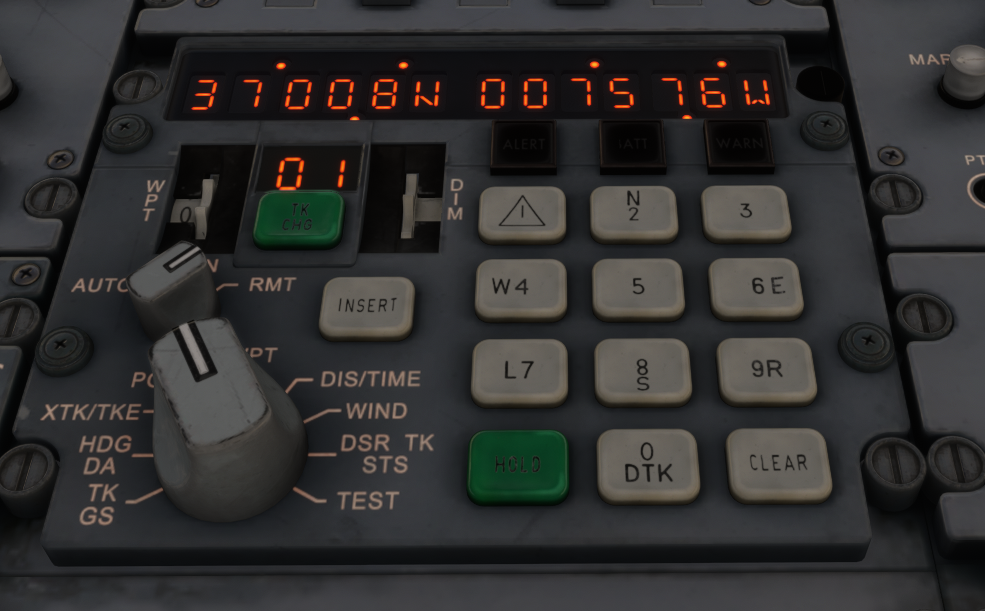
This one is kind of by design as a sim-ism for both stability and performance reasons. The entire INS computations/detection logic is inhibited unless user does a TK CHG 0 (P.POS) to another waypoint to initiate it.
-
@here Mod Conflict Can you please try with an empty community folder? Its possible there is some other mod installed that is now causing a conflict. There was already one identified by the community (Twotter Revived) that was preventing ENG 2 startup. That mod itself has received an update which will prevent the conflict with Tristar (or any other addon), but its possible there are other mods influencing core sim functions even when their respective add-on is not loaded. So a conflict needs to be ruled out. You need not uninstall any addons, simply rename your existing Community folder (e.g. _Community) and the sim will create a new empty one in its place on next start. Once you're done testing, delete the empty one and rename the old one to restore your addons. Assistance Settings Verify that all assistances are disabled. They have a tendency to reset after sim-updates even if you had previously disabled them. These ones are known to conflict with logic Automixture AI Auto-Trim Auto-Rudder Disable Crash Damage (ticked = disabled) Disable Aircraft Stress Damage (ticked = disabled) Disable Engine Stress Damage (ticked = disabled) Unlimited Fuel No Repro On our end we're not able to reproduce these issues starting the APU from C&D. Neither using the auto-flight engineer nor manually. See video attached on a streamed copy of 1.0.6. 1.0.6 - Starting from C&D manually - Standard 2026-05-18 23-42-12.mp4 1.0.6 - Starting from C&D via PFB FE Autocomplete - Cabin w/ Lounge 2026-05-18 23-49-46.mp4
-
Thanks we'll investigate
-
Thanks will pass it on to the team for further investigation. Appreciate the references.
-
Hi Acceleration is planned for update 1.0.7.
-
Can I suggest setting it to TOGGLE THROTTLE REVERSE THRUST instead for this function? If its a button you intend to use while its held, set it to toggle both ON PRESS and ON RELEASE.
-
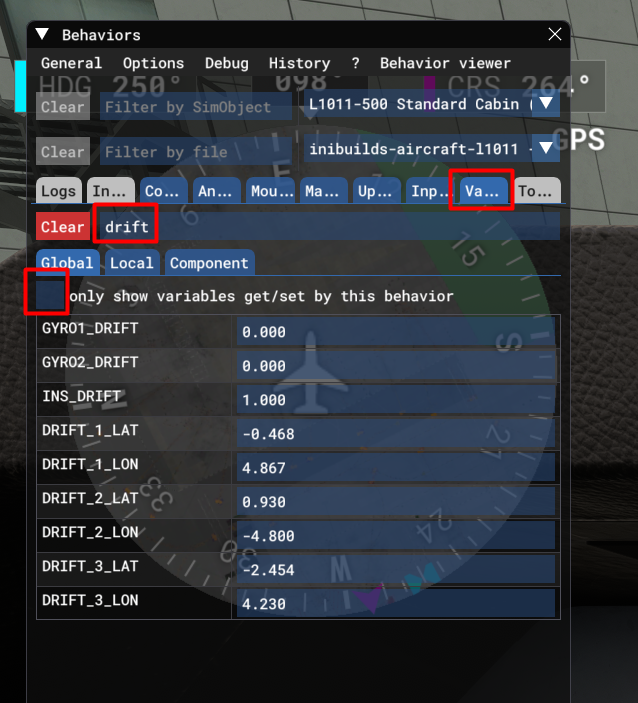
@Joshua Green If you can, at the end of the flight look up these variables in dev mode - Tools > Behaviours > Variables tab > uncheck "Only show variables..." > search for "drift" : Include your OFP as well, for devs to investigate further. Thanks!
-
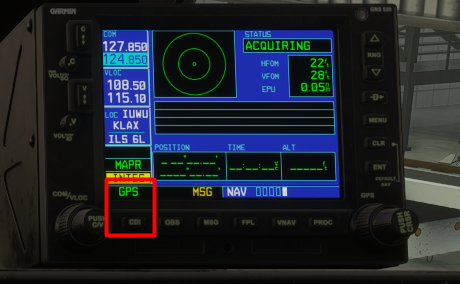
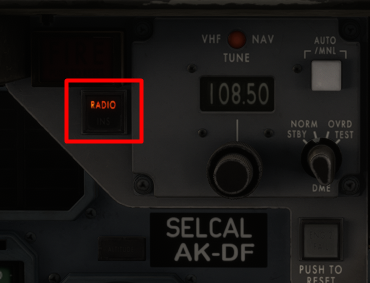
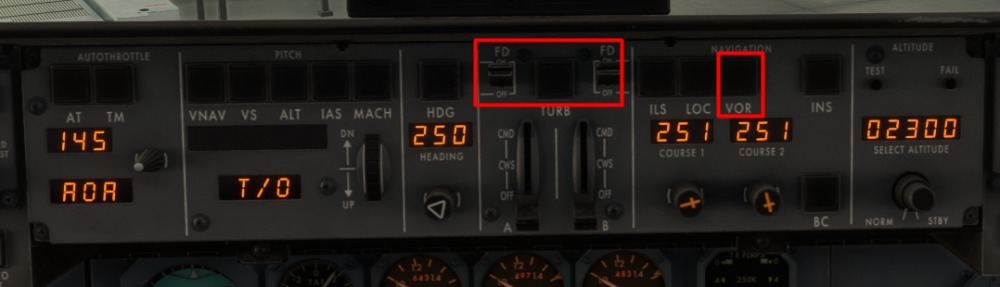
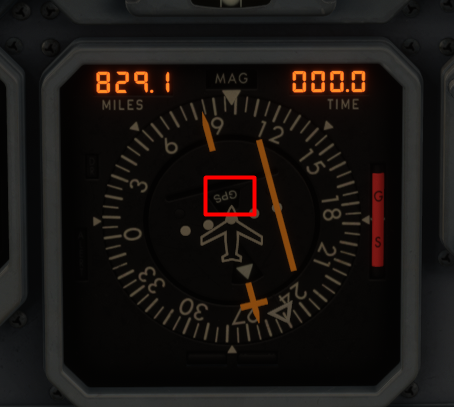
Hi As Bunkie mentioned above, the HSI DIS/TIME Readouts are only driven by the INS Computers. They cannot display data from any other sources such as your GPS or NAV1/2 DME. To use GPS Navigation, you have to Import or manually enter your route into the GPS Ensure CDI is set to GPS instead of VLOC Set the RADIO/INS switch to RADIO Set FD to ON and use VOR mode for guidance On your HSI it will also read "GPS" to show you the source driving the HSI needle I've done a number of flights already swapping between VOR, INS and GPS modes frequently across the same flight from C&D and haven't yet come across your issue. Maybe a video from Cold & Dark till when you notice the issue can help assess if there is some bug or any kind of missed step during setup? You can upload to Youtube/GDrive and share link here in case file size is too large.
-
Thanks logged.
-
Hey thanks logged for further investigation.
-
Hi @JaredGPW Please try v1.0.6 and see if the issue persists? We have reworked how HOLD THROTTLE REVERSE THRUST and TOGGLE REVERSE THRUST keybinds function and hopefully that resolves your issue? Thanks!
-
Thanks we'll investigate. Its more likely SU5 as it changed emissive properties of materials again.
-
Yes as of v1.0.6 you can now. The FAQ item has been updated to reflect this:
-
Now you can via RMT Entry Function. For more info see this: https://forum.inibuilds.com/topic/36719-how-to-ins-remote-entry-function/
-
Should be fixed in 1.0.6 but please check and let us know. The issue was already identified before it was reported here :)
-
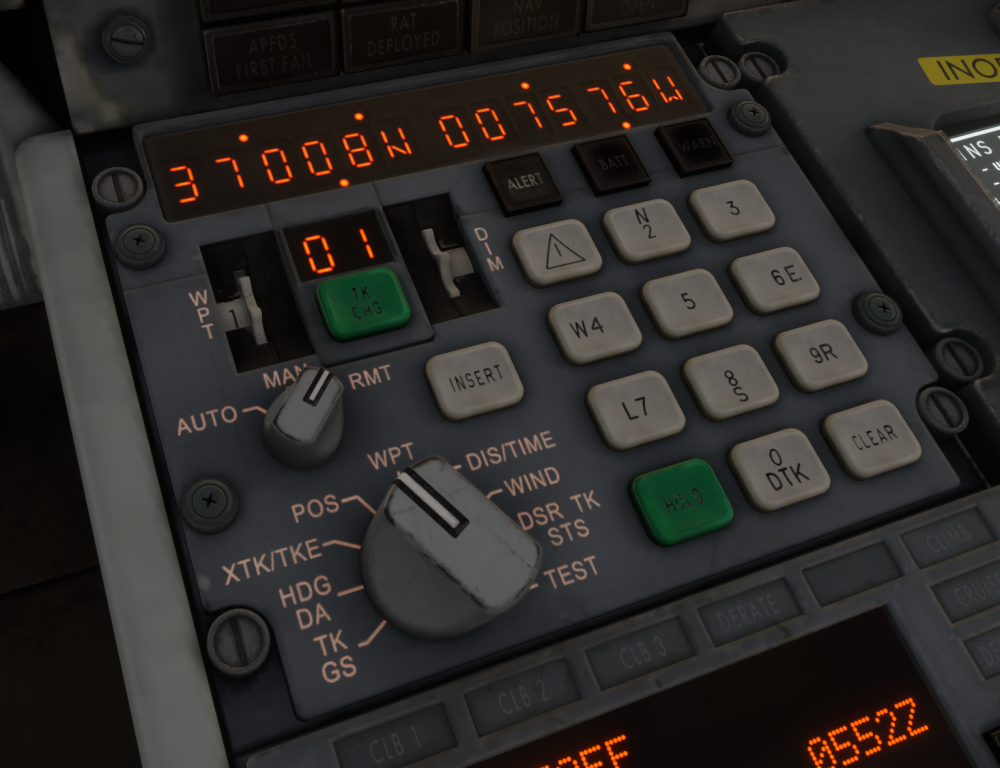
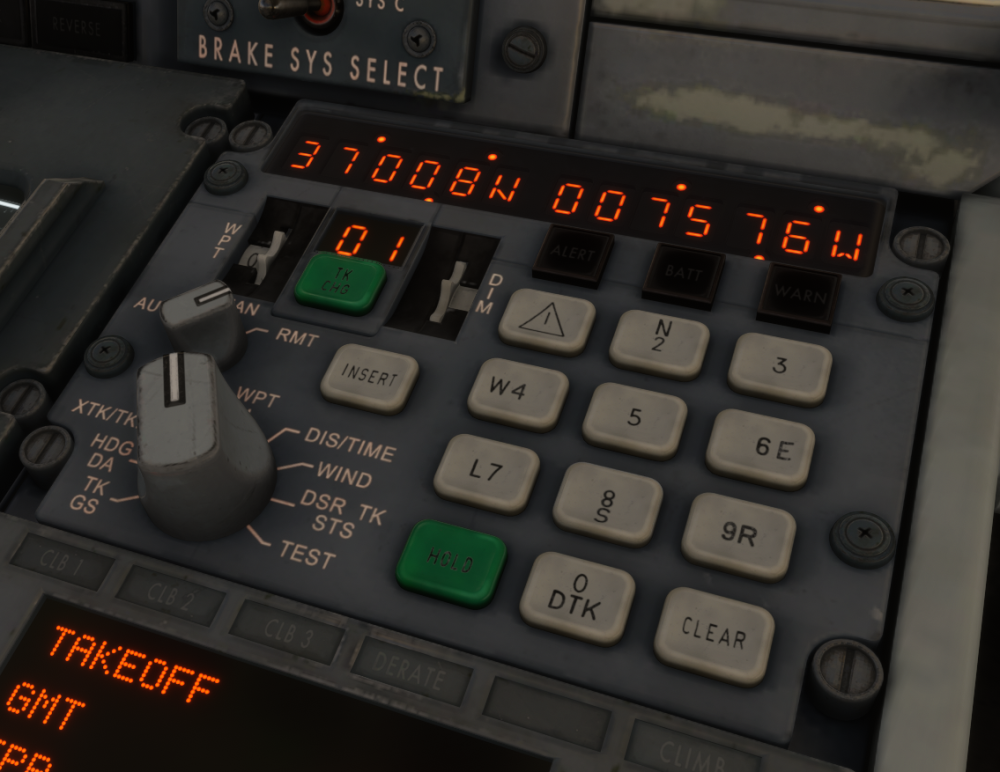
As of v1.0.5 Update, you can now remotely enter waypoints across all three INS units manually or via Simbrief Import from the Paper Flight Bag (PFB) - OFP Page. Remote Entry Function (RMT)Due to the complexity of the original autofill procedure and common user difficulties when operating the INS, this feature has been simplified to provide a more intuitive user experience while preserving the intent of the real system. The process generally works as follows: Set the desired units to RMT mode (at least 2 required for this operation). Enter waypoints manually or import them from Simbrief into the transmitting (TX) unit using the standard procedures. Each time a latitude or longitude is inserted (by pressing INSERT) or when an Simbrief import is completed, the TX unit will automatically transfer the data to all receiving (RX) units. Remote Manual Entry (v1.0.5+)Procedure Set INS 1, 2 and 3 MSU to STBY , ALIGN or NAV on the overhead panel Set INS 1, 2 or 3 Mode to RMT (at least 2 units required for this function) Set the Display Selector Switch to WPT on the Transmitting (TX) unit Set WPT Selector Switch to any number from 1-9 on the TX unit Enter Waypoint Coordinates on the TX unit The entered waypoint LAT and LON will update automatically on your TX unit and any other Receiving (RX) unit set to RMT as you press INSERT. Note: The waypoint will be entered into the same WPT number as selected on the main unit (i.e. if you populate WPT 3 on TX Unit, any other RX Unit will also populate its WPT 3 position) Set INS 1, 2 and 3 Mode to AUTO or MAN for navigation. Example In the example video we have remotely entered N3701.0 W00758.0 into WPT 3 from INS 2 (TX) to INS 1+3 (RX) at the same time via RMT function. 2026-05-12 04-52-20.mp4 Remote SB Import (v1.0.6+)Procedure Set INS 1, 2 and 3 MSU to STBY , ALIGN or NAV on the overhead panel Set INS 1, 2 or 3 Mode to RMT (at least 2 units required for this function) Use Captain's PFB to import to INS 1 (or First Officer's PFB to import to INS 2) The waypoints will be imported to INS 1 (or INS 2) and the other INS units set to RMT. The auto-batch logic (if more than 9 waypoints on SB import), will apply to the main and any other RMT unit as well. Set INS 1, 2 and 3 Mode to AUTO or MAN for navigation. Example In the example video below we have remotely imported from the FO PFB to INS 2 (TX) and INS 1+3 (RX) at the same time via RMT function. 2026-05-12 04-13-23.mp4
-
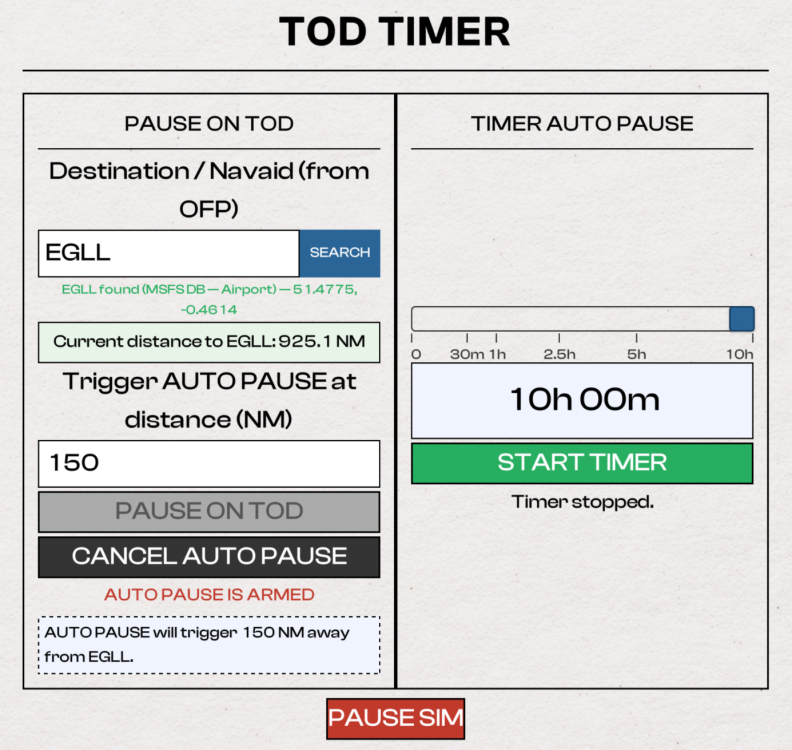
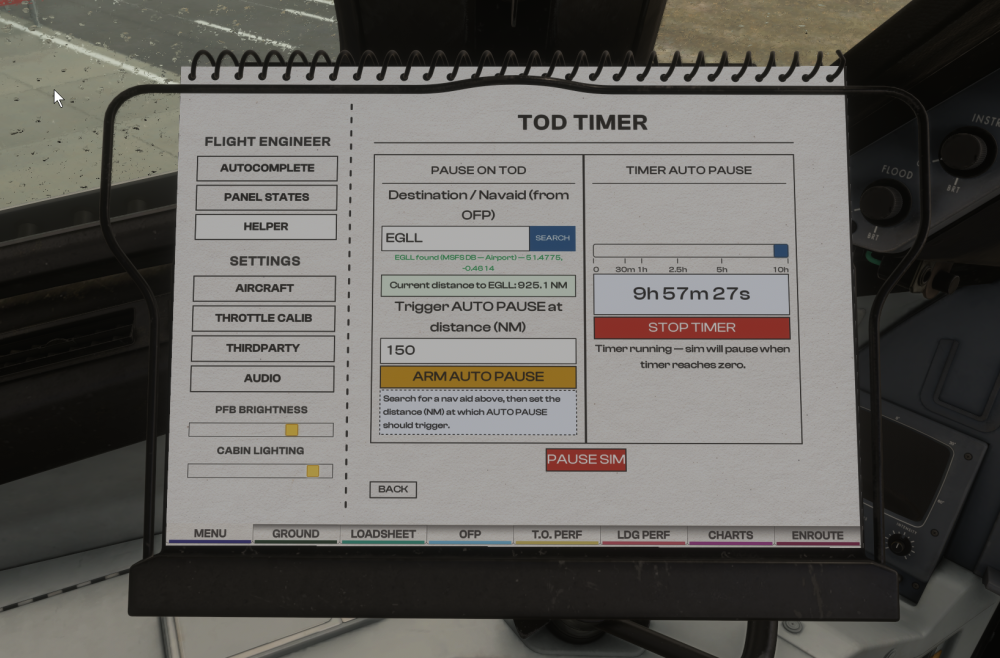
Since v1.0.6 Update, the Paper Flight Bag (PFB) comes with a variety of additional quality-of-life features such as TOD Timer. This feature allows the simulator to automatically pause either at a set distance from your destination or after a selected timer countdown. (Click to enlarge image) Accessing TOD TimerOn the Captain or First Officer's PFB, Go to Menu Select Helper Click TOD Timer Set up Distance-Based Auto PauseSearch for a reference position Airport using its ICAO code Navaid using its IDENT Set the desired trigger distance in NM (Nautical Miles) Click ARM AUTO PAUSE The simulator will automatically pause once the aircraft reaches the set distance from your reference point. You will receive a pop-up on your PFB when this pause triggers. Click UNPAUSE SIM to continue. Press CANCEL AUTO PAUSE to make any changes to distance or reference point. Example Airport: EGLL Distance: 150 NM The sim will pause automatically 150 nautical miles before reaching Heathrow. (Click to enlarge image) Set up Timer-Based Auto PauseClick and drag the slider to choose a time value in HH:MM Click START TIMER to begin the countdown immediately. The simulator will automatically pause when the timer reaches zero. You will receive a pop-up on your PFB when this pause triggers. Click UNPAUSE SIM to continue. Press STOP TIMER to make any changes. Example Timer: 10h 00m The sim will pause automatically 10 hours from when you start the timer. (Click to enlarge image) FAQ
-
That would make sense, thanks will pass it on to the team.
-
Thanks passed on to the team.
-
Hi thanks we'll have a look. I can reproduce the same on my flights.
-
As of 1.0.5 - no, only manual remote entry is supported across units. In v1.0.6 - yes SB import remote entry to INS 1 / 2 / 3 is coming. That update is estimated to go live this week. We appreciate the feedback and are working to add these to the manual as well as FAQ. Remote Entry Function (RMT) Due to the complexity of the original autofill procedure and common user difficulties when operating the INS, this feature has been simplified to provide a more intuitive user experience while preserving the intent of the real system. The process generally works as follows: Set the desired units to RMT mode (at least 2 required for this operation). Enter waypoints manually in the transmitting (TX) unit using the standard procedure. Each time a latitude or longitude is inserted (by pressing INSERT), the TX unit will automatically transfer that entry to all receiving (RX) units. Remote Manual Entry Procedure (v1.0.5+) Set INS 1, 2 and 3 MSU to STBY , ALIGN or NAV on the overhead panel Set INS 1, 2 or 3 Mode to RMT (at least 2 units required for this function) Set the Display Selector Switch to WPT on the Transmitting (TX) unit Set WPT Selector Switch to any number from 1-9 on the TX unit Enter Waypoint Coordinates on the TX unit The entered waypoint LAT and LON will update automatically on your TX unit and any other Receiving (RX) unit set to RMT as you press INSERT. Note: The waypoint will be entered into the same WPT number as selected on the main unit (i.e. if you populate WPT 3 on TX Unit, any other RX Unit will also populate its WPT 3 position) Set INS 1, 2 and 3 Mode to AUTO or MAN for navigation. In the example video I have remotely entered N3701.0 W00758.0 into WPT 3 from INS 2 (TX) to INS 1+3 (RX) at the same time via RMT function. 2026-05-12 04-52-20.mp4 Remote SB Import Procedure (v1.0.6+) Set INS 1, 2 and 3 MSU to STBY , ALIGN or NAV on the overhead panel Set INS 1, 2 or 3 Mode to RMT (at least 2 units required for this function) Use Captain's PFB to import to INS 1 (or First Officer's PFB to import to INS 2) The waypoints will be imported to INS 1 (or INS 2) and the other INS units set to RMT. The auto-batch logic (if more than 9 waypoints on SB import), will apply to the main and any other RMT unit as well. Set INS 1, 2 and 3 Mode to AUTO or MAN for navigation. In the example video below I have remotely imported from the FO PFB to INS 2 (TX) and INS 1+3 (RX) at the same time via RMT function. 2026-05-12 04-13-23.mp4
-
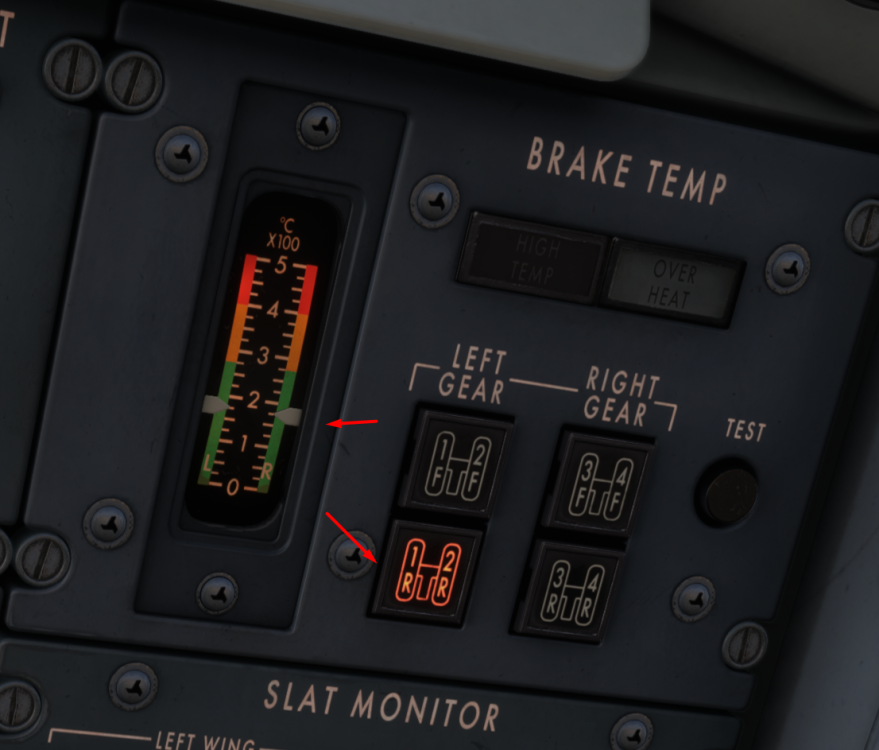
Hi, can you please elaborate on the issue and provide any screenshot/video reference for what you're observing? Also note you have to depress one of the 4 gear buttons (Left-Front, Left-Rear, Right-Front or Right-Rear) in order to see the temperature of the selected section. The sensor can only display temperature for one selection at a time. The same is required for when conducting the TEST to see a rise by 100c for selected sensor.
-
Thanks passed on to the team for further investigation.
-
Yoke AP Disconnect The Autopilot Disengage button on the yoke is actuated via the AUTOPILOT OFF keybind. You need to press it a second time to cancel any AP DISC warnings. Please verify the button you are using is mapped only to that keybind. AP 1 Master Switch on Glareshield The TOGGLE AUTOPILOT keybind is used to toggle the AP 1 Master Switch between the CMD and OFF positions. Note turning AP 1 Master to OFF via this keybind will trigger AP DISC warnings that must be further cancelled via the AUTOPILOT OFF keybind which actuates the Yoke AP Disconnect. See for reference this post: https://forum.inibuilds.com/topic/36540-tm-mode-goes-to-000-epr-if-ap-is-off/#findComment-89422
-
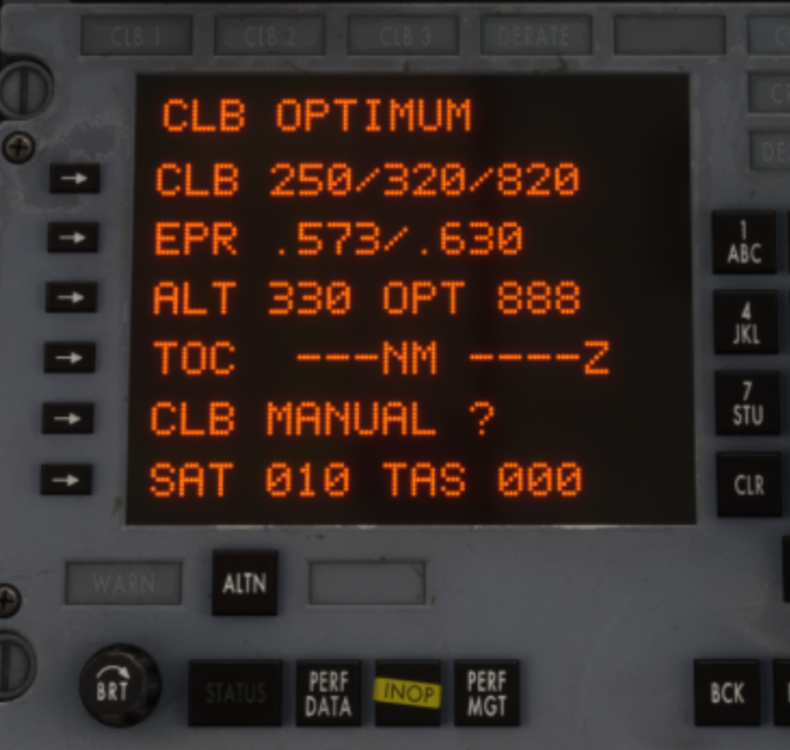
As of 1.0.5, Using TM+VNAV in climb will target either the OPT or MAX EPR values shown on the PMS CLB page depending on whether your current weight and TAT fall within the OPT range. If its within, it will use OPT power settings, else it will go for MAX values until back in OPT range. The fallback to MAX EPR is a failsafe to avoid users getting stuck in a very slow climb outside of OPT table parameters. So from the example below, it will target either .573 (OPT) or .630 (MAX) EPR depending on whether within OPT CLB parameters, and will automatically alternate between the two depending on atmospheric conditions and weights. For initial climb out, manually manage throttles (coupled with VS Mode if using autopilot) until you are in clean configuration before engaging TM+VNAV. If you want you can manually manage throttles per OPT values all the way to TOC to experience the slower climb rates that it will do at those OPT EPR values specifically.