




richboy2307
Staff
-
Joined
-
Last visited
Everything posted by richboy2307
-
Thanks for the report. Noted.
-
-
Hi @nmahink Can you confirm you had STEP ALTs page filled in with pre-defined waypoints where to step? The AUTO STEP CLIMB feature is dependent on having this filled in on the FMS. This feature will NOT automatically step to "OPT" altitudes on its own. Thanks!
-
Sorry you experienced a crash but thanks for your report. We'll look into it.
-
Hi, That is a very odd issue. I'm afraid will need more information than that to tackle this. In case it happens again please take screenshots of your cockpit showing the PFD,ND, EWD and FMS F-PLN & PERF pages so we can get more clues as to what may be happening. Personally though, that isn't behaviour I've experienced as yet in the 300+ hours of flying the A350 so far. Thanks!
-
Hi, Thanks noted above items. We are aware of this one. We are parsing the traffic data via Simconnect from within the sim. The issue is the sim doesn't relay any variable wake turbulence data in any exposed variable that we can poll for this information from within the sim. Same is true for vpilot or other injected traffic such as FSLTL. We're looking at solutions but this is largely a "sim limitation" with regards to data available for the moment. This one should be fixed as of v1.0.2 update. Is this in the incidences mentioned above by Chiara, where traffic is "erroneously" flagged as red on ND when they aren't really a threat? Or do you mean in genuine instances where traffic should have been threats? Just for testing I tried with FSLTL injected traffic and was able to receive RAs for genuine traffic threats. Thanks!
-
Those are not texture errors. If you look closely you'll note they're indicative of the underground roadway that runs beneath the area. These can be seen on Google Earth as well

-
Hi @Juan Esteva Seems like a potential Windows UAC / File permissions related issue wherein it may not be able to write into your GSX Profiles folder. Try the following: Run the iniManager as Admin, AND/OR Add exceptions for iniManager to your Antivirus program if used, AND/OR Use the 'Alternate Downloader' option in the iniManager settings (click your name on top left corner to access settings page) Thanks!

-
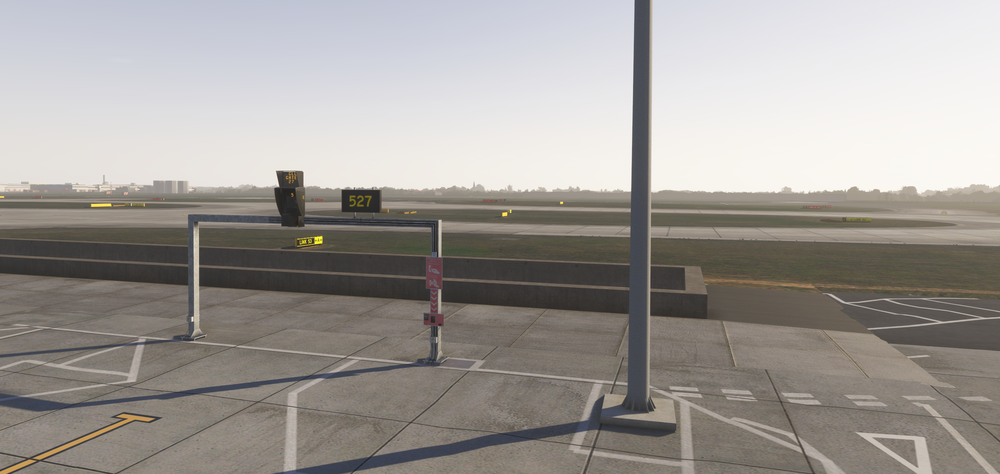
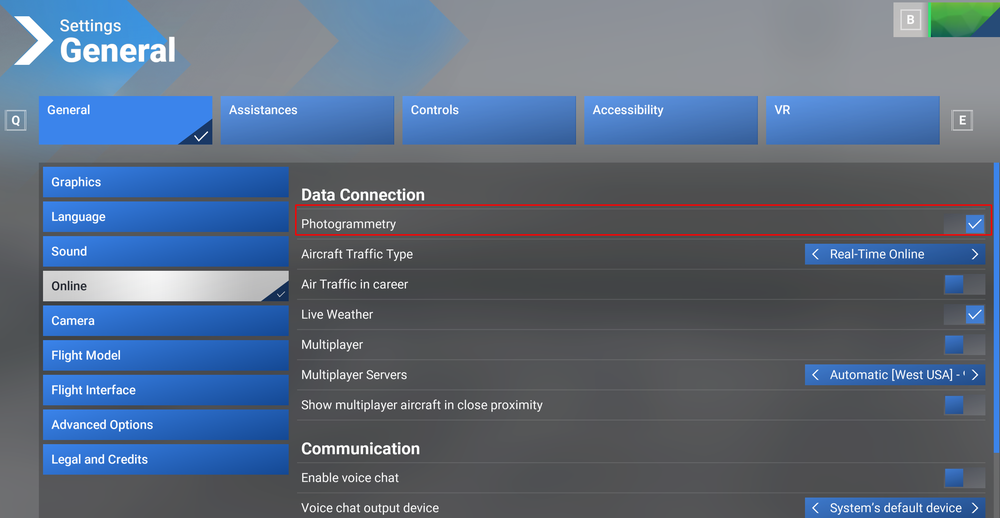
Hi , @Holger R. We have noted a slight elevation related issues at 9R near N10 and N8, however no others at this point. Here is what 527 looks like on my system. Please verify Photogrammetry is enabled. (Settings > General > Online > Photogrammetry) Any other EGLL sceneries are disabled in 'My Library'. Only 'Community EGLL London Heathrow' should show as installed. See link for guide: https://flightsimulator.zendesk.com/hc/en-us/articles/17373373933340-How-to-enable-and-disable-content-in-the-simulator Thanks!
-
In theory, GSX should switch automatically depending on the simulator in use, however in practice we've seen this is not working reliably as yet so GSX may end up using the 2020 profile (or worse both at the same time) leading to misplaced objects, wrong gate positions and other issues. So for now, yes it is highly recommended. Thanks!
-
Hi, Thanks for your feedback. Noted.
-
The cones are GSX objects that spawn for user/AI traffic, but for some reason they're floating in the air. Might have to be addressed via the GSX Profile or scenery update, but in any case team will be looking into it. Thanks!
-
Thanks for the link @ch4pz. An upgrade path via the FS24 Marketplace will come at a later time when the FS24 Marketplace is available. If you want to avail the discount asap as a customer who purchased EGLL via FS20 Marketplace or Simmarket, you may transfer your order (permanently) to iniBuilds Store, then purchase the scenery using the discount code on the same account via iniBuilds Store. Instructions 1. Transfer your order to iniBuilds Store https://inib.uk/order-transfer 2. After your order is transferred successfully, purchase FS24 EGLL Premium from the iniBuilds store using the code EGLL-UG at checkout to avail the special upgrade price: https://inibuilds.com/products/inibuilds-london-heathrow-egll-msfs-2024 3. Download and install the scenery via iniManager , 'My Products' section after purchase: https://inibuilds.com/pages/inimanager-v2 Thanks!
-
Hi @viperlky Sorry for late reply. But the modelled interiors are only available at the international terminal main building. Thanks!
-
Apologies for late reply. Noted, thanks!
-
Hi, Thanks passed your reports on to the team.
-
Hi Apologies for delay in response. Glad you solved it. Yes the "COMMUNITY" label there signifies that this scenery is the one being loaded from your community folder (where iniManager installs the product). Thanks!

-
Thanks @AndyM for your helpful images. In case you're still having issues @TheTrueDemon you may also use the official guide below: https://flightsimulator.zendesk.com/hc/en-us/articles/17373373933340-How-to-enable-and-disable-content-in-the-simulator Thanks!
-
Please follow below guide to disable any other EGLL sceneries from your library (such as the Handcrafted Asobo Heathrow): https://flightsimulator.zendesk.com/hc/en-us/articles/17373373933340-How-to-enable-and-disable-content-in-the-simulator Also ensure photogrammetry is enabled. These are photogrammetry related and difficult to completely exclude but feedback is noted for the team. Thanks!
-
Hi The VDGS on this scenery is operated via GSX Pro. Please ensure the following Downloaded the latest GSX profile from the iniManager called 'Premium iniBuilds London Heathrow (EGLL)' Remove any other EGLL GSX profiles for the Default Handcrafted or iniBuilds EGLL v3 (FS2020) Thanks!


-
Thanks reported.
-
Hi @Awemeter @LineDX Can you provide specific route examples of where you've noticed these issues? Ideally provide the OFP and any F-PLN edits made so we can reproduce the flights and observe the reported issue. Thanks!
-
@flightcpt.th So if you tried to load into the aircraft with an empty community folder (only A350 inside), its ok? However if you load in with your full community folder, its not ok? If thats the case, there is something in your community folder that is corrupted or causing issues with the simulator. You'll need do some trial-and-error testing to figure out which one. Thanks!
-
Hi @MPO910 Yeah we're looking into the OIS Charts/Enroute Map issues on FS2020. All seems related to the Navigraph Token refresh issue, which in turn causes other functions to lag/desync. Possibly also related to the above issue but reported. Thanks!
-
Hi, As replied on another post, It does have an effect, but its nowhere near to the same extent as some of the other aircraft, especially at the upper levels (~FL310+). The optimum CRZ MACH range is very narrow, 0.85-0.86 at its narrowest between CI 0 and 999. The 787 is quite similar in that regard, so a narrow margins in CRZ MACH is expected behaviour for this aircraft. As for discrepancies between planned and actual CRZ IAS at lower alts (below FL300), the report is acknowledged and we're looking into it. Thanks!


