




richboy2307
Staff
-
Joined
-
Last visited
Everything posted by richboy2307
-
I am sharing below information in the interest of transparency, to show that we're committed to the cause to improve the experience for all our customers as mentioned above but this issue is a complex one. 100% reproduction on one system does not mean 100% universal reproduction. As seen in this video below, I've been trying a few times to reproduce the crash based on your report. Loading in to an airport, changing navdata sources and constantly re-importing. Have done so over 50 times without a crash as yet on A350-900 (v1.0.2) in FS20. Once we get successful reproduction, we can introduce debuggers/logging to investigate further code-side and weed out the root cause. We try this on multiple systems and across testers by sharing the reproduction steps with them. 2025-03-11 20-30-19(1).mp4 So, if anything else to add to help us better reproduce the above, would be appreciated. Thanks!
-
Hi @EilidhP Thanks for your report. Passed on to the team. I understand your frustrations, the team are committed to resolve these instances of WASM crashes and improve stability for all. WASM is complex and is limiting by the fact there is no exception handling, so in case of even a small error in code or data received, the entire WASM crashes rather than failing a specific part of the function. So to reduce WASM crashes as much as possible, you need code to self-handle all edge cases perfectly. We are working tirelessly to that end and reports like these help in this effort. Thanks for your time and patience meanwhile!
-
Hi, Team has identified the source of this crash related to TCAS updates. We're in progress of testing the fix, in the meanwhile you may keep your TCAS on STBY to avoid potential crash. Thanks!
-
Thanks reported. Team has identified the source of this crash related to TCAS updates. We're in progress of testing the fix, in the meanwhile you may keep your TCAS on STBY to avoid potential crash. Thanks!
-
Hi @Sirraj Thanks for the report. Only this one is the wasm crash. In case it happens again, can you please share a screenshot of your screen showing all the displays, for some additional clues as to what being shown on the MFD may have caused a crash. Thanks!
-
Hi, Please screenshots or video clips of this as it happens will help. The plane does not descend on its own at TOD, you have to dial down the ALT on the FCU and then "PUSH" the ALT selector knob to engage DES mode. Just for context, haven't observed this behaviour personally in the 300+ hours on A350 in testing nor seen it reported by any of our testers as yet so we need reproduction steps if this is an issue. Like I said above, my guess at the moment is that the aircraft was not in the proper ATHR detent, as such there was overspeed or lack of descent as the aircraft is unable to command desired thrust, based on this other user report: https://forum.inibuilds.com/topic/25224-autothrottle-wont-hold-descentselected-autopilot-speed/ Thanks!
-
We are committed to resolve these instances of WASM crashes and improve stability for all. The team is working tirelessly to that end and reports like these help in this effort. For this specific TCAS related crash the fix undergoing testing currently. Thanks for your time and patience meanwhile!
-
Thanks for confirming. Fix is in place for this one, just going through testers as we speak. Same as above, we are committed to resolve these instances of WASM crashes and improve stability for all. The team is working tirelessly to that end and reports like these help in this effort. Thanks for your time and patience meanwhile!
-
Hi, Not sure what you mean by it not working? If the OIS (EFB) Throttle Calibration page is showing movement, means its being read by the sim and aircraft. You can try to delete your 2020 A350 ThrottleData.ini file and then redoing the calibration on next launch. FS20 ThrottleData.ini file location: Steam: %APPDATA%\Microsoft Flight Simulator\Packages\inibuilds-aircraft-a350\work MS Store: %LOCALAPPDATA%\Packages\Microsoft.FlightSimulator_8wekyb3d8bbwe\LocalState\Packages\inibuilds-aircraft-a350\work Thanks!
-
Hi @Huno This happens when you load in but the WASM has not yet initialized (so all the code that is required to control those and other systems are not functioning). You need to return to main menu and load in again, or restart the sim when this happens. In case you're having this issue consistently, please try the following Close the sim Clear your A350 WASM folder: https://forum.inibuilds.com/topic/24996-how-to-clear-the-wasm-folder/ Relaunch the sim and load into the A350 directly onto a runway at any airport. Note: The WASM will be recompiled on first launch so it is normal for it to take a long time (upto 20 mins) on initial load. For more info see https://forum.inibuilds.com/topic/25259-help-stuck-on-loading-screen-long-loading-times-on-first-launch/ Once spawned in, verify that the aircraft is running and systems operational. Exit back to main menu. Now you may do any flight you wish to conduct. It shouldn't take as long to load-in anymore for the chosen variant. Thanks!
-
-
Hi, I apologize for your experiences but unfortunately you have had a WASM crash. While some users are experiencing these more than others, there are equally many who have been able to fly without such instances since release. For more information on what a WASM crash is and how you can report it please see linked guide below. Regrettably, from our testing so far of reported crashes, very few of them are reliably reproducible as they're very case, hardware or installed packages specific instances and require close matching of conditions to reproduce. Nonetheless, we are committed to resolve these instances of WASM crashes and improve stability for all. The team is working tirelessly to that end but we also require your help. In case you experience a WASM crash, please do not close the sim immediately. Use the below guide to properly report the necessary information and reproduction steps. Also important to note, ensure you have cleared your WASM folder after an update to ensure a fresh WASM compilation. Thanks for your time and patience meanwhile!
-
Hi @Tstag94 Thanks for your report, while yes that has the word WASM in it, it is not a WASM crash I'm afraid. Symptoms of a WASM crash will include "Frozen" systems or displays. The biggest giveaway is the clock on the ECAM display stops counting up. In case you experience such a crash, please use the below guide to report the necessary information including the reproduction steps. Thanks!

-
Hi @AlexAlodia Thanks for your report. Can you confirm if you have cleared your WASM folder after updating? If not, please try now then try again. This will help ensure fresh WASM compilation. If you already did, can you please confirm which airport are you entering on the FMS DEP field when you're experiencing the crash? I've just tried to reproduce your issue whilst trying a few different airports already and have not yet experienced the reported crash. Here is an example of an attempt. 2025-03-10 20-50-40(1).mp4 Thanks!
-
Hi, Apologies for your experience. There is an issue related to the Navigraph token authentication on the OIS side that the team's aware of and looking into. This will affect anything that relies on live Navigraph connection (Charts, Enroute Map or ANF). In most instances you can regain by resetting your Navigraph Token. Thanks for your patience and understanding.
-
Hi, Thanks for your report. We've identified a WASM crash related certain type of traffic data when displayed on ND and team is working on a fix. Its likely the cause for your crash but please let us know. Thanks!
-
Hi @Muffwin Thanks again for your detailed report, team's aware of this one and working on a fix.
-
Hi, Thanks for your report. We've identified a WASM crash related certain type of traffic data when displayed on ND and team is working on a fix. Its likely the cause for your crash but try a flight without the EFIS TRAF/ID modes or TCAS in STBY and please let us know. In case you still have a WASM Crash, yse the below guide to verify and report the WASM crash (filter for "WASM" in the console search bar) with requested information as soon as you have it: Thanks!
-
Hi, Did you have your TCAS/XPDR on at the time with EFIS on TRAF or ID mode? We've identified a WASM crash related certain type of traffic data when displayed on ND and team is working on a fix. Its likely the cause for your crash but please let us know. Use the below guide to verify and report the WASM crash with requested information: Thanks!
-
Hi, Please try the following Check control bindings related to throttles and unassign from any devices where it should not be used Verify you have completed the throttle calibration process on the OIS Verify that your AI assistances are disabled: Also please provide screenshots of your cockpit, particularly showing your PFD, ND, FCU, MFD FMS F-PLN and PERF pages as well as your throttle quadrant for when you're experiencing such issues for additional clues as to any potential issues. My guess at the moment is that the aircraft was not in the proper ATHR detent, as such there was overspeed or lack of descent as the aircraft is unable to command desired thrust. Thanks!
-
Hi @Sirraj Did you have your TCAS/XPDR on at the time with EFIS on TRAF or ID mode? We've identified a WASM crash related certain type of traffic data when displayed on ND and team is working on a fix. Its likely the cause for your crash but please let us know. Thanks!
-
Thanks yes that is the WASM error message we need. Reported.
-
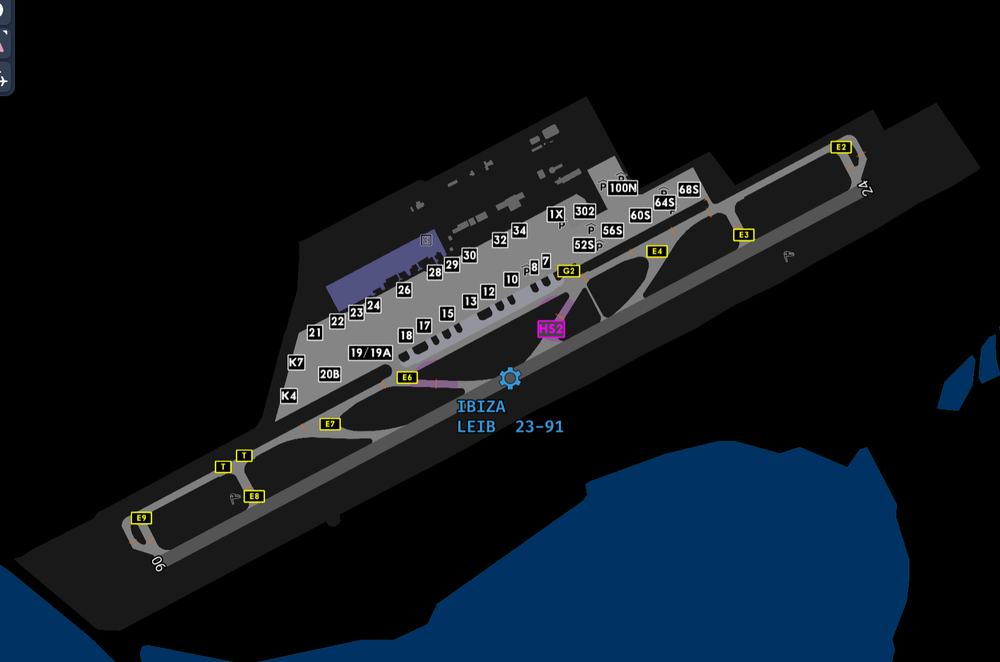
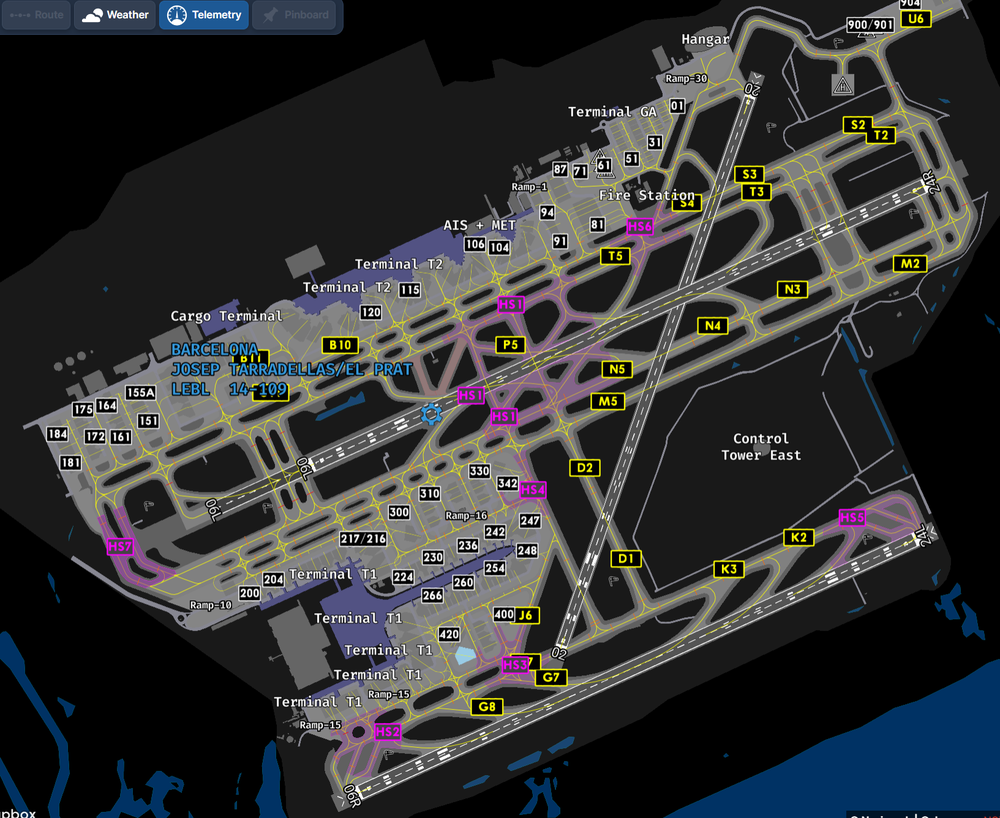
In short, not all airports have the required data, just like IRL. Ibiza (LEIB) is one example of such an airport. The more technical answer, BTV relies on ANF, which in turn relies on Navigraph data for the Airport Mapping Database (AMDB) that allows us to render the airport on the ND like the real plane. Airports that lack this data will as a result lack the ANF (and BTV selection via ANF) features. For such airports, you may still use BTV but via manual distance entry. For more info see Manual Distance Entry section of the BTV FAQ: You can also see this on Navigraph Charts app by zooming into an airport in any of the map views. You'll note the lack of runway or taxiway definition data at airports not in AMDB. Thanks!
-
Hi, These sound like instances of WASM crashes. Please use below guide to Verify and properly Report these kinds of crashes with the required information and screenshots for such reports to be actionable. Thanks!
-
Reported. I apologize for your experience. Regrettably, from our testing so far of reported crashes, very few of them are reliably reproducible as they're very case-specific instances and require close matching of conditions to reproduce. Nonetheless, we are committed to resolve these instances of WASM crashes and improve stability for all. The team is working tirelessly to that end and reports like these help in this effort. Thanks for your time and patience meanwhile!


