





IniJamir
Staff
-
Joined
-
Last visited
Everything posted by IniJamir
-
Hi, sounds like something might not have initialized properly during the initial loading of the A340, go ahead and clear WASM following the link below and then reconfigure the aircraft as well as log back into the Simbrief. Let me know if this helps.
-
Hi Roy, Sounds like an amazing time and I'm glad you've been able to experience the aircraft in sim. If you have the L1011 streamed the updates will come automatically as they are pushed from MS to the platform on their chosen days, if it's downloaded you will just have to enter the Marketplace > go to My Library > Downloaded and then select the L1011 and then download and install. Let me know if this helps :)
-
Can you check to verify that the A350 didn't get installed from within the Marketplace, even though you transferred the A350 from Marketplace to Manager when moving from Xbox. I am curious if it is installed and causing issues
-
Of course, enjoy!
-
Hi, It sounds like something might not have initialized correctly during the first load. Go ahead and clear the WASM folder via the steps below as well as verify that the livery selected is up to date. Let me know if this helps. Thank you.
-
Hello, This issue is known. A little more information; The same was reported on A310 and taken by Asobo as a sim bug, basically the click spot boundaries have become too small / scale incorrectly with zoom levels in SU5. Move closer or zoom in if you're having troubles for the time being. Thank you.
-
Hi Danny, Having owned the aircraft on Xbox and then transferring the license to PC should have had no affect on your PC installation whatsoever. That being said are you using liveries from the manager or from a 3rd party provider? I've been using the A350 v1.2.5 with no issue seen with lighting so far. Is this occurring on any other aircraft you own or just our A350. Let me know, thanks.
-
I've passed this along to the team.
-
If you open the scenery_config.json file with notepad++ and go to the Custom VDGS section, does it say it's disabled?
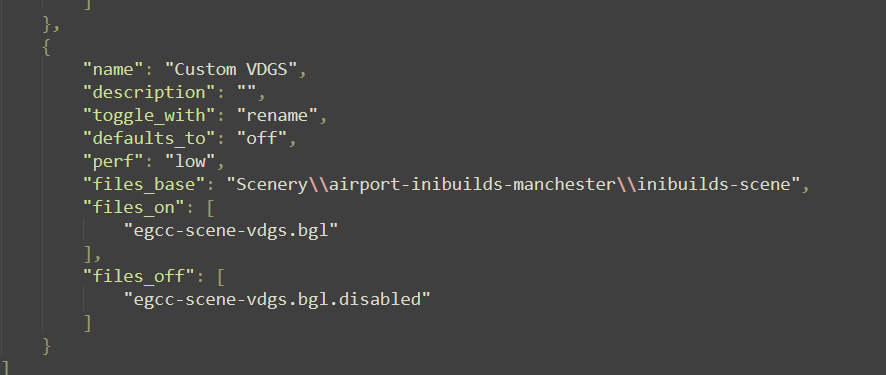
-
Hi, are you able to upload a vide the next time this happens, I have flow 350 a couple times since release of v1.2.5 and have yet to encounter this issue or seen it reported. Has this happened more than once or have you been able to reliably reproduce it. Were the airports default or 3rd party? Additionally have you cleared the WASM folder since these issues began occurring or even reinstalled the aircraft as something might have been corrupted during the update or with the rollout of SU5. Let me know if this helps. Thank you.
-
Clear the WASM and then try with the default livery and then load in somewhere like GVAC that doesn't have much going on around it. Let me know if this helps
-
Hi, so what more than likely is happening is that the detents are being picked up as buttons and that is throwing off inputs. When you go into the Controls Menu, Select the TCA and then Scan for Inputs, then move the throttle around to each of the detents and if any bindings are triggering from it; delete them. Let me know if this helps.
-
The list has been submitted to the team, I can't guarantee what is added, or when. Thank you.
-
Hi, this issue has been raised to the team, I will add this to the log for them, thank you.
-
Hi, do you have Hues Core or any other mods. Is this PC or Xbox?
-
Hi, just to confirm that your Photogrammetry is on? Additionally the default EGGP isn't loaded under our scenery?
-
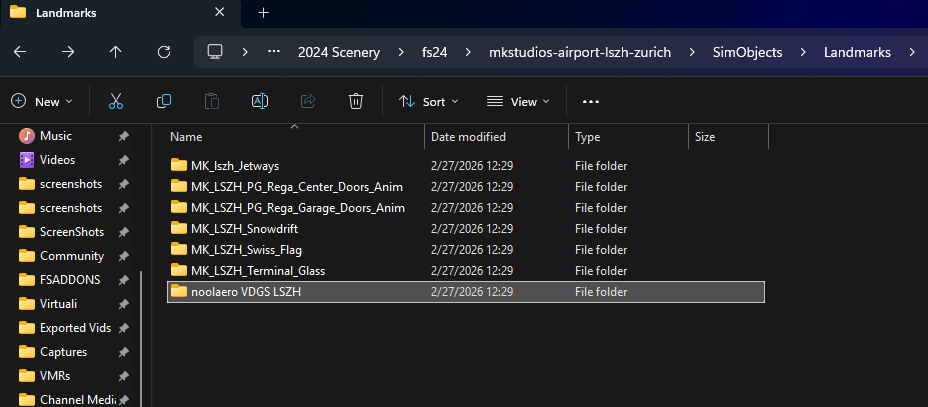
I'll have to double check this but it should be a file in the actual folder for the scenery, should be a .nool file if memory serves me correct. For Example as you reminded me I needed to remove the file/folder from my LSZH scenery since I use GSX. So in this folder as structure varies between developers, I found here in a subfolder of SimObjects and clicked the noolaero folder and deleted it outright.
-
Hi, do you have a TCA throttle per chance?
-
Clear the WASM folder and then relaunch the aircraft. Load into the airport GVAC, the initial loading does take awhile sometimes up to 10 minutes for some users including myself as I am on an older GPU and CPU; you can clear the WASM folder here.
-
Hello all, at the moment this issue is known; It’s a cue to let the user know the sim is paused but since su5 we’re seeing it trigger more when the system is under strain during loading or complex calculations as well as when there is diminished perf. Please make a report here on the MSFS Forums if there isn't a grand thread already as this is something that was introduced with SU5. Thank you Microsoft Flight Simulator ForumsMicrosoft Flight Simulator ForumsThis is the official forum for Microsoft Flight Simulator. Use this forum to connect with other flight simmers, ask for flight assistance, or log official bug reports.
-
Thanks, I'll pass this along to the team.
-
Hi, can you send a video of this issue happening, either uploaded to YT or Google Drive, thank you
-
-
Hi, If you haven't already, uninstall the scenery then clear the rolling cache. Afterwards reinstall the scenery and let me know if this helps.
-


