



Skip to content
View in the app

A better way to browse. Learn more.

iniBuilds Forum

A full-screen app on your home screen with push notifications, badges and more.

To install this app on iOS and iPadOS
  1. Tap the Share icon in Safari
  2. Scroll the menu and tap Add to Home Screen.
  3. Tap Add in the top-right corner.
To install this app on Android
  1. Tap the 3-dot menu (⋮) in the top-right corner of the browser.
  2. Tap Add to Home screen or Install app.
  3. Confirm by tapping Install.

John Linehan

Member
  • Joined

  • Last visited

  1. Thanks for your very quick response. I uninstalled and reinstalled and followed your guidance and it is all working perfectly. I am very impressed by the quality of the product. I also own EGLL for 2024 and KK for 2020. I will now purchase KK for 2024.☺️
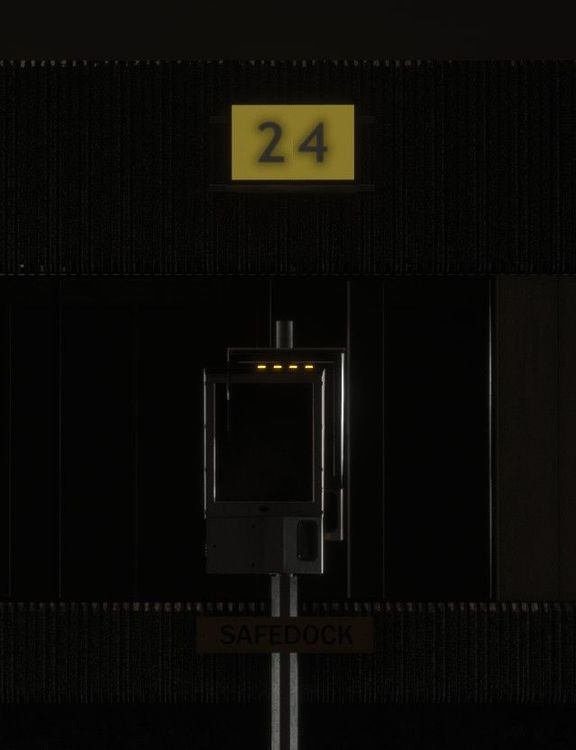
  2. Recently installed scenery and ensured Custom VDGS selected and GSX profile installed to correct location with no other EGCC profile but cannot get VDGS to work. Have tried disabling custom VDGS without success. Working with GSX pro latest update. Am I doing something wrong or missing a step? Update. I have cleared local cache and I can now see what appears to be a double Safedock with the working screen behind and thus obscured.
Account

Navigation

Configure browser push notifications

Chrome (Android)
  1. Tap the lock icon next to the address bar.
  2. Tap Permissions → Notifications.
  3. Adjust your preference.
Chrome (Desktop)
  1. Click the padlock icon in the address bar.
  2. Select Site settings.
  3. Find Notifications and adjust your preference.