





limbo
Member
-
Joined
-
Last visited
Everything posted by limbo
-
-
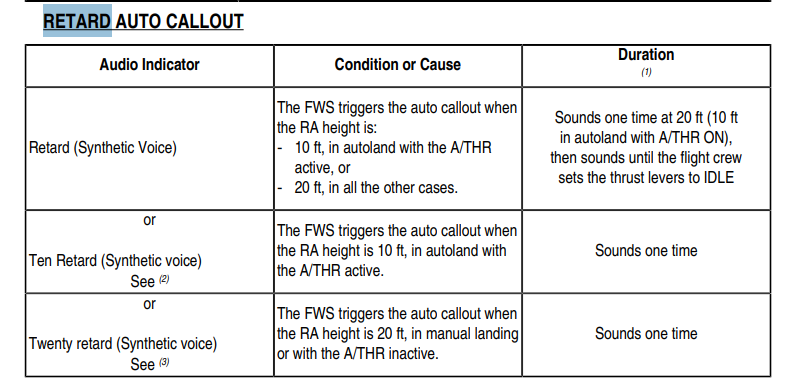
As detailed in my other a340 post this is prevalent in the a350 as well. The a350 is correct in terms of 20 retard, however on autoland it still calls out retard at 20 feet, this is incorrect as seen in this video, no clue if still applies https://youtu.be/c44dToFnGzs?si=ATDhhlT6CPBEugBV&t=961 Furthermore, the a350 also will overlap other callouts however this is also not the case, it must override and take priority over RA callouts, once the thrust is set to idle retard will no longer occur and the aircraft can callout the five callout as an example. Also, the retard callout will still occur one time if the thrust is set to idle before the callout as seen here you can see the A/T light extinguish before 20 feet: https://www.youtube.com/watch?v=8JjuksTvMRg&t=214s Hope this gets fixed soon for both the a350 and the a340, heck even the default airbus aircraft in msfs2024 as this is a VERY basic oversight that shouldn't have been overlooked and something basic that should have been on release and something that the pilots that test your aircraft should have spotted, but maybe they simply don't care...
-
This affects all inibuilds airbuses, however retard atleast in the a340 should not be instant as soon as 20FT however it is after 20 in the a350 which it is changed in the a340 for some reason, it should be right after the callout of 20FT. It should also still call even if the thrust is set to idle beforehand, furthermore it should also override any RA callouts, not overlap over them. This is also the case with all ini airbuses. I have not done an autoland at all but I assume it wouldn't do retard at 10FT either.

-
Not the same tone and sound completely different to the rest of the callouts. A youtube video that the sounds team can probably rip it from: Very loud and high quality just needs some noise isolation
-
All developers analyse feasibility for the next aircraft they make, Aerosoft and Toliss will be far out of inibuilds league and highly worth it. Aerosoft isn't handling anything systems wise. I disagree with trusting inibuilds, they still don't have a good release criteria for their aircraft, hope that changes.
-
Aerosoft and Toliss are handling the -600 no need for inibuilds...
-
Before I was banned from the Discord, I saw a community post about pitch rotation being completely wrong. Eddie said months ago that it was logged, yet nothing has changed months after saying it was logged (iirc) Claiming the flight model is “the best" or this aircraft is "ultimate" is not at all the case even multitude of updates later, performance and less WASM crashes sure, that is nice but the focus needs to be drawn back to the things that matter. Both the A350 and A340 suffer from completely wrong pitch rotation and a pitch-up jerk after raising the gear / immense pitch sensitivity last I was told this is from the transition to direct law to normal law but I doubt this would be the case at all. Despite the flight model being “verified by real-world pilots,” (which sorry to say most are actually affiliated with you guys and we know what happens when you hand out preview aircraft) the aircraft can levitate off the runway, float to the end, and climb at 100 knots even without stalling maybe that is terrible ground effect who knows, speaking from my experience. Even at MTOW, it will still rotate at around 2° of pitch according to the people in the discord For many of us complainers, this breaks immersion. While I accept whatever ini delivers in system depth now, the original promise of ultimate airliner experience hasn’t been upheld atleast in my opinion, and while I know you guys have to work around simulator constraints but compared to the likes of PMDG who have been trusted for decades and flying fenix then hopping into inibuilds airbuses it's a bit unsatisfying, it'd be great if a flight model overhaul could happen with maybe some digital flight data recorder stick aggregate to help with modelling flare physics or takeoff etc as I think having access to data like that could help improve a bit. Also, while cockpit videos may not be the best references it can be helpful a bit in simulating logic, you guys also haven't implemented proper retard logic, and it took you guys month to actually fix the RA callouts tonality, while all your staff without even looking at a video said but oh this is how it actually sounds, while all the airbuses you guys have ever made except the a300 and a310 had the exact same samples and voice for the callouts Stability and performance are decent, but the aircraft still sits in my hangar. I hope it gets fixed, but i'm not so hopeful Just note i'm not trying to come off as a pain here but it would be great to atleast have some clarity or if its taking alot of work if there is a possibility of flight model changes in the works, who knows?
-
@LineDXThe tone was wrong, it's only the quality that is the issue, it'll be fixed in due time.
-
You should submit a video, although I think they are aware of some weird timings with the ra callouts, the whole system logic there needs a overhaul.
-
They do sound like the correct tone but do sound a bit low quality, i'd assume they ripped it from the video I sent them The previous callouts sounded like you were wearing headphones and had a320 like voice, that was slam dunked into the a340 and also fixed.
-
According to other reports it happens with the a340 as well, it has been said they get aerodynamic data, but as i've said a few times now I think it would be good for ini to get stick aggregate data from the digital flight data recorder of reference aircraft if possible, I doubt they will address this as they to standyby their comment of their flight models being accurate, but for Takeoff and Landing in that regard, the data must be not accurate there.
-
I don't think that would be possible, there are still config files that need to be put in the flight simulator and is detailed in the SDK. While level d simulators are close it will never be as close in real life. Ini should look into digital flight data recorder data like fenix has done for takeoff and landing for stick aggregate to get accurate flight models aside from SDK values, although they have said that WASM affects flight model to even though the flight model mod has definitely worked.
-
They said they won't do that on the discord.
-
Yeah inibuilds seems to have flight model issues in takeoff and final approach. Easy oscilations in the a350 pitch up jerk after raising the gear (which probably shouldn't happen) for both the a350 and a340 and I believe the rest of the airbus fleet. I don't think ini will fix it with their constant defense of the flight model was verified by real world pilots, especially with how they acted when that flight model mod was released, I hope they source data from the digital flight data recorder for the a380 flight model because that thing has been in development for damn years, and data should be sourced for the a350 and a340 as well, cause if they just rely on real world pilots to make a flight model that is an issue in it's own regard, but we won't know.
-
This is an interesting topic for literally nearly all simmers who don't touch the airliners because well we're to young or to old or just didn't do flying, but I would like to know if there have been any changes to flight model for a350 as I still find myself feeling a pitch up jerk as soon as raising the gear which is off putting and finding it a bit hard to control on the roll axis on final. I will add also the aircraft touches down as soon as 5 gets called out this was not present in initial versions. To also add does Ini at all source digital flight data recorder data from real world flights, I think this would actually aid in helping create flight models alongside verification by real world pilots as Fenix has done this as well which they have set the example many times, it's not all the time a company has to go their own way! Just want inibuilds to improve (flight model and system depth) and with how many years that a380 has been in development the community has high expectations, will it be a redemption, not sure but I'm on edge. The company has a lot of potential with stunning visual models and on the surface systems A-B but given you guys are the first to many aircraft and being ace in system depth would certainty help with justifying the price you charge for aircraft but in the current state of system depth in the 350 and 340 I expect way more, the Xbox simmers deserve a taste to! (Not that I am one) That is all from me, I know this is going to face critique but these are my honest thoughts of ini and how they can improve, pricing data sourcing ecetera, again to clarify I have 0 clue about aircraft development (I know it's hard) or how an aircraft feels but I am skeptical with ini. Thanks for reading.
-
This is something that is the case for all ini airbuses and also a few other devs in the market. Any possibility ini can make it so the retard callout doesn't just overlap over the rest of the RA callouts, and also not end abruptly when the throttle is set to idle, as this is not the case with any Airbus Aircraft. Also the FWC still announces retard even if the throttle is set to idle before the callout, that needs to be adjusted as well A350 landing at New York Of course I am not asking for what Fenix has done since ini is not at all Fenix level (no offense), Fenix has implemented timings and a bunch of other stuff alongside that. The RA callouts (excluding 90-60) still need to be changed, there are alot of sounds that can still be changed ultimately, alot of things are shared between the airbus fleet in terms of GPWS which may not be accurate to per aircraft type. Oh and to add each ini airbus after raising the gear becomes sensitive to pitch, that probably shouldn't happen (but ofc I am no real world pilot) with a direct law to normal law transition during takeoff, would be nice if all flight models of each airbus can be adjusted instead of commonality with whatever values being modified for each aircraft, it is a bit irritating.
-
The one inibuilds has modelled is the a340-313, should be correct although idk
-
Is the tcas on the A350 and A340 by ini supposed to sound like boeing, cause I doubt it is, at least in 380 simulators, it is different.
-
My assumption is after I let them know that the callouts were wrong they may have decided to remove them to get some new some samples, because the ones they had in release version was that of an a350 (which should be put in the a350 cause the one's they have in that one sound extremely robotic although all the callouts in the a350 are wrong voice to which is off-putting)
-
Doing it again, but any update on this at all? If echo 19 is handling it that would be nice to know. You guys already sorted out most of the a340's one's, yet to be done for the 350.
-
most will say software is never perfect ,we get that but it's honestly surprising that features that were missing on the a350 (what a launch..) also are missing on the a340, I don't have the a340 but hearing this just makes me laugh. I don't understand why certain features are always missing it makes 0 sense and almost seems like basic stuff is never prioritized.
-
Yes, I think this is just an issue in general with ini aircraft, it just will immediately do a pitch up jerk immediately after takeoff and it's really annoying. It genuinely makes me question if this flight model stuff is really verified comprehensively by pilots, it would be great if you guys could source data like fenix has done for their flaring model (with the digital flight data recorder if it's possible to do that if you see it viable, please consider it as I would really like ini to be a really good contender since you guys are really good at modelling but lack in other areas) Another thing I would like to add is how the aircraft floats which seems to be a massive problem for me even with heavier weights, I don't know if it's the meh physics of msfs 24 or it's an ini flight model problem but I hope further advancements are made in this area as well in system fidelity in future aircraft.
-
As the other comment says, it's the RAT. It shouldn't be a problem if you don't fly in external view. To anyone that does consider yourself a weirdo and don't buy aircraft like this.
-
Thank you eddie, from 330 driver stream on preview version samples are correct now for all of them except minimums and maybe 90-60 I have 0 clue. Appreciate it 🙂 However this still needs to be sorted for the a350, I hear no difference on the new update in regards to tonality, the 90-60 callouts also need to be changed in regards to Hitachi's post.
-
This is correct, seems to just be done on all inibuilds aircraft where basic FWC logic like this can't even be replicated which isn't exactly high fidelity as they seem to advertise for the 2 main payware aircraft... imho ini isn't all that high fidelity but I don't expect them to be. The issue on ra callouts from your origin thread hasn't been fixed either, wonder if echo19 is fixing this but it isn't a full sound overhaul either.


