



Skip to content
View in the app

A better way to browse. Learn more.

iniBuilds Forum

A full-screen app on your home screen with push notifications, badges and more.

To install this app on iOS and iPadOS
  1. Tap the Share icon in Safari
  2. Scroll the menu and tap Add to Home Screen.
  3. Tap Add in the top-right corner.
To install this app on Android
  1. Tap the 3-dot menu (⋮) in the top-right corner of the browser.
  2. Tap Add to Home screen or Install app.
  3. Confirm by tapping Install.

Kristof1234

Member
  • Joined

  • Last visited

  1. Kristof1234 replied to fafadem's topic in Systems
    both a340 a350 are always crashing and will be
  2. lol it works!
  3. Kristof1234 replied to J0hnnyB0b's topic in Other
    Just got this also....
  4. Wow did you got this free? this product cost over 80 CAD$ Yes all is necessary at this price point!
  5. Why is this so hard to fix the Pilot Copilot issue for you? You got it wrong in A350 and in A340 LL THIS TIME. Fenix got it right and you just can't? This is not hard at all just require a developer who cares!
  6. don't have this issue with the whole wing setup 2 efis fcu and mcdu. Using latest firmware and simapp pro software software also rowsfire overhead panel with mobifilight all works like a charm.
  7. Wow thanks Steven is live real time FS2024 weather issue, my shows +52 ISA at FL370. Using no live default weather or Active Sky live weather fixed this problem at ISA -7/ No performance problem anymore. Glad you guys know what you doing with the planes.
  8. Just start from the gate dark mode and there is no crash each time
  9. WX not working in MCDU both SayintentionsAI and Beyond ATC
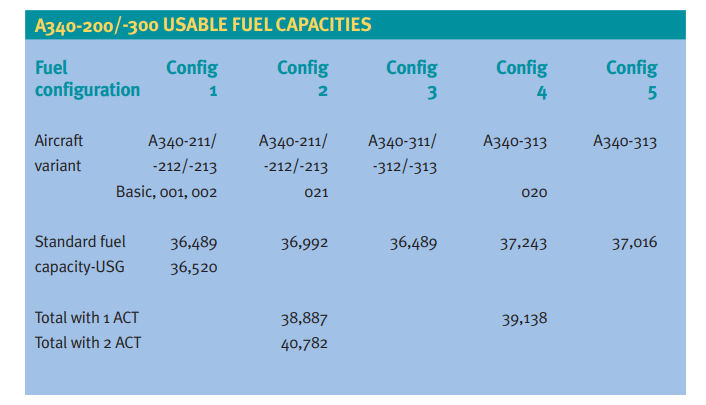
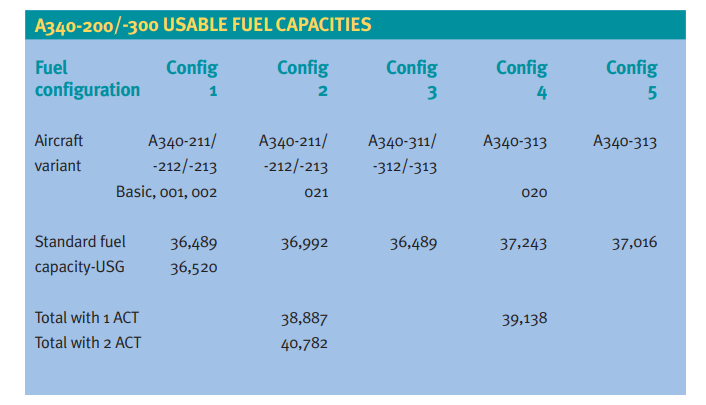
  10. Hi The Max fuel in A343 is low 113K Liter instead of around 140K+. It seems you use A333 tanks not A343. All good .80 kg for 1l ISSUE 52-A340-300 SPECS.pdf
Account

Navigation

Configure browser push notifications

Chrome (Android)
  1. Tap the lock icon next to the address bar.
  2. Tap Permissions → Notifications.
  3. Adjust your preference.
Chrome (Desktop)
  1. Click the padlock icon in the address bar.
  2. Select Site settings.
  3. Find Notifications and adjust your preference.