




Deleted Account
Member
-
Joined
-
Last visited
Everything posted by Deleted Account
-
Heya! Yep, this is the boost kicking in 🙂
-
Heya! Yeah, you are correct, currently there are no plans for the Ruslan. But we will see what the future brings 🙂
-
It also is possible to completly retract the slats in flight. It is dependant on your AOA as it is in the real aircraft.
-
It wasn't solved because it is not a bug. It is intended to be in that configuration.
-
These two are not able to be manipulated with any insim command. Do you mean an LVAR?
-
I can put it on the wishlist, but no promises 🙂
-
I'm sorry, which slat issue are we talking about?
-
Heya! It should be AN225_MACH_COMMAND (LVAR) (1 = Trigger button) for the orange button and AN225_AIRSPEED_COMMAND (LVAR) (1 = Trigger button) for the white one 🙂
-
Heya! Can't confirm that the plane is already loaded when loading in. The camera is a known issue, albeit a sim limitation. You'll need to set a key binding to "Decrease Cockpit View Height" to move the camera down manually.

-
Heya! 1) Not as a value I think, but there is this little gauge which tells you where the trim currently sits. 2) Nav2 currently isnt working, but it is already on our internal wishlist 🙂

-
Heya 🙂 Yeah, I´ve noticed that as well with my x56. I´ll put it onto our wishlist for consideration 🙂
-
Heya! I´ve put it down for consideration, thanks 🙂
-
It´s a bit weird, because no one on our team can replicate this issue. Please make a test where your community folder is completly empty except our NZQN, the default NZQN is uninstalled and the rolling cache got deleted. Then report back when the issue still persists.
-
Yes, I can confirm the issue. Will be rectified in a later patch 🙂
-
Heya! You mean when using the drone cam and looking around the airport? I can't say I can reproduce this issue. Where exactly is it happening?
-
Heya 🙂 Sounds reasonable, I'll put it on our internal wishlist 🙂
-
Heya again! Got an answer now, but you won't like it. It unfortunately isn't possible to do this with our plane 😕 Sorry for the inconvenience this causes.
-
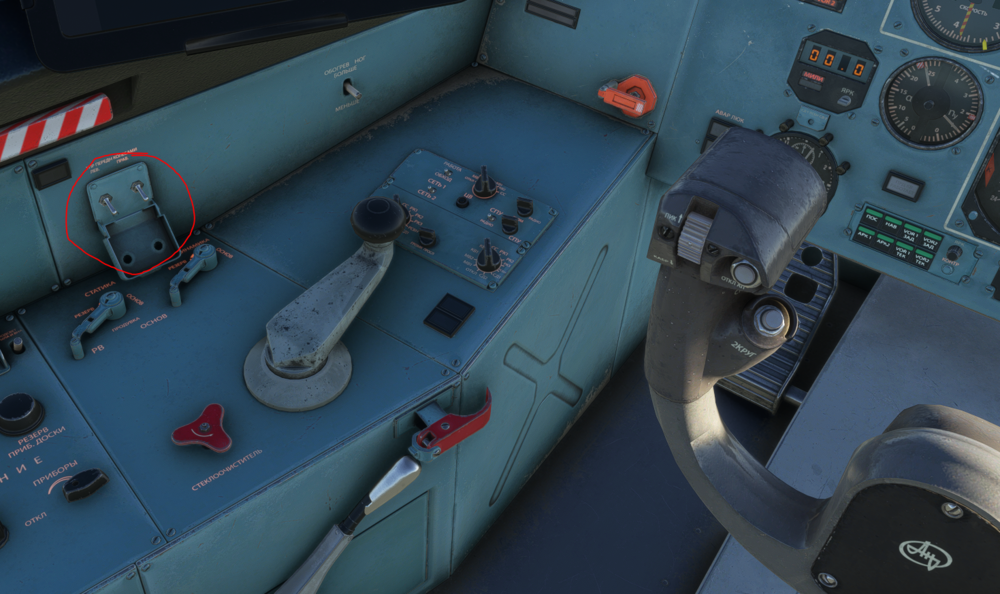
Heya! You can switch these two switches to disable the nose wheel steering 🙂 Then only the rudder moves.
-
Heya 🙂 I´ll bring it up with the team, thanks for the suggestion 🙂
-
Sounds good, thanks for getting back to me 🙂
-
As I said, it is not possible with the way we coded it. Sorry for the inconvenience.
-
Yeah, the ESC pause is a bit iffy to work with, it´s probably best to just disable the AP as you already found out before pausing 🙂
-
Heya! That´s definitely not how it is supposed to look; did you try with an empty community folder? Also did you uninstall the default NZQN?
-
No, this unfortunately is not possible. We had to use an alternate logic to not mess things up at another end.
-
It unfortunately is rather hard as the data is not readily available as you already guessed 😕


