




richboy2307
Staff
-
Joined
-
Last visited
Everything posted by richboy2307
-
Hi @Muffwin Can you please confirm if you're experiencing any such issue as of v1.0.4 update? We believe this may have been on of those instances of crashes induced by memory allocation bug but would appreciate if you could let us know your experience such that we can be sure. We have been trying since v1.0.2 and even now on v1.0.4 and unfortunately none of our testers could reproduce the condition you saw (HOLD not showing up and then WASM crash after changing HOLD parameters). Attached is my latest attempt at the same on v1.0.4 below. Let us know if you're still experiencing this, and any further reproduction steps in case you do. Thanks! 2025-03-17 21-04-39(1).mp4
-
A video like this where you get the crash would be even more helpful. Like we've been trying all sorts of functions and undoing and erasing TMPY on all and not getting the reported crash. So more information to match the conditions such that we can re-create the crash would be helpful. 2025-03-17 19-39-49(1).mp4 Thanks!
-
Thanks reported.
-
Hi @geckuz Thanks for your report. Apologies you experienced a WASM crash. Been trying to reproduce your crash but not having any success as yet. I'm afraid it might have been something specific to the conditions or type of action being undone. Can you please provide the following information which would help in reproduction of the crash: Your specific route (OFP) What was the change made which you were undoing at the time of crash? The NAVDATA method used (SIM DEFAULT or NAVIGRAPH). Thanks!
-
-
@mseder A screenshot or video please of what you're seeing would be helpful as I'm not able to reproduce the issues you're mentioning. What are you using to control the aircraft? Is there any specific key on your keyboard or keybind you're pressing just before the issue begins? Or does this issue start as soon as you click on any textbox on the EFB and then you can no longer exit it? We need more information please. Thanks!
-
Allow me to clarify It is not mandatory for you to clear your WASM folder each update as the sim should handle this for you normally however we are recommending users do so at the moment. The WASM folder contains files that are generated by the sim on first launch of the A350 WASM. These files then are cached for subsequent launches UNTIL either user clears them manually, or the aircraft is updated (so A350 WASM version changes) It does not matter when you clear the WASM folder (before or after the update), as long as its done when the simulator is NOT running, on next launch the WASM Compile will be triggered. Why do we recommend clearing WASM folder? We have seen user reports where the sim has not handled this process gracefully, or their initial WASM Compile was somehow corrupted, so as a troubleshooting step we recommend clearing your WASM folder for the time being. Thanks!
-
Yes in case you're having this issue verify your AIR DATA knob is in the centre (AUTO) position. That is the only time (other than failures) that such an ECAM would trigger.
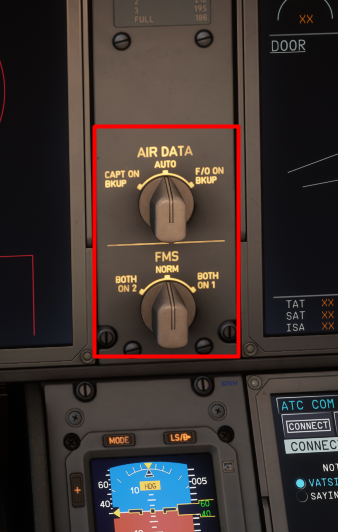
-
-
Thanks reported.
-
Well you assume wrongly, as there's many users congratulating us for great performance on OMDB Enhanced and EGLL Premium compared to their 2020 counterparts, even running on laptops in some instances. Just some samples to back the above: But anyways, please paste a screenshot of your in-game FPS counter whilst loaded at the airport, along with your sim graphics settings for more clues as to what may be happening. Thanks!
-
Yeah this is what it shows during boarding (except the ZFW and FUEL LOAD fields, those remain empty unless you manually input or click the SIMBRIEF IMPORT on top right). However at the end of boarding the TOTALS and ZFWCG should update to reflect the final loaded value. Weird that its not updating, like the boarding complete flag is not being read properly by the OIS. Anyways, reported for the team. But please also your GSX settings in case its relevant. The settings on the GSX menu. Just the SIMULATION page You will need to disable the OIS "GSX INTEGRATION" option to be able to access this menu. Thanks!


-
Do you mean the view resets to top of the F-PLN or that the procedure is getting input at the top of your F-PLN? IRL these would be 2 entirely independent units run by separate computers. However this is not the case in the sim currently, they're both the same pages hence you see the scroll on both. Thanks!
-
@Timalshiwa Yes please try on 1.0.3 and let us know if you still have the crash after. This update contains various stability and crash fixes in the WASM code that should lead to less memory corruption/overrun situations which lead to the reported WASM crashes. You can just reply here in case you do have another crash with the full report. If no longer crashing, still do let us know here so we can close the thread. Thanks!
-
Can't say I've seen that. Just tried to load via GSX on 2020 before replying to you and saw the values update after GSX has successfully completed boarding. Can you confirm your simbrief plan is imported on GSX prior to boarding? If yes, can you please also share your GSX Settings so we can try to reproduce the above. Thanks for the feedback. I'll update the images/instructions to reflect the 2020 UI. But apart from the visual differences, its essentially the same in both sims, especially on the cosole. Thanks!
-
Thanks reported.
-
That almost sounds like you managed to activate a text box on the OIS somewhere, which then inhibits control inputs and other sim events from being triggered. You'd need to click elsewhere on the OIS screen to exit it. If your camera view is stuck, then use the camera tool on the toolbar to go to any preset views where you have the OIS in view to click on the screen and exit the text field. In case it happens again, some screenshots or preferably a video recording would be ideal to offer some more clues. But no, that doesn't sound like a WASM crash. Thanks!
-
If you're using GSX to request boarding/refuelling, it does so progressively and the values will only update after the process is completed by GSX. If you're a non-GSX user or don't request boarding/refuelling via GSX first, you can set your fuel/payload using the loadsheet's ZET ZFW and SET FUEL page. Apologies you had a crash but please try after 1.0.3 update as this has been focused on stability and addressing the reproducible crashes. However if you still have a crash, then please use below guide to Verify & Report the Crash with all the requested information. Thanks!
-
Hi @David Whittaker That is intentional to lockout assistance options as they can conflict with AP/FBW logic. Additionally we recommend disabling assistances per below for the same reason: See above link and ensure all the assists are disabled. Also ensure you have the appropriate OIS option selected if you're only using your rudder to steer. Additionally the A350 uses CFD such that aircraft has momentum and you cannot make sudden turns at high speeds with full deflection, instead you will cause the wheel to skid so you should ease into turns at 10kts or lower speeds. Thanks!
-
Hi @Timalshiwa Were you on update 1.0.3? If not, can you let us know if you still experience a WASM crash (and include full report as above) after the update. Thanks!
-
Hi @simon tiger Apologies you had a crash but a message like that is not helpful. Please read the message above yours and follow the instructions to make a proper report that will help us to investigate/reproduce your experienced issue and thereby solve it. Thanks!
-
Hi @sk0941 Thanks for your report. Apologies you had a crash however this issue is not universally reproducible. From my own experience, I always use the ATC COM page on FO side on my VATSIM flights and have yet to have a WASM crash as a result of that particular action.0 Can you check if you are still having this issue after the v1.0.3 update? While the sim should handle this for you automatically on first launch after an update/reinstall, we have seen it not happening for some users so you should also try to manually clear your WASM folders. Clearing WASM Folders - Delete all contents on the file paths (Work folder and all .dlls) - FS20: https://forum.inibuilds.com/topic/24996-how-to-clear-the-wasm-folder/ - FS24: https://forum.inibuilds.com/topic/24917-how-to-clear-the-wasm-folder/ If you still have the crash, please don't close the sim. Use the below guide to verify and report the WASM crash with all the requested information, especially reproduction steps. Thanks!
-
Thanks, reported.
-
-
That sounds like a possible keybind conflict (inadvertent inputs on Aileron/Rudder/Pitch or trims for either of those). Check your control profiles and ensure none are bound on any connected devices other than the one you want. Additionally, you may use the AP DISCONNECT PROTECTION option from OIS Simulation Settings which inhibits the realistic AP disconnection logic (due to control inputs or excessive rate of change on g forces) Thanks!


