




iniKyle
Staff
-
Joined
-
Last visited
Everything posted by iniKyle
-
Hi, Unfortunately, this is currently a limitation with GSX and our Multi-Jetway tool. We have reached out to the GSX developers for further clarification. Thanks for your patience and understanding!
-
Hi everyone, I also encountered this issue the other day, only to find out that I had the Marketplace version installed as well. If you have transferred over to the iniManager, please ensure that the Synaptic A220 is DISABLED in the Marketplace. That should resolve the issue. Thanks!
-
-
-
Hi, Thanks for your feedback and suggestions! I’ll make note of this and pass it along to the team for further consideration. Thanks again!
-
-
Glad we got it working! Enjoy your flights :)
-
Hi, I know you mentioned logging into Navigraph on the tablet, but you’ll also need to log in to Navigraph directly through the FMS as well. Thanks!
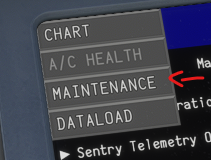
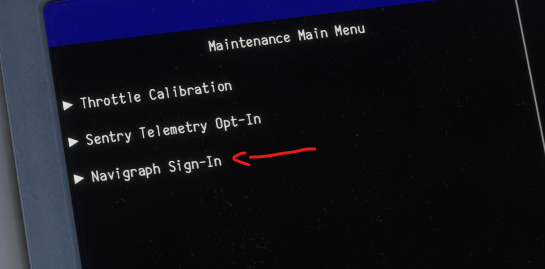
-
Hi, Let me know if this thread attached helped solve your issue. Thanks!
-
-
Hi, Yes, this is a current limitation within GSX. We have reached out to the developer for further clarification. Thanks for your patience and understanding!
-
Hi David, Thanks for the video! It’s funny you mention this, as I’d say that about 90% of the time, this is the exact culprit when troubleshooting these types of issues. If you haven’t already, I’d also highly recommend taking a look at Addon Linker. It’s a great tool for keeping your Community folder clean and helping the sim run efficiently. Thanks again! https://flightsim.to/addon/1572/msfs-addons-linker
-
-
Hi Mark, Unfortunately, this is a current limitation with GSX. We’ve reached out to the developer for further clarification and will provide more information as we have it. Thanks for your patience and understanding!
-
Hi, I’ll forward this to a team member with an Xbox for further review. Please note that most of the team is off this week for our summer break, so there may be a slight delay in getting back to you. Thanks for your patience and understanding!
-
-
Hi, In order for the nose wheel to behave as intended, the Nose Wheel Steering Axis needs to be bound to a control input. Hope this helps clarify! Thanks!

-
Hi, Did you inpout your USER ID in to the tablet? Thanks!
-
-
Hi, Thanks for your feedback. I’ll pass this along to the development team for further consideration. Thanks again!
-
Hi, Please make sure you have "Disable rear staircase if jetway" enabled in your GSX settings. Thanks!

-
Hi, Definitely something to consider. Thanks for your feedback, I'll pass along to the development team!
-
-
Hi, We’ve reached out to GSX for further clarification, as we developed this tool to work with GSX based on all the parameters and information provided by them. Thanks for your patience and understanding!
-
Hi, Please follow the attached thread to get the jetways behaving as intended. Thanks!


