



Skip to content
View in the app

A better way to browse. Learn more.

iniBuilds Forum

A full-screen app on your home screen with push notifications, badges and more.

To install this app on iOS and iPadOS
  1. Tap the Share icon in Safari
  2. Scroll the menu and tap Add to Home Screen.
  3. Tap Add in the top-right corner.
To install this app on Android
  1. Tap the 3-dot menu (⋮) in the top-right corner of the browser.
  2. Tap Add to Home screen or Install app.
  3. Confirm by tapping Install.

DLH916

Member
  • Joined

  • Last visited

  1. Yo Man, you are my hero!!!! That it was, thank you very much for your help!!!
  2. Hi and thanks for the answer but now, this doesn't solved my issue. I have found this before I have wrote here and did all the way but without success. The issue is I have allways only one AIRAC to choose and this is an old one.
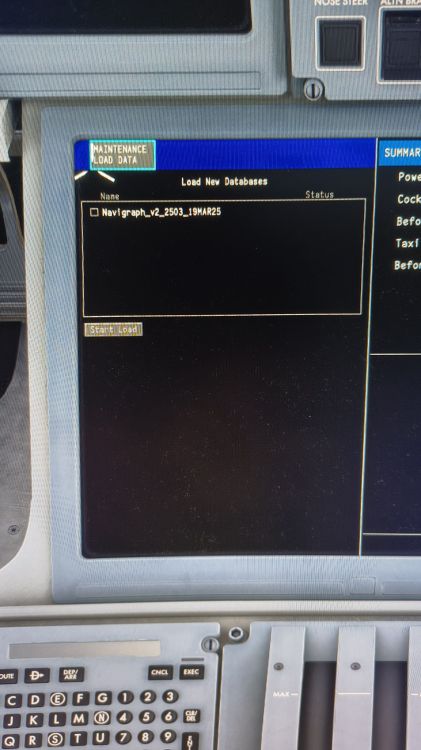
  3. Hi guys, I've installed the A220 3 times but I can't load a new database from Navigraph. The Synaptic A220 is linked in my Navigraph account correctly and on the EFB Settings I am Loged in to Navigraph, but when I press the Load new Database Button in the FMS I always get an old AIRAC from 2503_19Mar25. I have all thinks done, deinstalled, new installed. Delite the WASM folder and so on. I don't know what to do yet. I do have MSFS2024 as Steam Version. Did anybudy have the same and mybe could fixed it?
  4. After restart of the Computer all thinks worked fine again. It's a kind of strange behavior I can't explain.
  5. The same for me, new Update, new issues. Things that worked before doesn't work after that. My TCA doesn't work and the APU doesn't start at all. I give up, I've never had such an issue Aircraft for MSFS before.

Account

Navigation

Configure browser push notifications

Chrome (Android)
  1. Tap the lock icon next to the address bar.
  2. Tap Permissions → Notifications.
  3. Adjust your preference.
Chrome (Desktop)
  1. Click the padlock icon in the address bar.
  2. Select Site settings.
  3. Find Notifications and adjust your preference.