



Skip to content
View in the app

A better way to browse. Learn more.

iniBuilds Forum

A full-screen app on your home screen with push notifications, badges and more.

To install this app on iOS and iPadOS
  1. Tap the Share icon in Safari
  2. Scroll the menu and tap Add to Home Screen.
  3. Tap Add in the top-right corner.
To install this app on Android
  1. Tap the 3-dot menu (⋮) in the top-right corner of the browser.
  2. Tap Add to Home screen or Install app.
  3. Confirm by tapping Install.

Toddy647

Member
  • Joined

  • Last visited

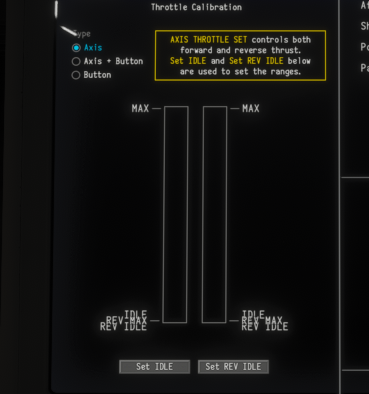
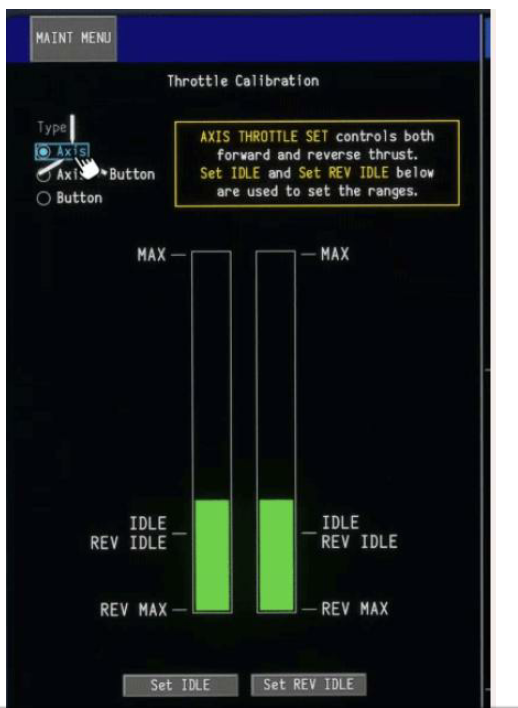
  1. Hi, up to Version 1.05 everything is fine. Since updating to 1.06 I have issues to activate Reversers. I additionally made a mistake setting Idle and reverse Idle (First Picture). How can I reactivate the situtation shown in the Second Picture? Have I to delete one file in order to make the system forget former settings? I cannot change any settings of idle or reverse idle, except moving the lever. Normal Throttle's ok. Only reverser makes problem. Uninstall and reinstall does't work. Perhaps a clean installlation helps. What have I to do, to make a clean installation?
Account

Navigation

Configure browser push notifications

Chrome (Android)
  1. Tap the lock icon next to the address bar.
  2. Tap Permissions → Notifications.
  3. Adjust your preference.
Chrome (Desktop)
  1. Click the padlock icon in the address bar.
  2. Select Site settings.
  3. Find Notifications and adjust your preference.