




Capgelly
Member
-
Joined
-
Last visited
-
Copy. Tx for the reply Kyle.
-
I bought the A380 through the MSFS 2024 Marketplace. The update offered to the aircraft in the Marketplace took three times to get it right, so I decided to transfer the Order to the IniManager. Took a screenshot from my MSFS 2024 Library as proof of purchase but could not do the Transfer Order in IniManager because the A380 is not among the choices in the dropdown tab to select it. Can you add it. I would much rather manage the aircraft in the IniManager going forward GTE
-
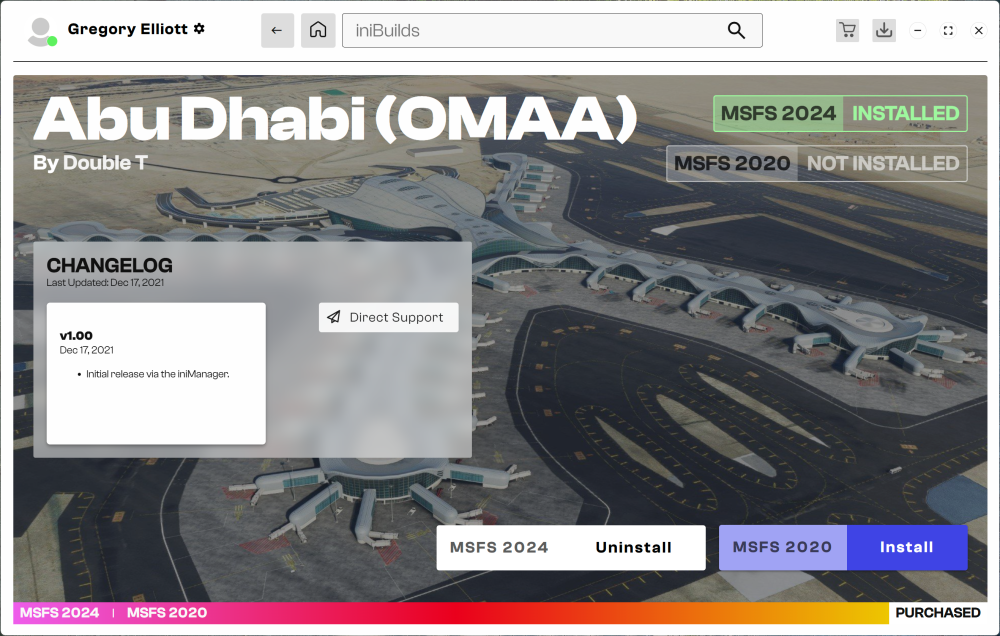
As it turns out Holundiman, I'm not confused -- just an idiot. First, I read somewhere across the internet that the Multi-Jetway tool was compatible at both Abu Dhabi and Dubai, and regardless I bought the wrong OMAA airport (DoubleT's) through the IniManager. So even if OMAA did support it, it would not have worked . . .
-
Hm. I’ll check it again tomorrow but didnt see it on reinstall this morning. Actually looks like I may have the wrong version. I think mine says it was last updated in like 2022 or so. Tx Kyle. Mmhm. Yep, I bought the wrong one. Its by "DoubleT" not Inibuilds:
-
OMAA and OMDB supposedly have multi-jetway support - but I can find no GSX profile for OMAA. The others I bought, EGLL, KJFK and KORD have a tab/link to download the GSX Profile on the airport install page. For OMAA the site says it is included in the Scenery folder - but its not.
-
Bought OMAA from the IniManager yesterday. Tried to use multi-jetways -- tool says no compatible jetways and I don't see any GSX profile for OMAA in Virtuali at roaming Appdata. Looked in scenery folder for one and don't see one there either.
-
I have the Abu Dhabi OMAA airport from Inibuilds with multiple jetways at gates in concourses A and D but the App in the EFB says "not compatible" when looking to operate them. Did go into the GSX appdata and changed "externaljetways=0" to "externaljetways=1" but it did not make any difference
-
Copy. Tx guys. Haven’t messed with Airbus in a while - mostly Boeing and some fun turboprops Remembering back I do recall having to initiate the descent in Airbus.
-
Tx Kyle. Tomorrow. Its beer thirty here now….
-
Hm. Thinking about your reply Kyle. If your saying I need to manually disengage Alt Hold before T/D that is kind of like what I used to do in an older Airbus model - where you had to hit VS just before T/D and even just -200 to get descent started and once going re-engage managed mode.
-
Hi Kyle and thank you fir the reply. Example. Flight EGLL to KBOS. Initial cruise lvl 380. Two auto step climbs to FL 400. All managed mode. Once Alt Hold set at FL 400 I reset the Alt knob down to 1500. (ILS 31L at KBOS) and waited for T/D. Got there, green bubble popped up, but no descent so has to go to VS and manually get it down to the descent path and then tried to engage managed mode again - but it just kind of wanted to go straight down to 1500, rather than follow the path. I think it might have something to do with not going into Perf and manually entering the new cruise level after the step climbs - but have not tested.
-
Not sure if it is expected to without first initiating a descent manually but through 4 or 5 flights it has not auto started descent at T/D. FMS set to IAF level etc. T/D shows In MCDU flight plan and the green bubble pops onto the PFD.


