





IniJamir
Staff
-
Joined
-
Last visited
Everything posted by IniJamir
-
Hello, I'll leave a link clarifying the differences between Premium and Enhanced Editions down below but to answer your question first and foremost the Marketplace doesn't show the tiering system, just that it's for 2024, that said if you purchase EGLL on the Marketplace you would get the FS2024 Premium Edition and OMDB the Enhanced Edition since those are the most advanced versions of those sceneries available for 2024. Users of the 2020 ones can just enable them in the library and that's why it doesn't have Compatible Taglines like on the Site/Manager. Here is the link down below Hope this helps, Thank you.
-
Hi, Sorry, as this now goes a bit out of my knowledge area as far as fixes go. We do have a Direct Support Team https://inibuilds.com/pages/contact that should be able to help with this issue. Sorry for the inconvenience.
-
Hi, I was able to verify that this is occurring on my end as well, thank you for bringing this to our attention.
-
Glad we were able to assist, thank you!
-
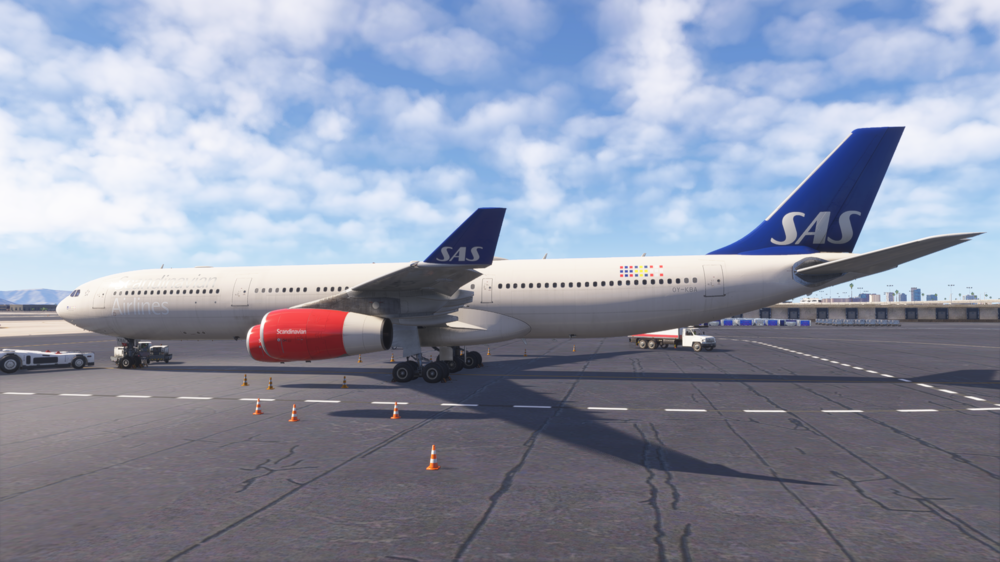
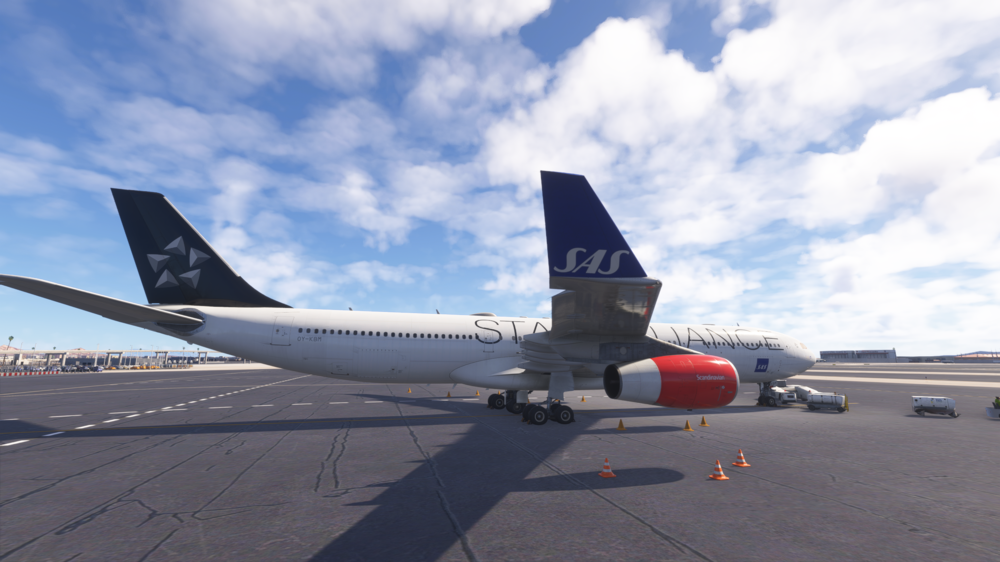
Hello. I just loaded into the sim with both versions of the SAS Liveries on IniManager and did not see this issue occurring as demonstrated below. It is possible that the livery may have corrupted and recommend reinstalling the liveries as well as the aircraft itself just incase something did happen to corrupt.
-
Hi, Are you able to produce media of the issue, I am on PC and updated to 1.2.1 and not seeing this issue occurring, have you attempted to clear WASM for the 340 or reinstall the aircraft? I loaded into the A350-900/ULR/1000 and did not see this issue occurring on my end. If you can please submit footage with the current version please and thank you.
-
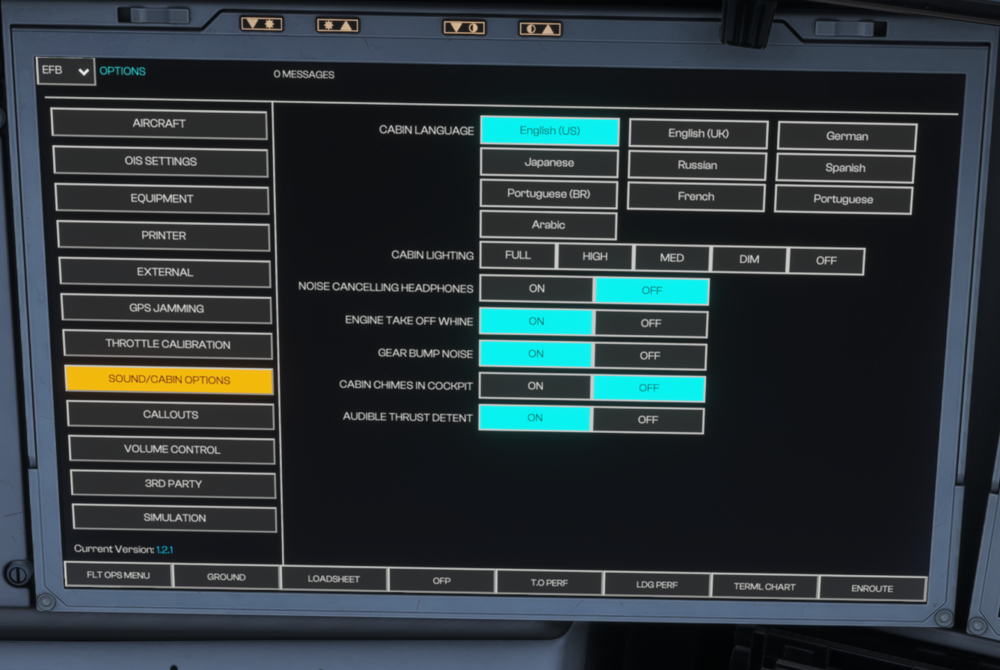
Hi, for the EFB you can control the lighting in the Sound/Cabin Options section(See Image Below). For the FA Panels in the 350 I just have one of the custom camera key binds set to transition the camera from the flight deck to the FA Panel outside the L1 Door.
-
You do indeed have to press and hold the Test Button in order for the functions of the Fire Test system to run. Hope this has helped, thank you 🙂
-
If you have the ability to, try uninstalling the A340 from the marketplace and then reinstalling if you haven't already, I saw you said you deleted the files, from the file explorer itself or using the uninstall function in sim?
-
Hi, Is this livery from the Livery Manager or from Flightsim.to? It is possible that that livery needs to be updated for compatibility with update 1.0.9.
-
Hello, Thank you for your time and attention to detail with making this report. I will push this to the team as well rename the title; whilst I understand the frustrations the title doesn't help to explain the issue at hand. Once again thank you for these contributions as they do help.
-
Hello, Do you have the plane selected currently in the Free Flight Screen, if you do then go back to free flight and select a different aircraft (A321 or whatever) and then come back to update the aircraft.
-
Hi, Have you tried a reinstall of the aircraft since you made this post, subsequently there is a new version of the IniManager that addressed some server issues we were having over the weekend, it is possible that your install may have corrupted. If this isn't fixed I recommend uninstalling and then reinstalling the aircraft, downloading the new IniManager Version 2.5.1, and then reinstalling the aircraft to see if it works. Additionally after the first load in of the aircraft do me a favor and restart and then spawn in again as usually the aircraft has to compile WASM for the first time and sometimes initialization has some hiccups that can otherwise lead to issues like these. When you uninstall the aircraft, follow the procedure to clear your WASM folder for the A340 before you update the Manager and reinstall the aircraft as well; instructions in the thread below. Please let me know if this helps.
-
Hello and sorry for the delay in response. Since this aircraft is a Microsoft aircraft developed by Inibuilds, issues that affect aircraft like the A320/21LR/330s/A400 for example have to be reported and confirmed on the Official Microsoft Forums. Sorry for the inconvenience and the delay in communicating this so much later than should have been.
-
Hi, This was something I wanna say I saw on the discord section, I will raise this to the team but in the meantime would you be able to compile/attach media of this occurring?
-
Hello, This issue is known, The EFB needs to be updated to remove the 80 and 90 callouts options from the EFB itself as we do not have those audio files present for callouts in the A340. Thank you.
-
-
Hello all, So I have spoken with the developers and it appears that all of our code within the aircraft are still functioning as they are supposed to where both the OIS and MCDU Inhibit code is present, however it seems that something on the simulator side is not being communicated and as such is allowing the OIS/MCDU inputs to also be registered to the sims default/added key binds. We have reached out to Asobo letting them know that this issue is present and affecting the aircraft as such. Sorry for the inconvenience at this time and thank you for your patience.
-
Glad I could be of assistance, You're very welcome 🙂
-
-
Hi, Sorry for the delayed response, I will raise this issue to the team, thank you!
-
Hi, Sorry for the delay in response. I will raise this issue with the team
-
-
Linking this to Master Thread and the locking this thread so it remains on topic and relevant. Thank you both.
-
Hi, Just to verify, when you press the button, is the behavior you see in the timestamped video below, what is happening in sim? If not please attach a video so I can see what the differences are between yours and the intended behavior I have seen in this video which matches my sim, thank you.



