





IniJamir
Staff
-
Joined
-
Last visited
Everything posted by IniJamir
-
I'll pass it along to the team, thank you.
-
The fuel predictions were reverted back to v1.2.1s predictions and fuel flow
-
Hmm, It's possible that a reinstall might be needed, something might have corrupted on the install.
-
No, the POIs for Hong Kong City do not conflict with Kai Tak Airport 🙂
-
Hello, This is a known issue regarding our maps provider which is being investigated, thank you.
-
I'll see what I can find out from the team about this.
-
Hi, v1.2.4 is out which rectifies these issues, thank you for your patience 🙂
-
Do you have the default crash setting enabled in the game settings, under Assistances I believe?
-
Yes these reports are helpful and are being investigated. Thank you
-
Thank you for this 🙂
-
Hi, Can you disable the SS3D and enable our POIs, I wanna check something and am amongst other tasks right now, thanks.
-
Glad you were able to get that sorted 🙂
-
Hello, this was provided to me regarding the ND Range Display Functions from the FCOM of the A350, hopefully this helps "In ARC mode, the ND range corresponds to the radius of the arc. In all ROSE modes and PLAN mode, the range corresponds to the diameter of the outer circle. Thus, in order to keep constant the distance displayed ahead of the aircraft mock-up: ‐ The ND range is doubled when the flight crew changes the ND mode from ARC mode, to any ROSE mode or PLAN mode ‐ The ND range is divided by two when the flight crew changes the ND mode from any ROSE mode or PLAN mode, to ARC mode."
-
Tune into the dev stream tomorrow, 1500z and there will be more answers there 🙂
-
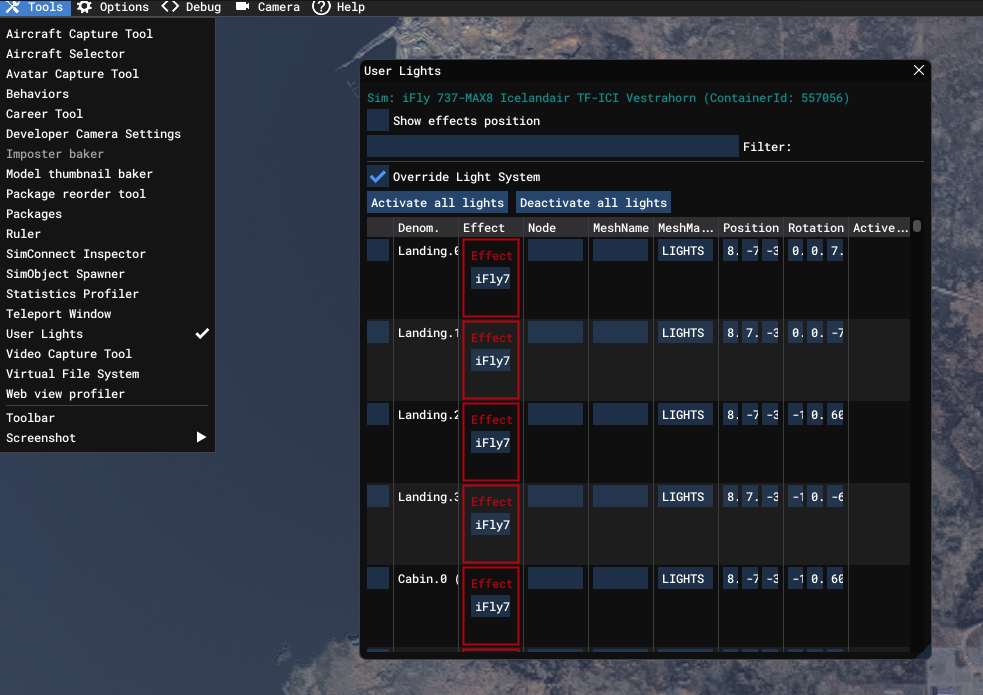
Hello, Please enable Dev mode via the Pause Menu, Game Settings, Advanced, and then Enable Dev Mode. Then go to the top bar as demonstrated in the image below and untick the "Override Light Systems" option, let me know if this helps
-
Issue is known, thank you
-
This issue is known about, thank you.
-
I'll pass this along to the team, thank you.
-
The Ghost WASM one is tricky, I know it is still being investigated as of current. I've had it occur for me once in the last two A340 updates and that's been it since launch (my heart lies in this plane lol so I do fly it a lot compared to 350), it's harder than a traditional WASM cause it doesn't throw any of the usual indicators of WASM errors. Hope this helps.
-
Usually I try my best to get around to responding with updates on issues as I get informed about them or inquire. It'll either be confirmed in here or with the release of the update changelogs.
-
-
Hello, The sound issues are known about by the team and fixes are already planned to address those issues, as for GPWS callouts, I'll have to ask if those are product of bug of a bug or if those issues stem from something else entirely. Secondly were the arrival issues encountered specifically in this route pair or have they occurred else where, I flew KIND-ONT-OAK with no issues as well as RCTP to VHHX following the update and have yet to see this occur. Nosewheel steering I'll raise as well, I know between multiple aircraft I just use the same input and as such I have to change how much input I taxi with between developers. Thank you 🙂
-
Sometimes updates don't actually update, it doesn't occur to often but it can, manually uninstall the aircraft via the IniManager and then reinstall it and let me know if the aircraft actually updates
-
Sounds like something is not initializing during the initial load which is causing issues, try clearing the WASM again (I hate to say it but this is kind of the turn it on and off again when it comes to this type of issue)
-



