




Deleted Account
Member
-
Joined
-
Last visited
Everything posted by Deleted Account
-
Heya! There is already ground rumble preset, I´ll talk to the sound guys and see if we maybe can up them a bit 🙂
-
Heya! Sorry for the late reply! Im afraid there is no documentation on which systems exactly were implemented. What do you mean with TA and TL please? Only acronyms that come to mind would be Traffic Alert and Traffic Load (Which both wouldn´t really make sense I guess) -- The slow/fast mode are to move the clock IRL, as IRL the plane doesn´t know the time. (It doesn´t jump to the current time when moving to RUN) -- Unfortunately only with an LVAR, A310_TRP_TOGA_BUTTON if I´m not mistaken.
-
Heya! You can activate the GO-AROUND mode by pressing the GO button again (the one you use when taking off) From there on you should be able to work with your NAV / Heading mode as per usual and edit the flightplan accordingly.
-
Yes, I experienced the same in my test. It makes sense in so far as no hydraulic power means no moving flight surfaces.
-
Heya 🙂 Is this only happening at the remote stands? Are all the other gates fine airline wise?
-
Heya! You can always manually drop the RAT down on your left hand side.
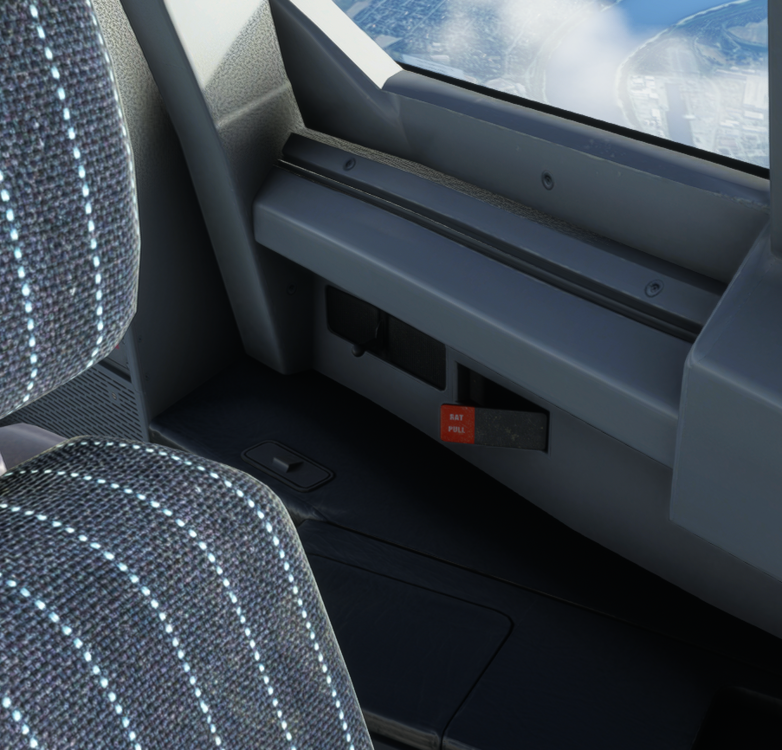
-
Thanks for following up, closing this thread 🙂
-
Heya! What part isnt working when trying it through the iniManager please? That should work without an issue. Also the issue should hopefully be fixed for the next patch, it´s a intermittent issue and we are working on a solution 🙂
-
Heya! I can confirm the Number 2 is missing for me as well, the hatswitch to the right looks left for me as well, but the hatswitch to look to the left actually does look to the left for me. I´ll forward it to the devs 🙂
-
Also is it just on this runway, or is this everywhere?
-
Yep, basically what Alexair said. Please make sure that you don´t have any other hardware (e.g. a dormant PS/Xbox controller) connected to the sim that could interfer with it. Also make sure you removed the chocks, that could also be the issue 🙂
-
Did you buy it on the iniStore? If so you can just click the Update button in the iniManager 🙂 If you bought it somewhere else, best to remove it completly and then just drag and drop the new version to your community folder.
-
To be honest, I don´t even think they need to update them, as they want a 4th gen CPU (Intel) or a 1st gen Ryzen CPU. This includes all the features those CPU possess, AVX included. They specifically don´t quote any core counts or GHz speeds. Both those CPUs listed above are Legacy Xeon Processors, so 5 generations prior to the one wanted.
-
A sim has not been confirmed for the A380. This development update only showed the model in MSFS, but this doesn´t mean it will come for MSFS. This update is 2 years old after all and just showed that we were also able to do stuff for the - back then - new sim.
-
Oh yeah, 100%, if I made it sound like it was your fault, my apologies. This definitely is a bug and we need to fix it. But yeah, we unfortnuately need reproducable steps for that.
-
Again, we really want to fix those bugs, but we need reproducable steps to get to the frozen state. Otherwise it is nearly impossible to iron those out 😕
-
Yes, of course you select the active frequency with the TFR switch. What I meant is that the left field is coded as always being the active one, which is why the ingame ATC switches that one. I do not own the BAe146, so could you please confirm (maybe even with a video) that the ingame ATC switches the right frequency when it´s selected as the active one?
-
Thanks for reporting for sure 🙂 And yeah, if you manage to reliably reproduce it, please do let us know! I´ll play around a bit more with the RSKs and see if i can get it to crash.
-
Mh.. this doesn´t make any sense to me 😕 With an empty community folder there should be nothing interferring with loading the A310 and giving you those kinds of issues. I unfortunately don´t even have any other steps you could do, as you said you already tried reinstalling, tried with empty community folder, tried with disconnected hardware.. Do you maybe have any kinda Antivirus software running in the background that could interfer with it for some weird reason?
-
Heya! We´re currently working on an update for the Xbox version, which should arrive Soon™ that should fix those issues 🙂
-
Gonna bet that the cabin light mod messes with it 😄
-
Heya! This is the Aerodynamic Visualization. You can turn it off in the Assistance Options 🙂

-
Heya! Sorry for the delay, I can reproduce this and will add it to our internal bug thread 🙂 Thanks for reporting 🙂
-
Heya! So I actually ran into this issue myself just now. Do you have any other mods for the A310 or that are A310 related in your community folder? If so, please remove them 🙂
-
If you could try and reliably reproduce this, it would be a great help at fixing this issue. But for the moment its rather hard for us to nail this particular one down 😕


