




richboy2307
Staff
-
Joined
-
Last visited
Everything posted by richboy2307
-
Thanks for the suggestion. I'll share with the team.
-
Thanks for the suggestion. I'll share with the team.
-
-
Yes currently only via those LVARs but I'll check with the team in case its possible to implement control via simconnect/default events as well. Thanks!
-
Hi, currently there aren't any more liveries planned for the A300 however we note your suggestions in case we do. In the meanwhile the best bet is for community to paint some, or find some painters through those sites to who may take requests/commissions for A300 repaints. Thanks!
-
Hi @janjoensson Usually we do not exactly when updates will go live, however EGLL update v3.1.0 (PC) on marketplace has finally gone live as of 20th May. Also for your reference, if you want you can actually request to transfer your order from Marketplace to IniManager here: https://forms.inibuilds.com/order-transfer Thanks!
-
Thanks but I believe this is more applicable to the A300 so moved. Thanks!
-
Hi, thanks for the video. I'll pass it on to the team.
-
Hi, thanks for your post. Apologies for the late response. Can you confirm when did you notice this? Also where? As I'm not seeing this as of the v1.1.25 on the overhead. Thanks!

-
Thanks for the feedback, i'll pass it on to the team! As for the Terrain Radar on ND however, that is not simulated for the time being as the default sim terrain radar has significant performance issues.
-
Thanks, please see this and reply there.
-
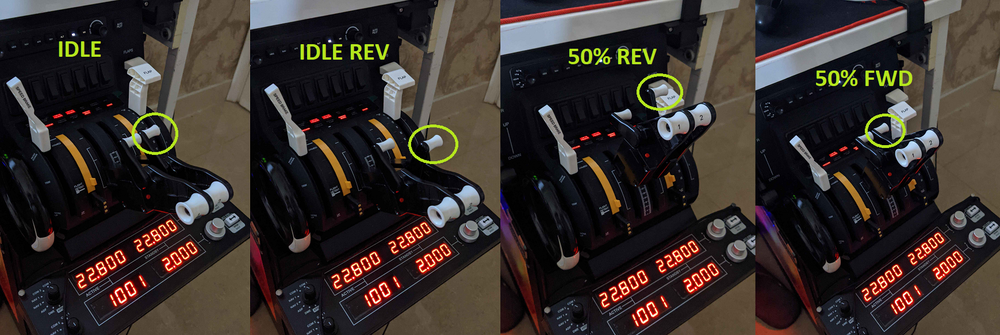
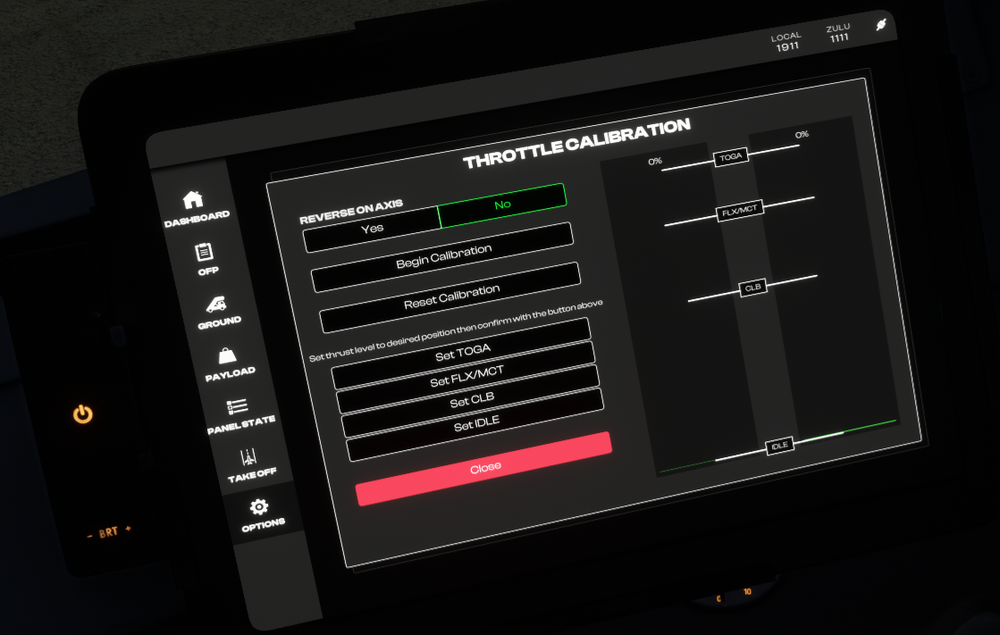
In my defence, FSUIPC has this labelled as "Toggle Reverse Thrust" for some reason on their mappings (lol), so I assumed it would be the same name on MSFS. But you're right the "Hold Throttle Reverse Thrust" binding needs to be used in MSFS instead. (See screenshot for MSFS controls setup) In either way it is setup, to achieve IDLE REV with reverser doors deployed, I have to move the throttles forward after lifting the reverse lever button (circled), but only ever so slightly. This is seen in the Spad.next screenshot - the bar fills up fully red at 100%/full fwd position. If you move the throttle lever axis back to 0%, then reversers will stow themselves so it does need some input above 0% for reversers to deploy. I've also enclosed a screenshot of the plane's throttle quadrant and you can see its basically just below 0, yet the reversers are deployed. You don't have to be significantly in the yellow range for it to work. Right, I don't use that bottom button zone for reversers. On my setup I use those instead for toggling fuel cutoff switches, so I can shutdown/startup engines using the Bravo TQ. While that would be ideal, unfortunately as far as we know there aren't currently any LVARs that can be written to externally for throttle control. ``XMLVAR_Throttle1Position`` (2 for Eng 2) is what controls the levers currently, with 1.0 being IDLE, 0.0 being MAX REV, so ~0.95 being IDLE REV. But I've tried via SPAD.next atleast and its unable to write to this LVAR reliably. It may set the value for a second or so but it will then revert back to original value. Do let me know if you have any success though. Thanks!



-
Hi all, Could you please record a video like this where you notice the issue? While this is PC, i've tried a few times and not able to reproduce these issues. In order to go back to managed mode there needs to be a valid flightplan in the MCDU as well as the INIT/PERF pages filled in. 2024-05-28 22-43-29(1).mp4
-
What do you mean the button is not recognized? With AP1 on, if you mouse over to the red button and click it, you will hear the alert for 1 second once but no master warning and or AP OFF ECAM warning. With AP1 on, if you disconnect via the AP1 FCU button, you will hear the alert continuously and get a Master Warning flashing red, along with AP OFF ECAM warning. Then if you click the red button on the stick, both will be silenced. (see video) Are you using any AI assists for rudder? Also the tiller axis is disabled above a certain speed (~80 KIAS if I remember correctly), but the rudder should still be effective. Thanks! 2024-05-28 22-12-59(1).mp4
-
On the A320Neo you need to set fuel and payload via the EFB. It will not work if you try to do it via the toolbar payload menu. After you select the desired value, you need to hit apply and select a loading option (Instant, Fast or Realistic). Not a video but try this: Thanks!
-
Hi @Marcel Booij On LOCKED interaction mode, when you left click on any of those knobs, it will show you a drop-down with the possible interactions in order to interreact with the switch. For example here in order to set Managed mode you need to Right click, or in order to set selected you need to middle click. In order to see this guidance you need to enable 'INSTRUMENT DESCRIPTION TOOLTIPS' from the accessibility menu (either Delayed or Instant per your preference) Thanks!


-
Hi @Frafty, the MCDU autofills the frequency as set by the airport scenery itself. However if there is some discrepancy between the airport data vs the actually ILS LOC/GS set-up per the dev or navdata then the end result is what you see. So its best to cross-check what is auto-filled and make the appropriate corrections where necessary as this is always a possibility with faulty/outdated scenery data. Thanks!
-
Hi @AFR7545 Could you please share the route you were trying? Also are you using Navigraph navdata? I've just tried on this route (VHHH DCT CH DCT MAGOG A470 SWA V37 JCS V36 TEBON ZSAM) and do not experience such issues (see video below) Yes this is the only one. If there are any changes, that package itself will be updated. 2024-05-28 20-52-35(1).mp4
-
Hi @Lewis Hughes This is the correct behaviour per Airbus logic as they want you to disconnect AP using the red disconnect button on the control stick. This should be mapped to the 'Autopilot OFF' command in the control options, so you could assign a key/button to it or simply click it twice with your mouse in the cockpit to both disable the AP and silence the aural and ECAM alert. Thanks!
-
Hi @SPN136, is the plane actually stalling or this is only showing up in what I think is your VA event logger?
-
Hi @notam.sky that red button should be mapped to the AUTOPILOT OFF command, so you can assign your button to it. Also just to confirm, have you set the Audio Control Panel (ACP) properly as well, as shown here?

-
Hi thanks for the report, logged.
-
Hi @UpUpandAway this was all taken from real timings / data on the 320neo. If you have any reference data to the contrary, please feel free to share. Thanks!
-
Hi @UpUpandAway, I'm not certain if you can do this entirely via MSFS Control options, but I have mine set via FSUIPC/SPAD.next as follows: - Axis 1 assigned to Throttle 1 Axis (same for 2) - EFB Reverse on Axis = NO - One of the the reverser lever button (circled in the image) set to TOGGLE THROTTLE REVERSE THRUST (don't assign both as they will just cancel each other out). This will basically act as DEPLOY/STOW for your reversers. So essentially, once I lift the reverser button (circled) on my hardware throttle lever, the position of both the throttle axis is basically controlling how much reverse thrust I want (as opposed to forward thrust as it normally does). At Idle it would be IDLE REV and full forward it would be MAX REV as long as that reverser button (circled) is lifted. When I'm done with reversers, I'll simply lower the reverser button (circled) on my hardware throttle lever, and this will then allow the levers to work for forward thrust as normal again.

-
Hi @MikeHughesNews Firstly, please ensure you are using your Pilot ID (Numbers only) on both the MCDU and EFB settings. Secondly as mentioned above, ensure you are using the correct aircraft type (A20N), have the 'Detailed Navlog' option enabled on Simbrief Dispatch, and are using the same units (KG/LBS) for your Simbrief Dispatch as set on the EFB settings. Thanks!


