




richboy2307
Staff
-
Joined
-
Last visited
Everything posted by richboy2307
-
Hmm, are you using any assists or auto rudder that could be causing issues? Or is there some imbalance in between left and right thrust/fuel load that could be causing constant correction? The only other report we've received of this issue in the past the user claimed the issue "fixed" itself after a reinstall. While I'm not certain that is the issue here, it wouldn't hurt to try? Thanks!
-
Hi We are not able to reproduce these issues on our end with v1.1.1, even with Navigraph navdata. Could you please try troubleshooting such as : Do a flight without any other addons, only the A300 in your community folder, to see if there are other addon conflicts. Delete the contents of your "work" folder after a fresh re-install to ensure no corrupted data: Steam: %APPDATA%\Microsoft Flight Simulator\Packages\inibuilds-aircraft-a300-600 MS Store: %LOCALAPPDATA%\Packages\Microsoft.FlightSimulator_8wekyb3d8bbwe\LocalState\Packages\inibuilds-aircraft-a300-600 Make these flights in default "White" or "Inibuilds House" liveries to eliminate any "bad" livery files causing conflict And when you do encounter the issue, report with: Screenshots/Videos of the failed systems or anomalies you notice Write-up of the things you did just prior to the crash (e.g. what you clicked, what you interacted with, what control inputs you gave etc) Cirtcuit route information & navdata used (E.g. Navigraph data - KMKE/01L YOUNT KMKE/01L ILS) Any extra things you noticed just before to the crash (e.g. momentary sim-freeze, abrupt winds change, sudden weather update etc.) Thanks!
-
Hi this was removed from xbox version due to performance issues reported by users. Thanks!
-
Hi @Trevor can you please provide a screenshot of this issue? I have just loaded up at a gate (B25) in FACT, on A300 v1.1.1, and selected RWY01 for departure, and selected same on the EFB, yet I am not seeing this issue.


-
There had been interim issues with Simbrief import on Xbox, which should be resolved as of SU15 public release. Please let us know if you still experience such issues since, on v1.1.1. Thanks!
-
Please report if anyone has had this issue on v1.1.1 and SU15 update. Thanks!
-
Hi as mentioned above, there have been changes made to account for the new ground physics model brought by in SU15 which allows for better friction and inertia modelling, so you need to be slow enough (Below ~10 Kts) whilst also providing enough power and using differential braking where necessary to make turns, especially 90 degree ones. As for the steering controls, with the EFB rudder till option enabled, the tiller should be controllable by the same axis assigned to your rudder. To troubleshoot, you can disable this option, un-assign your rudder axis, and assign that hardware axis to 'Nose Wheel Steering Axis' instead in MSFS Control Options. See if you are able to turn the nosewheel and taxi using that. If yes, then it is a case of the rudder steering axis not connecting to tiller properly. There are no issues seen regarding this in our internal testing or via the beta testers. However you may try instead to close the sim, clear the contents of this folder, then reload the sim and load into plane, reconfigure the settings and try again. It will regenerate the files and re-compile the module, to eliminate any faulty compilation on initial loading. Steam: %APPDATA%\Microsoft Flight Simulator\Packages\inibuilds-aircraft-a300-600 MS Store: %LOCALAPPDATA%\Packages\Microsoft.FlightSimulator_8wekyb3d8bbwe\LocalState\Packages\inibuilds-aircraft-a300-600 Thanks!
-
Hi, thanks for the rerport. As stated before, we have not been able to reproduce crash-on-load issues on our end or via our testers. As such we need users who are facing such issues to engage in additional troubleshooting on their end to help us resolve this issue. Please refer to the steps mentioned in this post : Thanks!
-
Yes feedback/requests regarding this are noted internally. Something we may look into in the future, but no guarantees. Thanks!
-
Hi what was the route used when you noticed this? I am not able to induce any WASM crashes by simply adding a STAR/APPROACH proc to an ALTN airport on the MCDU FPLN page. Also please provide the Navdata source used (Navigraph or Default). See attached bits from FCTM. Thanks!

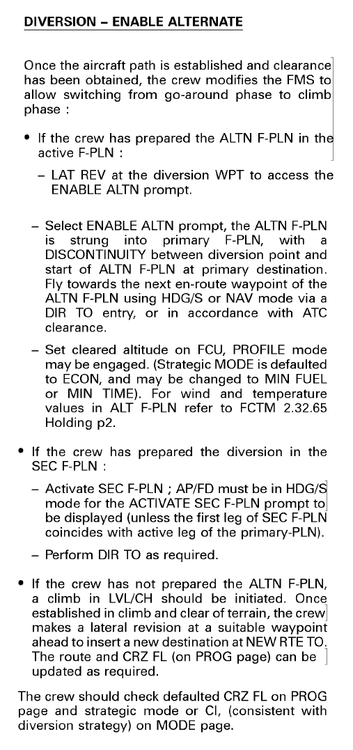
-
Thanks for the report. We would certainly like to fix all the sources of WASM crashes. In order to tackle this better, we need more details so we can try to recreate the circumstances that lead to your crashes, and try to identify the root cause. So can you please provide more details such as: - Is this issue specific to any engine type/variant? - Is this issue happening after SU15 release? - What was the route, and what specific action lead to a crash (what did you click or input you gave prior to noticing the crash)? Thanks!
-
Thanks for the report. Can you confirm the navdata you are using?
-
Thanks for the report, logged.
-
Hi, Thanks for the the report. Sounds like a WASM crash. Can you please detail how you changed the destination? Was it by entry KSDF/KSFO in the FROM/TO field on INIT page? Also please share what navdata source (Navigraph or Default) and the original flightplan (e.g. VHHH/25L BEKO2B BEKOL A461 IDUMA IDUM3B ZGGG/20R) Thanks!
-
@Erik Thanks again for your post. The team has spent a load of time testing different combinations to make it available to no avail. It used to be straightforward (anything without a jetway) but now it seems something has changed since about SU14. In short, the ramp system is bugged. We're aware of the issue but don't have a solution at this time. The issue occurs whether the parking is set to GATE or RAMP of any size.
-
Hi, Just checked in MSFS v1.1.1, I am able to define a new waypoint using below method, and able to recall/use the newly defined custom waypoint on FPLN page using the defined identifier With regards to direct entry of LAT/LON WPTs on FPLN page, this is currently not implemented and results in 'RUNWAY NOT IN DATABASE' error message instead of the LLXX WPT entry (similar to PBD WPTs). The feedback is noted and we'll look into it. Thanks!
-
Hi, Can you please also confirm if you are noticing this issue without your hardware controllers connected? Or if there may be any bindings for aileron trim or rogue (wrong) aileron axis inputs affecting this? Check your bindings to see if there is a particular axis bound to aileron that shouldn't be, or that there isn't any jitter in your axis inputs. Thanks!
-
Hi, First of all apologies for your experience. The team is monitoring feedback and taking action on reproducible issues. With regards to such WASM crashes, unfortunately it isn't usually a clear or "easy" fix, and while may be happening in one sim, may not be happening or reproducible in others. In order to tackle this better, we need more details so we can try to recreate the circumstances that lead to your crashes, and try to identify the root cause. So can you please provide more details such as: - Is this issue specific to any engine type/variant? - Is this issue happening after SU15 release? - What was the route, and what specific action lead to a crash (mention the procedure/waypoint/data entered specifically)? - What navdata are you using (Navigraph / Default)? If able, please also provide any media (screenshots/videos) of steps taken leading into the crash as it can help greatly! Once again, apologies for your experience but the team is working to resolve as many of such issues as possible. Thanks!
-
Hi, We checked internally and through beta testers and do not see reports of such with PG enabled, and the client loading in the data as intended. These bumps will only appear if PG is off due to the missing elevation data. For the same reason this could also happen with PG On, if due to some connectivity issues the required data has not been streamed/downloaded into your client. Thanks
-
Thanks, these and other reports of terrain issues are noted by the team and being looked at.
-
Thanks, as reported previously, it is logged for the team to look at. The currently released A300 build was already made with SU15 in mind and tested with SU15beta as such. However things can change sometimes with public release of SU. so we will be giving it another look. Not specifically about this issue, but updates in general are planned and will be coming. Cannot provide any firm time estimates on them. The team has been awfully busy behind the scenes but is working to get caught up on all the issues and updates for products accordingly. Appreciate your patience and understanding. Thanks!
-
Thanks, the terraforming is designed to work with the full terrain data that comes when photogrammetry is enabled. If that data is missing or incomplete, then the terraforming will appear broken too. We are not noticing such issues on our end with a fresh install of the scenery (via iniManager).
-
Hi, it would help if you could provide a video clip of the issue as we have not seen such issues ourselves or reported by others during the SU15beta. Regarding the throttle calibration, can you confirm you are seeing the changed IDLE/CLB/FLX/TOGA detents on the EFB after calibration? If not try to reset the calibration, toggle REVERSE ON AXIS on/off, before setting to the value you need. The ATHR light may not come on if your throttles are not in the right detent. Thanks
-
Hi could you please provide a screenshot of your payload and t/o calc pages on the efb? Also of the INIT B and PERF TO pages on the MCDU. To cross check if the weight/weather and other taken by the EFB/Plane are matching what was actually in loaded into the plane. Thanks!
-
Do you have any hardware/control bindings that could cause conflicts? Such as master battery/alternator switches on Honeycomb Alpha Yoke for example. Also does this happen even when spawning on the runway/mid-air? How about when using EFB panel states? Thanks


