richboy2307
Staff
-
Joined
-
Last visited
Everything posted by richboy2307
-
It means the bug is logged internally for the dev team, and they will address it in a future update if possible. Unfortunately that is not something that would be user configurable, and will not be implemented as an option. Thanks for the suggestion though.
-
Hi @SylentPG, Perhaps try to clear the contents of this folder. It should regenerate these the next time you try to load into the plane: Steam Version: %APPDATA%\Microsoft Flight Simulator\Packages\microsoft-aircraft-a320neo MS Store Version: %LOCALAPPDATA%\Packages\Microsoft.FlightSimulator_8wekyb3d8bbwe\LocalState\Packages\microsoft-aircraft-a320neo Thanks!
-
Hi @Giuliano Arruda I haven't noticed this myself, nor seen it reported by any other users till date. Are you landing with the AutoThrust (AT) enabled, or is this happening with manual throttle control? If manual, can you check your throttle calibration? It seems like the "IDLE" position on your throttle axis may be configured to TOGA perhaps. Toggle the 'REVERSE ON AXIS' setting to force reset the existing calibration, then calibrate again with your desired settings. If with AT, as if conducting an auto-land, you will be able to regain control of throttles by disconnecting AT. Also ensure you have retarded your physical throttle levers (if using hardware axis) to IDLE prior to touchdown as during ROLLOUT, the AT will disconnect and then your hardware axis becomes active. So if the lever wasn't already in IDLE, but instead at TOGA as set during takeoff, then the problem can occur. Thanks!
-
Hi @Geoffrey Hargreaves You need to use the rudder axis to steer, and before that ensure you have ``RUDDER CONTROLS TILLER`` option enabled on the EFB. Additionally, the A320neo uses the new ground-handling as introduced in SU15, meaning for tighter turns you need to go slower (~10kts or less) or else the inertia of the plane will cause the wheels to skid and reduce turning ability. As for Simbrief, you need to enter your Simbrief Pilot ID (Numbers only) on the EFB (Options Page) & MCDU (MCDU Menu > ATSU > Pilot ID). For Xbox, ensure you have enabled the ``ON SCREEN KEYBOARD`` from the EFB options, and use that to fill in the ID on the EFB. If you use the 'Xbox Overlay Keyboard", it may not accept the value entered, even if it shows on screen. Thanks!
-
Hi @mido2040 The team is already aware of the reports of performance issues by some users and looking into it. Thanks!
-
Hi @Timm Turner The flightplan you set/import in the World Map will not be loaded automatically into the plane. You need to either: Enter it manually in the MCDU, OR Import your Simbrief flightplan into the EFB (Dashboard Page > Simbrief Icon) and MCDU (INIT Page > select INIT Request) To import from Simbrief, you need to set your Simbrief ID on the EFB & MCDU first as follows: EFB - Go to Options page > enter Simbrief Pilot ID (Numbers Only). You can enable the ON SCREEN KEYBOARD option too from below to help you fill it in. MCDU - Press the MCDU Menu button > select ATSU > Enter your Simbrief Pilot ID (Numbers Only) Thanks!
-
Thanks for your detailed report. Has been logged for further testing. Yes the result sounds like a WASM crash, hence why certain systems are now INOP/unresponsive. Unfortunately though we haven't been able to reach the same result internally yet, having tried multiple times, across variants (PW F/PAX, GE F/PAX). Here's a video of one such attempt in N744FD (Fedex PW F) at EDDM: 2024-06-07 02-07-01(1).mp4 If there were any WASM crashes, it would have showed up in the Dev Mode Console Window on top left immediately with a warning in red. However as you can see after doing this process, none happened and all systems can be interacted with without issues. Do let me know if something was missed in this process however. Thanks!
-
-
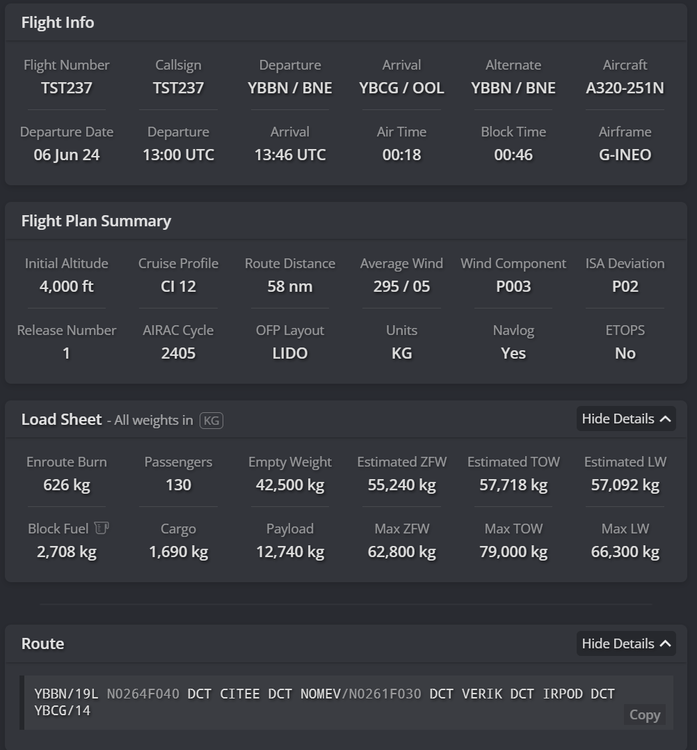
Hi @Bazz So it shouldn't ignore your constraints in a managed descent (DES). It would however ignore them in an Open Descent (OP DES). Normally you would see on the bottom right of your PFD, the target ALT, same as set on your FCU in blue colour. If it is limited by any constraint, it would show up in Purple with the ALT of that constraint. So when you are noticing this issue, could you please provide a screenshot of your PFD,ND, FCU and also the MCDU (FPLN Page)? Could you share the full route that you tried? Also a screenshot of your INIT A/B pages or list the values used. I have just tried with a couple of randomly generated dispatches via simbrief and not exactly seeing your calcs. Here's an example: From this, I can see for YBCG RNAV-W RWY 14, the following computed path: Do note that VAPMU is programmed in this procedure as 2500ft or above alt constraint by the navdatabase itself, and we cannot control that. So given this restriction, it has computed the path (within margin of error) whilst still abiding by the constraints. I am not able to reproduce the erroneous path currently, but would love to try with the data you are using to see if we can reproduce the problem, and thereby improve on it. Thanks!
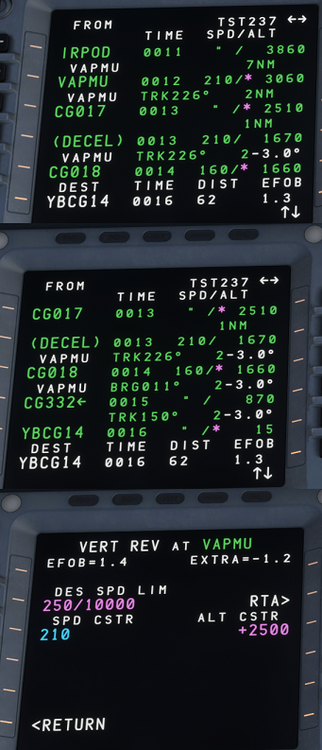
-
For our aircraft (e.g. A300/A350) we probably could theoretically, but obviously no for Microsoft products like the A310/320neo. Thanks!
-
Hi @Kevin B There is an update currently under testing that includes performance and stability fixes. Please try with that once available and let us know about your performance then. Thanks!
-
Hi @DanDan87 / @Airbuskid87 Can you check if you have Aircraft Light assists set to OFF? (Options > Assistance Options > Aircraft Systems) Do note, after setting it to OFF, you will need to restart the flight for changes to take effect.
-
Hi @Shanks16 Thanks for the data. We do have performance metrics internally as well, which we gather from tests across different tiers of systems as part of the optimization process but never hurts to have have more data for analysis. Shared with the team. Also would appreciate if you could run the same test on the upcoming A300 update once it is available. There are some performance and stability improvements coming in that, so would be curious to see the difference on your system compared to the current data. Thanks!
-
Hi @LeeH No, we do not have any more liveries planned for the moment. Thanks!
-
Hi @Thompson Thanks for the suggestions. 1) Navigraph Charts - As this is a Microsoft Product, that decision ultimately rests with them. As much as you or we would love to, in the end such integrations with 3rd-party, non-default services have to be wanted and approved by them in their product. 2) In-Game ATC integration - your suggestion is noted and shared with the team. Thanks!
-
Hi @MitchellAA300 We just checked on our end and are not able to reproduce such issues with lighting. The lights will generally disappear at certain zoom levels (as this is part of LOD optimization for performance reasons), but they remain on in external views at the right zoom level. Also stairs are only available on cargo variants. Are you not able to see them via the EFB on the cargo aircraft?
-
I'm afraid you're on your own with that as that is copyrighted and protected material that we cannot share whole. However, google is your friend 😉
-
Thanks, reported.
-
Hi @kekki Please English only on these forums. And no you shouldn't need to restart the plane after every flight. What is the issue you are facing?
-
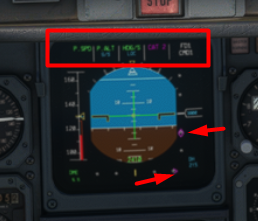
Hi @BrownCow069, Good catch. The 'Actual N1%' needle (green arrow) is correct, and at max reverse ~45% N1 is expected. However what appears to be wrong here is the 'Thrust Lever Angle (TLA) Position / N1% Command' needle (red arrow), so will log that as a bug. Thanks!

-
Thanks for confirming my statement. It "updates" with some "ILS data" every time you select a procedure. The 'phase of flight' determines whether that "ILS data" should be read from Departure Airport or Arrival Airport files. But if you continue further to read the third paragraph, you'd notice: In other words, when you select a procedure, the MCDU is calling on a default MSFS function that pulls the "ILS data" from an airport. The "ILS data" it pulls, is as defined by: the scenery itself (default or add-on) OR some other scenery files (as added by Navigraph or other navdata addons).* *The priority of the load order between both of the above is also not something the a320neo can control. There is no independent nav-database that the airplane is calling upon (e.g. in addons such as Fenix or PMDG which you can update via Navigraph Hub). So the "fix" to this issue is to ensure the scenery data and additional navdata is not in conflict, and appropriately taking precedence. Hope that helps you to better understand the issue. Thanks!
-
Ah, sorry I misunderstood your request. But that should be an easy fix. Bug logged, thanks!
-
Hi @Hungrypilot We currently have it tuned per IRL data for the A306. The BRAKE FANs exist for this reason, and are important equipment on this plane (unless you got time to wait for your brakes to cool). Generally, the slower you are, the less energy there is to lose using brakes, and the less heat will be generated as a result. In short, more flap, more reverser, less brake. Turn on brake fans as soon as you vacate. Do note that even with them ON, the brakes will continue to heat up as they try to dissipate the energy stored in them, and eventually they will reach equilibrium and the fans will start taking effect. Thanks!
-
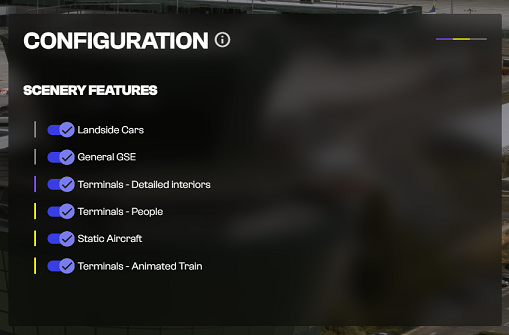
Hi @PotatoSalad Ensure you are on the latest version of the the iniManager (2.3.7). On launch of the iniManager, it should automatically download the latest version of the 'scenery_config.json' file that rectifies the issue. In case you are still not able to see the options, please re-install the scenery. Thanks!
-
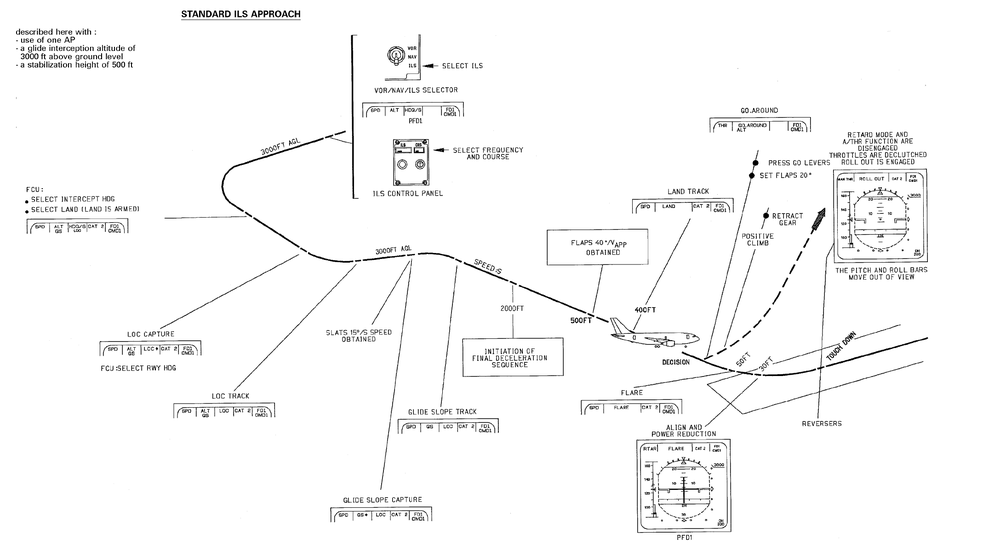
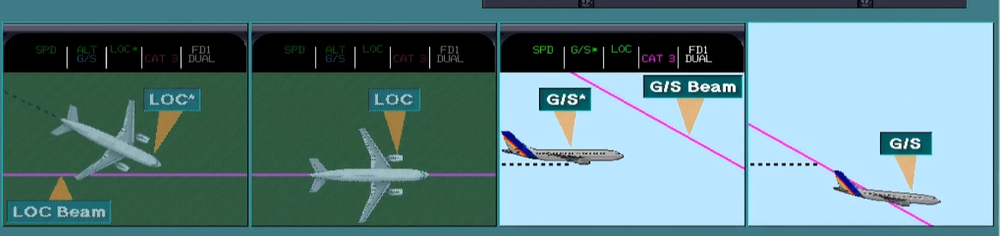
Hi @JoeDel To intercept an ILS, you need to: Fly on an intercept heading/course towards the LOC, and Capture and establish on the LOC before you can capture the GS Capture the GS at an altitude below the GS If you are already above the GS, the AP may still capture the LOC, but will not initiate a descent to capture the GS. The airplane will also not follow the GS until you are established on the LOC first. From your screenshot, I can see LAND is selected on the FCU, and G/S & LOC are properly armed (in blue) as the next modes for the autopilot to capture. However, from the ILS raw data, I can see that the LOC is to your right, and the GS is already below you. From the current position, you'd need to fly further to the right to intercept the LOC, and initiate a descent to a lower altitude (e.g. 1500ft) using VS mode (at -1000 fpm or as necessary) to get below the GS to intercept it. There are plenty of video tutorials available on youtube regarding this, but here is a Computer Based Training (CBT) for a standard ILS approach: https://youtu.be/bS_tLfKDak4?t=587 Hope it helps, thanks!