




richboy2307
Staff
-
Joined
-
Last visited
Everything posted by richboy2307
-
Yoke AP Disconnect The Autopilot Disengage button on the yoke is actuated via the AUTOPILOT OFF keybind. You need to press it a second time to cancel any AP DISC warnings. Please verify the button you are using is mapped only to that keybind. AP 1 Master Switch on Glareshield The TOGGLE AUTOPILOT keybind is used to toggle the AP 1 Master Switch between the CMD and OFF positions. Note turning AP 1 Master to OFF via this keybind will trigger AP DISC warnings that must be further cancelled via the AUTOPILOT OFF keybind which actuates the Yoke AP Disconnect. See for reference this post: https://forum.inibuilds.com/topic/36540-tm-mode-goes-to-000-epr-if-ap-is-off/#findComment-89422
-
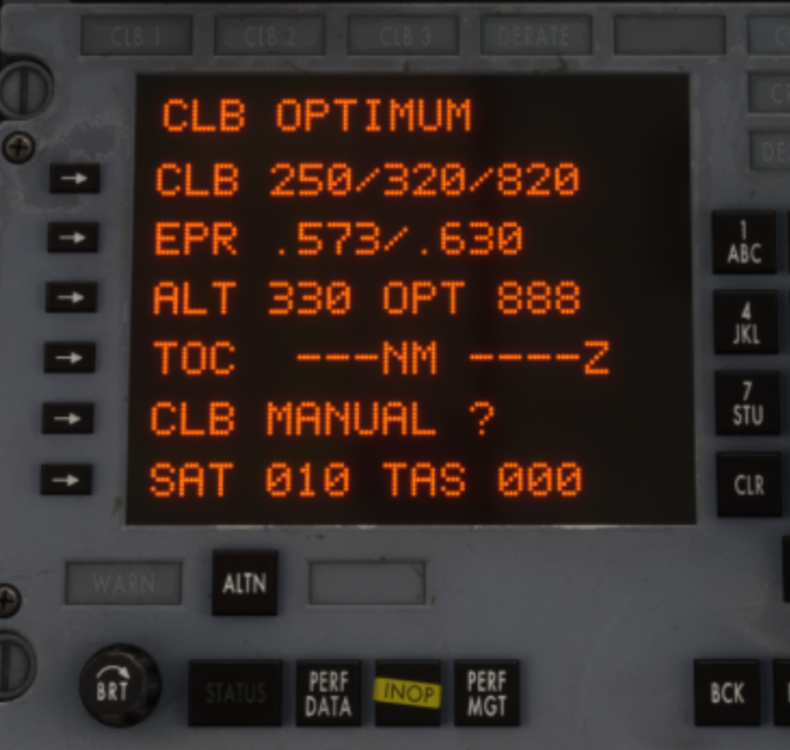
As of 1.0.5, Using TM+VNAV in climb will target either the OPT or MAX EPR values shown on the PMS CLB page depending on whether your current weight and TAT fall within the OPT range. If its within, it will use OPT power settings, else it will go for MAX values until back in OPT range. The fallback to MAX EPR is a failsafe to avoid users getting stuck in a very slow climb outside of OPT table parameters. So from the example below, it will target either .573 (OPT) or .630 (MAX) EPR depending on whether within OPT CLB parameters, and will automatically alternate between the two depending on atmospheric conditions and weights. For initial climb out, manually manage throttles (coupled with VS Mode if using autopilot) until you are in clean configuration before engaging TM+VNAV. If you want you can manually manage throttles per OPT values all the way to TOC to experience the slower climb rates that it will do at those OPT EPR values specifically.
-
As Agfors said, the HSI DIS/TIME Readouts are only driven by the INS Computers and are NOT coupled to the DME on the Tristar based on all the refs we have.
-
Hi @agfors @Prof_Plumpy Please check again on v1.0.6 and advise. Refinements have been made to the TM+VNAV / IAS / MACH mode controllers that we hope will alleviate the delay in response in maintaining pitch/speed in the various modes. As for TM+VNAV specifically for step climbs under 10,000ft, this actively being worked on by the team for 1.0.7 specifically. Some of the improvements may be noticeable on 1.0.6 itself, particularly on CPT PMS coupled with AP1 but overall work continues on this.
-
Thanks suggestion is noted.
-
Thanks logged for the team.
-
As MD82 has said, Both Rudder (Rudder Axis) and Tiller (Nosewheel Steering Axis) will control the nosewheel. That is how it is on the real aircraft as well and this is what is simulated now since v1.0.4 The difference between the two is in the degree of travel. The rudder alone has limited movement of nosewheel, while the tiller can move the wheel much further/sharply. So even if you set RUDDER CONTROLS TILLER to NO, you will see some limited nosewheel steering with rudder axis input alone. Then try giving tiller axis input (to either left/right extreme) and you'll note it goes much further. If you're having any other issue, please provide video/screenshots of what you're seeing and also of your keybinds for both Rudder Axis and Nosewheel Steering Axis. ---- Moderation Note: I have deleted the irrelevant messages that had no bearing on the issue at hand. Thanks!
-
Hey Glad its sorted. For the benefit of other WinCtrl hardware users that may suffer from same in future, could you list exactly what was the issue and what you did to fix it? Thanks!
-
The GNS530 getting stuck on initialisation is a sim bug as far as we can tell. It's all WT code and we're not doing much our side with it besides giving it power (without which the display wouldn't turn on at all). If you do get stuck in this situation, you can as Jake suggested, try to recycle power (Trip the APU GEN or disconnect EXT Power) as that usually resets it. Alternatively you can try to restart your flight though that is rarely necessary. This issue is reported on other aircraft using WT GNS as well and we're hopeful it will be resolved eventually.
-
Hey Randomised from doors open to doors close on the ground Random 10-15 mins after seat belt sign turned on above FL200 Randomised on ground after doors open again for arrival
-
Thanks, there were many different cabin configurations for the L1011, but the version we’ve modelled is based on the best references available to us. At this time, we don’t have plans to add additional cabin layouts, and we believe the existing variants already offer a good range of options to capture the feel of this era of aviation.
-
We're not seeing this our end. Try the following maybe? If you locally installed the addon via My Library, try deleting and revert to streamed version? Check under "My Library" if these liveries show up and are not "disabled"? Delete your Content.xml file and restart the sim after to let it build fresh. NOTE: This will reset any addons you may have previously disabled manually via My Library. Keep a backup of the original file and re-disable the addons after if needed.
-
Is a livery-side issue. Already reported elsewhere, the relevant livery artists will work on it when possible. Expect livery updates via iniManager or Marketplace Livery packs for this. Thanks!
-
Try spawning on runway, then use whatever keybind is bound to TOGGLE AUTOPILOT MASTER? For me its Z on my keyboard and another key on the Win Cntrl URSA Minor joystick and both work. If that doesn't work, for testing purposes try creating a new controller General Controls and Airplane Controls profile that is blank with only TOGGLE AUTOPILOT MASTER bound. This will help rule out some keybind conflict. 2026-05-01 13-32-52.mp4
-
The AP1 can be toggled between CMD and OFF using the "TOGGLE AUTOPILOT MASTER" keybind. The Autopilot disconnect (on yoke) can be used via the "AUTOPILOT OFF" keybind. The only one not mapped is AUTOPILOT ON as forcing it on via key event was causing other logic issues with CWS in certain cases. As for the 000 EPR issue, as mentioned above team is investigating the correct behaviour and working on it for a future update. Thanks!
-
Try this recommended procedure If starting fuel quantity is less than 63,000 lbs: Feed tank-to-engine throughout flight. If starting fuel quantity is between 63,000 lbs and 116,000 lbs: Crossfeed all engines from tank 2 until fuel levels in all tanks are equal. Leave one tank pump operating in tank 1 and tank 3 while crossfeeding from tank 2. Monitor tank quantities to ensure that lateral balance remains within limits. Feed tank-to-engine for remainder of flight, especially when fuel remaining fuel quantity is less than 63,000 lbs. If starting fuel quantity is 116,000 lbs or greater: Crossfeed all engines from tanks 1 and 3 until total fuel remaining is 116,000 lbs. Crossfeed from tank 2 until tanks 1, 2, and 3 are equal. Leave one tank pump operating in tank 1 and tank 3 while crossfeeding from tank 2. Monitor tank quantities to ensure that lateral balance remains within limits. Feed tank-to-engine for remainder of flight, especially when fuel remaining fuel quantity is less than 63,000 lbs.
-
Thannk suggestion is noted but just for reference you can "right click" or "middle click" on the dial to auto-set current GW value.
-
There is no default profile, though we do have an "official" one available in the FAQ section: https://forum.inibuilds.com/forum/744-faqs/ You just delete any 3rd party profile you installed and replace it with this one. Restart COUATL after if sim was running at the time.
-
Repaints (those obtained via iniManager) should not affect this as there are no files included that would affect systems logic. We can't say the same for all community-made liveries however. Changes have been made in v1.0.3, so please let us know if this is still the case now?
-
-
-
Thanks, with 1.0.3 we have made changes to the AP controller, but only added this to "VNAV" for now. We are working to implement the same logic into IAS/MACH modes as well for future update. If you have any additional feedback meanwhile, specifically to how AP behaves with TM/VNAV , please let us know. Yes, see the post attached below. We're investigating the following:
-
I have split your topic as its a separate issue to the one you had replied to. Thanks we want to investigate this further. Was your AFCS ALT window indicating the mode as "ALT CAP" still when you changed the target? Or was this after it had already changed to ALT? How were you changing the altitude target? click and drag or mouse wheel? Thanks!
-
While it is correct that TM mode requires FD+AP, we'll have another look at what it should do when conditions are not met (i.e. just disengage TM instead of commanding EPR 000/IDLE thrust). The other thing to note is that both PMS are independent, so need their data entered separately. PMS1 data is only used by AP1 channel.
-
Hi There is a potential fix in v1.0.4 coming that may address the issue of the spoilers not appearing visually post landing. Please verify and let us know after. Thanks!


