




richboy2307
Staff
-
Joined
-
Last visited
Everything posted by richboy2307
-
Hi @dkoch Thanks for your feedback. I'll share with the team. Correct, in the real unit it should be for indicating the markers with varying levels of flash. This is already a known item internally, and unfortunately we couldn't get the sim to play nice in providing those indications so opted to make it a signal status light in the meanwhile. Thanks!
-
Hi everyone, Yes, we believe it to be a faithful representation of the expected behaviour, to the extent possible without resorting to custom engine models running externally to the sim. Please see the explanation and video below that elaborates on this further. Ok I think "GregP" above may be on to something here, and I can see where the confusion may be stemming from. The RPM % is not a direct measure of the available usable stable power output in all instances. Per Greg (Ace Maker), there is no discernible delay between throttle input and engine RPM% change. As a result, you need to be careful in your throttle input (upto 70% RPM) to avoid engine surges that do not translate into a direct increase in usable/stable power output. This is also what is being referred to by the AOPA PIREP that you are quoting: So what is this engine surge we are referring to? Here watch this video of our T-33 where throttle is applied rapidly. (Observe the timer on the transponder - I start the timer as I advance the throttles, and stop it when engine RPM% stabilizes. The input viewer window indicates my physical throttle lever input with the white bar and "THR:XX" numeric values shown for reference.) T33 Throttle to 50%.mp4 You'll note that, yes, the RPM% is increasing to beyond 50% within 1s but in fact taking ~4s to stabilize at ~50% RPM, and thereby a state where its providing a reliable increase in power output. This is the engine surging before stabilizing. You'll also note the EGT and fuel flow rise rapidly during this surge. Again, this is what the AOPA PIREP quoted above is advising to avoid. The surge will be more severe if you advanced throttles from idle to full power for example, increasing the risk of RPM% and EGT overlimit events. This is one of the "delays" you ought to actively manage - i.e. the delay in achieving an increased power output from the engine when advancing throttles from an idle state rapidly. The actual increase in power output does lag behind the surge both in reality and in the sim. So how do you ensure a proper increase in power output of the engine without causing a surge? You advance the throttles slowly and that is the other form of "delay" in response that you ought to manage. If you keep the throttles spooled up, say at 50% RPM as Dudley mentioned, you only have to advance the throttles slowly for a shorter period of time till you reach 70% RPM, than if you were coming up from idle. Per Greg's feedback and data, beyond 70% you do not need to be as careful because the engine is far less likely to surge from rapid throttle advancement. At the risk of sounding like a broken record, we do appreciate the additional information but as stated above, we're going to stick with the verifiable and direct first hand data and input provided by Greg, over some second hand reports found elsewhere. He is vastly experienced on the type and able to provide direct feedback to our team regarding all aspects of the T33 flight model and handling (including the powerplant) that is available to all within this sim. His endorsement of the iniBuilds T-33 is a great source of credibility and confidence for us that this product, in its current form, is a faithful representation of its real world counter part. Thanks!
-
Hi, the team is aware of this issue and are working on a iniManager V3 with a system for user-definable custom install locations outside of the community folder. For now though, as you've correctly identified, it is recommended to move the product directly to community folder in order to effect an update, and then you return back to your intended "linker" method. Thanks!
-
Interesting. Can you check again now the v1.0.1 update is out? Apologies, I believe I may have been on that version at the time I took the screenshot. Can you verify that the labels are matching as my screenshot now? The second meter (yellow arrow in your screenshot) needs to indicate WING instead of L.E. However the first meter (red arrow in your screenshot) is correctly reflecting the L.E fuel now. This is on the list of things to address for next update. Thanks!
-
Summary of Fuel System The fuel is normally fed to the engine via the FUSE tank. This tank can be topped up by transferring fuel from any of the 3 types of AUX tanks (TIP, L.E and WING) via their associated fuel tank switches on the left hand side of the cockpit. The fuel is transferred at an accelerated rate from the AUX tanks to the FUSE tank until it is full, and then the rate of transfer slows down to the rate of burn by the engine. Fuel DOES NOT start to vent simply when the FUSE tank is full. When does the fuel start to vent? The fuel begins to vent overboard only when both these conditions are satisfied The FUSE tank is full; and All AUX tanks (TIP, L.E and WING) are turned ON at the same time. This will be indicated by a FUEL VENT light on the main panel, just behind the control stick. These points are also illustrated via the video below: 2024-09-09 15-31-40(1).mp4 Thanks!
-
Hi @Tim-HH, Thanks for your feedback. The throttle response in our T-33 is tweaked exactly to the specification and feedback from Greg (Ace Maker). Per his guidance, the throttle response should be near instantaneous and it most certainly will spool up from idle within a few seconds. To the extent that the spool up needs to be carefully managed up to 70% RPM to avoid engine surges beyond 100% RPM, which we have modelled. While we appreciate the additional information and feedback submitted by the community, we stand by the invaluable, verifiable and direct first hand data and input provided by Gregory "Wired" Colyer of AceMaker Aviation when it comes to the flight characteristics and behavioural model of the engine simulated in our rendition. Thanks!
-
Thanks. I'll add it to the FAQ: https://forum.inibuilds.com/forum/455-faqs/
-
Thanks for the feedback, will share with our Team. Thanks!
-
Hi DH, Thanks for your question. The answer to this is Yes. The fuel won't vent simply when the FUSE tank is full. There is an additional condition that ALL the tanks are also turned ON at the same time for fuel venting to occur. Allow me to clarify below, and also illustrate via a video that I made for a similar support query submitted on our discord: Thanks! 2024-09-09 15-31-40(1).mp4
-
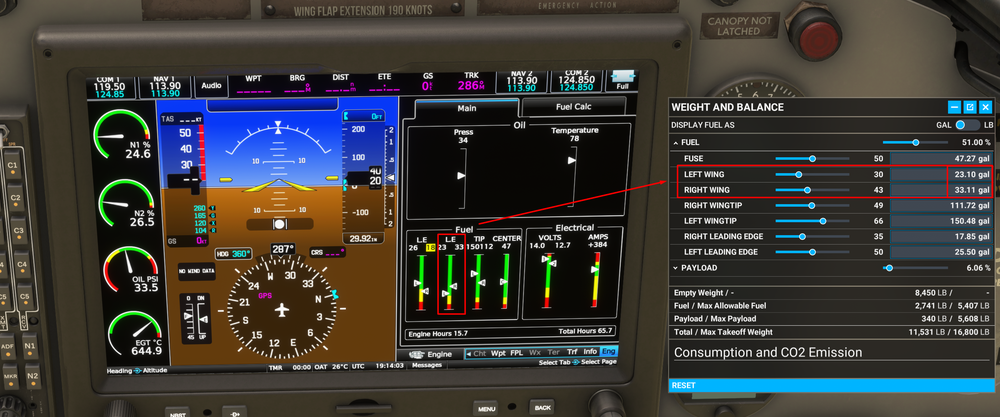
Hi thanks for your report! I do see the "L.E." indication is duplicated on the fuel system page. Whereas one of those (the one marked) should be "WING", as seen to match the fuel values of LEFT/RIGHT WING on the Weight & Balance menu. However, I don't understand your report regarding them being reversed? Could please share a screenshot of where you are noticing that. Thanks!
-
Thanks for the suggestions. I'll share with the team to see if we can add some kind of acceleration to the scrolling of the totalizer, and an EFB option for auto sync. Could you please elaborate on this? Do you mean a fuel and payload manager? The reason there isn't any is due to the size of this EFB. It being small phone does not leave much room for detailed schematics or or many pages either. Thanks!
-
Not in works at this time, but thanks will share your suggestion with the team.
-
I have also used the T-33 along with FSLTL Traffic using the modern avionics without issues. One of the A-B flights I did were KTPA to KMIA (with FSLTL), along with some other operations en-route. Did not experience any CTD with a lot of traffic around, as part of testing returns on the G3X TCAS. So again, the T-33 itself is highly unlikely to be the cause of a CTD. As for the horizon bar, it is a separate element that isn't part of the rotating gyro ball inside. It just moves within the visual limits of the instrument, unable to hide itself completely in either extremity of pitch attitude. That being said, thanks for the additional resources and documentation linked. Will share with the team. Thanks!
-
Hi @Editer Will share with the team. However it is a limitation of the sim sadly in the way it models droplets on glass surfaces. It will put it on anywhere defined as glass materials that is exposed to the environment. Thanks!
-
Hi @mgr Yes, this is by design - the AP is disabled upon switching of panels based upon feedback during testing. Reason: To avoid instances where the user is stuck with AP engaged accidentally upon switching panels as there is no way to interact with it in the classic cockpit. Additionally there is no indication of AP state in the classic cockpit, so the issue may not be immediately obvious to a user either if accidentally (or intentionally) engaged via any control bindings in the classic cockpit. As for ease of tuning, we'll look into QoL improvements for tuning via the EFB, specifically for NAV radios. As for the COM radios, they can already be tuned via the EFB by clicking on it. The list is populated by frequencies available nearby the user and can be refreshed by a button on the same page. Thanks!
-
Hi, thanks for your report. Could you please provide more info or share a screenshot of your sim's graphic settings? So we can try the same settings and see if we can reproduce the issue. At the moment on DX11/DX12 with either TAA, or DLSS anti aliasing not seeing any such flickering (RTX 3090). Thanks!
-
Yeah that was intentional. We had received feedback early on during testing that the horizon line only moved up and down on this particular instrument, whereas bank indicated by the top triangle and the angle of the gyro ball inside the ADI. So it was changed to reflect that feedback. But we'll look into it again and make the changes if necessary. Thanks! Unfortunately also unlikely. I've done 3 60min+ flights with different avionics and could not observe any memory leak or abnormally high memory usage. Sorry, we're not able to reproduce any CTDs on our end. Try with an empty community folder as suggested above. Or without any additional software running that communicates with the sim in real-time to rule out potential conflicts. For completeness, I have been using this plane extensively with addons like FSRealistic, Vpilot, Navigraph Simlink, LittleNavMap, FSUIPC7 and SPAD.Next without issue. Fixed. Thanks!
-
Hi @Alan_A No worries, I've moved your topic to the suggestions section where I feel its more appropriate. In the image above, 111.80 is tuned into NAV1. The first digit is always 1 so its omitted. Only the 11 / .8 / 0 parts are tuned by each of the 3 dials. For tuning the digits at position A, the click spot for the inner most dial is at position 1. For tuning the digit at position B, the click spot for the middle dial is at position 2, reached by moving the mouse outwards towards clickspot 2 from center of the dial. For tuning the digit at position C, the click spot for the outer dial is at position 3, reached by moving the mouse inwards towards clickspot 3 from outside of the outer dial. Noted. I'll share this suggestion with the team. Thanks!

-
Hmm, we are not able to reproduce the issue. On either Marketplace or iniStore version. Able to get the chimes across various stages of flight, multiple times. There is a certain cooldown period (less than 5 seconds) for the sound, so they won't play simultaneously if you keep spamming the switch, however at no point did it only play once for the entire flight.
-
Hi, could you please elaborate on this one? What is broken about it? It would also help if you could include a screenshot of what you're noticing. As a note, some of the gyro instruments, like the Artificial Horizon wouldn't work properly if the INVERTER is not switched on. This switch is towards the bottom right corner of the front panel. We have flown the plane for extensive periods, point A-B flights even for periods longer than 30 minutes without any reported CTD issues by testers, or observed internally. So this is most likely something specific to your simulator, either configuration or some other addons causing issues (such as SimFX). Can you try the following, to rule out any other conflicting addons? As for the fuselage tank switch, FUSE: The fuselage tank booster pump (electrically driven) is turned ON to supply fuel to the engine under boosted pressure. This makes sense if you're expecting to conduct manoeuvres that may lead to situations where engine could potentially be starved of fuel, or the fuel quantity remaining is generally low. NORMAL: The fuselage tank booster pump (electrically driven) is turned OFF, and the fuselage tank by-pass valve is set for normal operation (i.e. open) to supply fuel to the engine under normal engine-driven demand pressure. BYPASS: The fuselage tank booster pump (electrically driven) is turned OFF, and the fuselage tank by-pass valve is reset to permit fuel from the other selected tanks to by-pass the fuselage tank straight into the engine. This should only work provided either Leading Edge or Wing tanks are selected on. This is indeed an abnormal operation procedure for which you want to avoid routing fuel through the fuselage tank (usually due to a suspected failed/clogged fuselage tank valve). Thanks!
-
Thanks for the feedback everyone. We're monitoring all feedback/bug reports and are working to improve the product wherever possible. Just as a summary so far, the team is aware of the following reports: Mirrored Textures for repaints Colors/material of Thunderbirds USA livery. Paintkit - this is a WIP. Flight Dynamics - Particularly pertaining to low-speed and stall characteristics - also a WIP. TACAN - also a WIP. The list above is non-exhaustive, and there are other improvements also coming. These are just the main ones I've seen reported on the forums and socials elsewhere. Thanks!
-
Hi @Javilis23 Yes, you can only have one scenery active at any given time for an airport to avoid conflicts. Please uninstall the WU17 EGSS from your content manager, then restart your sim. Also advised to clear your scenery indexes in this instance: Thanks!
-
Thanks for sharing. Will see if I can reproduce a crash in those instances.
-
Yes, is planned but not available on release. Thanks!
-
No additional repaints or language versions planned at the moment, but thanks for the suggestion. I'll share with the team. As for paintkit, is planned but won't be available on release. Thanks!


