richboy2307
-
Posts
1685 -
Joined
-
Last visited
-
Days Won
83
Content Type
Profiles
Forums
Downloads
Everything posted by richboy2307
-
 SYSTEM OVERVIEW There are three Radio Management Panels (RMPs) in the cockpit that are situated on the pedestal. In the sim, these units allow you to Tune VHF Frequencies (COM RADIOS) Tune VOR and ILS Frequencies (NAV RADIOS) in STBY RAD NAV mode Enter the Squawk (SQWK) code and squawk IDENT Adjust volume for voice communication or NAVAID identification TUNING COM RADIOS (VHF PAGE) The VHF page is used for tuning the active and standby VHF1/2/3 frequencies which control the sim's COM1/2/3 radios respectively. Press the (1)VHF shortcut key to reach this page. The active COM frequencies are displayed on the left. The standby COM frequencies are displayed on the right. To dial a frequency, first please select the desired (2) Right-Line Select Key (RSK). When the digits are blue, surrounded by a blue box, use the (4) keypad to type in your desired frequency. To swap the active frequency, click on the desired (3) Left-Line Select Key (LSK). The (5) digital display shows the Receive and Transmit status of the various VHF radios. An active (A) Receive status is shown by the Megaphone icon, and the active (B) Transmit status is shown by a green highlight. To switch the active radio, push the Transmit button (green when active) and pull the Receive knob (blue when active) for the desired radio: (6) VHF1 Transmit and Receive (7) VHF2 Transmit and Receive (8) VHF3 Transmit and Receive (Click to enlarge image) TUNING STBY NAV RADIOS (NAV PAGE) The NAV frequencies (LS,VOR, ADF) are normally controlled by the NAVAID page on the MFD FMS. To manually control frequencies via the RMP, first go to the NAV Page by pressing the (1) NAV key. Then select (5) Standby Radio Navigation (STBY RAD NAV) key. Select the desired (3) Right-Line Select Key (RSK) to access the LS or VOR pages respectively. To input frequencies click on the desired (2) Left-Line Select Key (LSK). Then use the keyboard (4) to type in your desired frequency. On the VOR Page you can additionally enter the CRS by clicking the appropriate (3) Right-Line Select Key (RSK). To listen to any NAVAID, turn the (6) NAVAID selector knob to your desired NAVAID (ADF 1/2, LS, VOR 1/2 or MKR) and then pull the relevant reception knob (blue when active). (Click to enlarge image) CHANGING TRANSPONDER CODE / SQUAWKING IDENT (SQWK PAGE) The SQWK page is used for changing the active transponder code (SQWK) and to squawk IDENT when requested by ATC. Press the (1)SQWK key to reach this page. To change the SQWK, use the (2) keypad to type in your code. When the (4) Digits are blue, surrounded by a blue box, they are editable. Once the input is accepted it will turn green. To change the SQWK code again you need to switch to another page (e.g. VHF) then back to SQWK page. To squawk IDENT, press the (3) Left-Line Select Key (LSK). The status below will update to TRANSMITTING IDENT whilst doing so. (Click to enlarge image)
-
SYSTEM OVERVIEW The Brake To Vacate (BTV) function optimizes the autobrake deceleration on landing in order to reach the selected runway exit point/ manually entered landing distance. The system takes into account the selected runway condition/braking action in its calculations. Once armed, the system works autonomously to delay braking in order to reduce brake wear, optimize the runway occupancy time (ROT) and improve passenger comfort. SETTING UP BTV In order for BTV to function, it needs information such as your stopping target stopping distance and runway condition. This information can be provided by 2 ways: via Exit Selection on the ANF (airport moving map on ND), OR via Manual Distance Entry Instructions on how to set up BTV using each method is shown below. 1. Exit Selection on the ANF [*Navigraph Only] Step 1: Choose Landing Runway on FMS Press the F-PLN shortcut key to go to the FMS F-PLN page At the bottom left corner, select your DEST airport and select the Landing RWY - you can also select your APPR and STAR on this page, however the BTV system only requires the runway at minimum to function Choose TMPY F-PLN and then INSERT TMPY to confirm the selection. (Click to enlarge image) Step 2: Set ANF to your DEST airport Whilst on the ANF display, the currently displayed airport map can be changed via the ARPT SEL function page as follows: Change to PLAN mode via the ND Mode Selector Knob Change the range to ZOOM via the ND Range Selector knob Move the KCCU cursor to the ND screen by - Clicking anywhere on the ND screen, OR - Clicking the ND key on the KCCU Click the double-arrow Additional Function Button at the bottom-right corner of the ND Select the (A) ARPT SEL tab Choose from the (B) FMS AIRPORTS list to display your Destination Click the (D) DISPLAY AIRPORT button to make it the active displayed airport. (Click to enlarge image) Step 3: Choose the Braking Action / Runway Condition Pull the RWY COND/BRAKING ACTION KNOB-SELECTOR to bring up the RWY CONDITION / BRAKING ACTION matrix on the SD (this knob is located just above the landing gear lever) Rotate the selector clockwise (or anti-clockwise) to choose between the various RWY CONDITION / BRAKING ACTION options The selected option is validated automatically Push the knob selector to hide the RWY CONDITION / BRAKING ACTION matrix on the SD (Click to enlarge image) Step 4: Choose target Exit via ANF Click-and-drag to center the map on your desired exit Click the interactable taxiway icon on the runway (interactable elements have a blue border around them) Select SET BTV EXIT from the options list (You can also UNSET BTV EXIT from the same options list to remove your selection) Once a target Exit is chosen, A blue line will appear along the landing runway to the selected exit showing the chosen BTV target exit, AND On the top left corner of the ND, you will see the chosen RWY (and its LDA), BRAKING CONDITION and EXIT as well as the corresponding Runway Occupancy Time (ROT)(in seconds) and TURNAROUND time (in minutes) for MAX REV or REV IDLE usage respectively. (Click to enlarge image) 2. Manual Distance Entry Step 1: Choose Landing Runway on FMS Press the F-PLN shortcut key to go to the FMS F-PLN page At the bottom left corner, select your DEST airport and select the Landing RWY - you can also select your APPR and STAR on this page, however the BTV system only requires the runway at minimum to function Choose TMPY F-PLN and then INSERT TMPY to confirm the selection. (Click to enlarge image) Step 2: Open the LANDING function page Change to PLAN mode via the ND Mode Selector Knob Change the range to ZOOM via the ND Range Selector knob Move the KCCU cursor to the ND screen by - Clicking anywhere on the ND screen, OR - Clicking the ND key on the KCCU Click the double-arrow Additional Function Button at the bottom-right corner of the ND Select the (A) LANDING tab Enter the BTV Exit (B) DISTANCE from threshold for your target (This information can normally be obtained from the Airport Ground / Information Charts) Step 3: Choose the Braking Action / Runway Condition Choose the (C) LDG PERF CODE that is most suitable to the reported landing runway condition / braking action. You can bring up the RWY CONDITION / BRAKING ACTION matrix for reference by, Pull the RWY COND/BRAKING ACTION KNOB-SELECTOR to show the matrix on the SD (this knob is located just above the landing gear lever) Rotate the selector clockwise (or anti-clockwise) to choose between the various RWY CONDITION / BRAKING ACTION options The selected option is validated automatically Push the knob selector to hide the matrix on the SD (Click to enlarge image) BTV ARMING & ENGAGEMENT The BTV autobrake mode arms when the following conditions are met: A BTV exit is selected OR BTV distance is entered manually, AND A/BRK pushbutton is pressed Once successfully armed, The A/BRK pushbutton will be lit up green The PFD FMA will show BTV in blue (Click to enlarge image) The BTV autobrake mode engages on landing if any one of the conditions is met: immediately after ground spoilers extension if the NLG is on ground; OR 5s after ground spoilers extension if NLG is not on ground (Click to enlarge image) BTV DISARMING & DISENGAGEMENT The autobrake disarms if any one of the conditions is met: The A/BRK pushbutton is pressed again, OR The selected landing runway on the ANF is modified, OR The BTV exit is deselected, OR The FMS runway is changed to a runway that is different from the selected landing runway, OR A go-around is performed below 600 ft. The reversion occurs during the go-around, when the aircraft climbs above 600 ft. The computation is based on the minimum between the radio altitude, and the aircraft height above the runway threshold. The autobrake disengages if any one of the conditions is met: The aircraft ground speed reaches the BTV disconnection speed (approx. 10 kt), OR The flight crew uses the brake pedals, OR The flight crew presses the A/THR instinctive disconnect pushbutton, OR The ground spoilers retract or disarm. When autobrake disengages the the following happens: A single chime audio indicator sounds The MASTER CAUT lights comes on The AUTO BRK OFF memo appears on the PFD and WD.
-
- 1
-

-
You can run Take-off and Landing Performance calculations on the On-board Information System (OIS) display itself via the T.O PERF and LDG PERF pages respectively. TAKE-OFF PERFORMANCE PAGE The amber boxes denote mandatory data that must be filled in to COMPUTE a take-off performance calculation. (Click to enlarge image) CONDITIONS DATA This data can be filled in manually or automatically by clicking the SYNC button at the bottom. The SYNC button will fill in the amber mandatory fields with the following data Latest METAR for the selected Departure airport Current Aircraft Gross Weight You can customize the remaining conditions per best fit for your conditions RWY COND: DRY or WET A-ICE: OFF, ON (ENG), ON (ENG & WING) CONF: 1+F, 2 or 3 for your Flaps configuration. You should try running different configs in case you fail to find a result on your first choice. AIR COND: ON (STD) or OFF depending on whether or not you intend to keep Packs ON during takeoff. You should try a Packs OFF departure when extra engine performance is necessary (high altitude, temperature or weights) THRUST: FLEX (STD) or TOGA. Consider using a TOGA takeoff when extra engine performance is necessary (high altitude, temperature or weights). DEPARTURE DATA You must select your DEP airport (ICAO Code) and runway to obtain the TORA, ELVN and other data necessary to compute Take-Off performance. You can enter this Manually via the on-screen keyboard, OR Via an import from your FMGS data (SYNC FMGS) if the INIT has been completed and a DEP selected, OR Via an import from your Simbrief OFP (SYNC SIMBRIEF) RESULTS Once all the amber mandatory fields are filled in and you see <OK> next to your DEP airport and runway selection, click the COMPUTE button to obtain a takeoff performance result. The key information you will need from this V-SPEEDS: V1 / VR / V2 THRUST: Flex Thrust Temp MTOW (PERF): The maximum takeoff weight for the presently input CONDITIONS data. STP MARGIN: The remaining distance between the end of the runway and the computed stopping position of the aircraft You can press the SEND TO FMGS button to send this data directly to the FMS PERF page. (Click to enlarge image) On the FMS PERF page, you will see a yellow CONFIRM TO SPDS* button which you can press to complete the OIS Take-off performance data uplink. (Click to enlarge image) LANDING PERFORMANCE PAGE The amber boxes denote mandatory data that must be filled in to COMPUTE a landing performance calculation. (Click to enlarge image) CONDITIONS DATA This data can be filled in manually or automatically by clicking the SYNC button at the bottom. The SYNC button will fill in the amber mandatory fields with the following data Latest METAR for the selected Arrival airport Estimated aircraft landing Gross Weight from the FMS You can customize the remaining conditions per best fit for your conditions RWY COND: Choose the current runway condition from DRY / WET / COMPACTED SNOW / DRY SNOW / WET SNOW / SLUSH / STANDING WATER / ICE COLD AND DRY. These will affect your landing distance / braking action. CONF: FLAPS 3 or FULL. The FLAPS 3 settings allows you to carry more energy into your approach and is recommended in case of reported windshear and/or severe turbulence VPILOT: This is the extra speed margin you intend to use over your VAPP. Usually used in windy conditions. LDG TECHNIQUE: MANUAL or AUTOLAND. Manual landing figures based on threshold speed of Vls. Autoland figures based on threshold speed of Vls + autothrust increment (5kts). BRK MODE: MANUAL or MEDIUM REV: YES or NO. This refers to use of reverse thrust. ARRIVAL DATA You must select your ARR airport (ICAO Code) and runway to obtain the LENGTH, ELVN and other data necessary to compute Landing performance. You can enter this Manually via the on-screen keyboard, OR Via an import from your FMGS data (SYNC FMGS) if the INIT has been completed and a ARR selected, OR Via an import from your Simbrief OFP (SYNC SIMBRIEF) RESULTS Once all the amber mandatory fields are filled in and you see <OK> next to your ARR airport and runway selection, click the COMPUTE button to obtain a landing performance result. The key information you will need from this VAPP: This is your computed approach speed for the calculations. LDA: This is the total Landing Distance Available for the selected runway per the database. FACTORED LD: This is your demonstrated landing distance for the given configuration and weather conditions with some additional safety margins. It is essentially your "legal" landing distance. You want this to be less then STOP MARGIN/ LD: The remaining distance between the end of the runway and the computed stopping position of the aircraft using the Landing Distance. STOP MARGIN/ FLD: The remaining distance between the end of the runway and the computed stopping position of the aircraft using the Factored Landing Distance. (Click to enlarge image)
-
- 2
-
-

-
Close the simulator if it is running. Navigate to your your FS24 WASM Folder: Steam: MS Store: Delete all the contents of this folder. This folder and its contents will be re-generated next time you load into a flight with the aircraft.
-
- 1
-
-
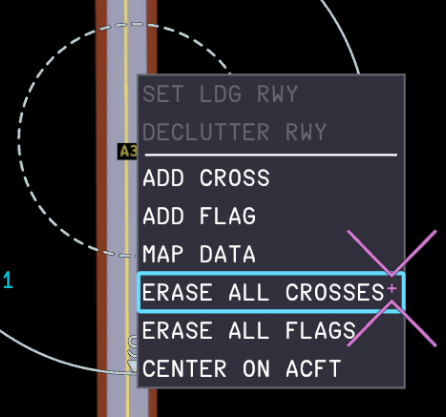
SYSTEM OVERVIEW The Airport Navigation Function (ANF) enhances crew situational awareness of the aircraft location within the airport operational environment. The Navigation Display (ND) displays an airport moving map when the flight crew sets the ND Range Selector Knob to 'ZOOM' on the EFIS Control Panel. The Keyboard and Cursor Control Unit (KCCU) is used to interact with the airport navigation display. (Click to enlarge image) CONNECT TO NAVIGRAPH Firstly open the On-board Information System (OIS) third-party options page, which is accessed from FLT OPS MENU > OPTIONS > 3RD PARTY. (Click to enlarge image) Connect your Navigraph account by Scanning the shown QR Code, OR Navigating to https://navigraph.com/code and enter the code shown on the OIS. After you have completed the authentication steps the OIS will update to show the additional 'UPDATE DATA' and 'RESET NAVIGRAPH' options. (Click to enlarge image) ANF NAVIGATION- CONTROLS AND INDICATORS When the ND Range Selector knob is set into the ZOOM position, the airport navigation display is displayed on the ND the knob can be turned clockwise or counter-clockwise to increase/decrease the range of the airport navigation display the knob has a range of five different ZOOM levels (5, 2, 1, 0.5 and 0.25 NM) the green knob indicator light remains in ZOOM position at the above five ZOOM levels. When the ND Range Selector knob is moved out of the ZOOM position, the airport navigation display is no longer displayed on the ND the ND returns to normal flight navigation display mode. The KCCU cursor and keyboard are be used to, Activate interactive functions of the ND Move the airport moving map by click-and-drag action Enter data on the ANF function pages. The KCCU Cursor can be moved to the ND by, Clicking anywhere on the ND screen Clicking the ND key on the KCCU The ND Mode Selector Knob allows you to display the airport navigation display differently in the following modes, ROSE-NAV ARC-NAV PLAN (Click to enlarge image) ARPT SEL FUNCTION- CHANGING DISPLAYED AIRPORT MAP Whilst on the ANF display, the currently displayed airport map can be changed via the ARPT SEL function page as follows: Change to PLAN mode via the ND Mode Selector Knob Change the range to ZOOM via the ND Range Selector knob Click the double-arrow Additional Function Button at the bottom-right corner of the ND Select the (A) ARPT SEL tab Choose from the - (B) FMS AIRPORTS list to display your Origin, Destination or Alternate airport; OR - (C) AIRPORT ITEM SEARCH FILTER list by typing in via the KCCU either the ICAO/IATA code of desired airport Click the (D) DISPLAY AIRPORT button to make it the active displayed airport. (Click to enlarge image) MAP FREELOOK FUNCTION- CENTER ON AIRCRAFT / RUNWAY / TAXIWAY The ANF airport moving map can be moved around by a simple left click-and-drag action with your cursor anywhere on the map. In the PLAN ND mode, to re-center the view onto your aircraft position, Left click with your cursor anywhere on the airport moving map display Select CENTER ON ACFT from the function list that shows up (Click to enlarge image) In the PLAN ND mode, to re-center the view onto a specific runway or taxiway, Click the double-arrow Additional Function Button at the bottom-right corner of the ND Select the (A) MAP DATA tab Select an item from the (B) MAP ITEM LIST via - RWY filter to list all the runways in database for the active airport map; OR - TWY filter to list all the taxiways in database for the active airport map Click the (C) CENTER MAP ON XXXX button to center the map on the selected item (where XXXX is the selected item from the Step 3) (Click to enlarge image) MARKING FUNCTION- ADD OR REMOVE CROSSES AND FLAGS In the NAV/ARC/PLAN ND modes, you can add CROSSES or FLAGS to highlight important checkpoints/hotspots or mark off closed taxiways for enhanced situational awareness. The CAPT and F/O sides share these marks. You can add or remove these marks in two ways: via the MAP DATA page on the Additional Functions Menu; OR via the airport moving map display on your present cursor position MAP DATA Page Method To add (or remove) a CROSS or FLAG from a map item via the MAP DATA page, Click the double-arrow Additional Function Button at the bottom-right corner of the ND Select the (A) MAP DATA tab Select an item from the (B) MAP ITEM LIST via - RWY filter to list all the runways in database for the active airport map; OR - TWY filter to list all the taxiways in database for the active airport map Click the (C) ADD CROSS or ADD FLAG button to mark the selected item from the Step 3 above. OR Click the (D) DEL CROSS or DEL FLAG button to unmark the selected item from the Step 3 above. Airport Moving Map Display Method To add a CROSS or FLAG anywhere on the map via the airport moving map display, Left click with your cursor anywhere on the airport moving map display Select ADD CROSS or ADD FLAG from the function list that shows up To remove a specific CROSS or FLAG on the map via the airport moving map display, Left click with your cursor the CROSS or FLAG you wish to remove It will be highlighted with a blue box indicating the it is the selected map item Select DELETE CROSS or DELETE FLAG from the function list that shows up To remove ALL CROSS or FLAG anywhere on the map via the airport moving map display, Left click with your cursor anywhere on the airport moving map display Select ERASE ALL CROSSES or ERASE ALL FLAGS from the function list that shows up
-
- 3
-
-
-
You can manage your external integrations such as Navigraph via On-board Information System (OIS) third-party options, page which can be reached via FLT OPS MENU > OPTIONS > 3RD PARTY. (Click to enlarge image) (Click to enlarge image) Reset Navigraph After an A350 Airliner product update it is recommended to reset your credentials and refresh your Navigraph token to avoid issues with Charts, Enroute Map or FMS Navdata functions. It is also sometimes necessary as a troubleshooting step. Simply click the 'RESET CREDENTIALS' button and it will disconnect from Navigraph, returning you to the connection screen with a QR code to allow you to re-connect your Navigraph account. Re-Connect to Navigraph Then you can re-connect to your Navigraph account by Scanning the shown QR Code, OR Navigating to https://navigraph.com/code and enter the code shown on the OIS. After you have completed the authentication steps the OIS will update to show the additional 'UPDATE DATA' and 'RESET NAVIGRAPH' options. (Click to enlarge image)
-
- 1
-
-
Hoppie Network is seamlessly integrated into the Multi-Function Display (MFD) ATC Communications (ATC COM) pages and functions to allow users to conduct the following tasks: Request Digital ATIS (D-ATIS) Communicate with online ATC (VATSIM/IVAO) Connect to Hoppie Network Firstly, enter your Hoppie Logon Code on the On-board Information System (OIS) third-party options page which can be reached via FLT OPS MENU > OPTIONS > 3RD PARTY. You can enter this manually via the On-Screen Keyboard OR by pasting it into the field by clicking on the text field and then pressing Cntrl+V key on your keyboard. (Click to enlarge image) Connecting to a Station Press the ATC COM shortcut key on the KCCU to access the MFD ATC COM pages. Then go to the 'CONNECT' page. (Click to enlarge image) To connect to a station, Select the network (VATSIM or IVAO) Select the station ID in the 'NOTIFY TO ATC' field (Choose from list OR type manually through the KCCU) Click the ' NOTIFY ' button to send a connection request to the station. The status will update with a green 'NOTIFIED TO YYYY at XXXXZ' where YYYY is the station ID, and XXXX is the current ZULU time in the sim. (Click to enlarge image) Once a station is connected successfully, the 'NOTIFY' button will be greyed out and green 'ACTIVE ATC: YYYY' status will be shown on the MAILBOX. (Click to enlarge image) Requesting D-ATIS Press the ATC COM shortcut key on the KCCU to access the MFD ATC COM pages. Then Select D-ATIS tab to go to the D-ATIS page. Enter a 4-letter ICAO Code in the airport entry field to request either DEP/ARR atis for that airport. You can display D-ATIS for upto 3 airports at a time. (Click to enlarge image) Click the SEND REQUEST button to request D-ATIS via the Hoppie Network. You will then receive: METAR: if an ATIS station for that airport is offline, the latest published METAR will be received. (e.g. GVAC below) ATIS: if an ATIS station for that airport is online, the latest DEP or ARR ATIS will be received, (e.g. EGLL below) (Click to enlarge image) You can update the ATIS individually by pressing the respective 'UPDATE OR PRINT' button or UPDATE ALL to grab the latest information. Making ATC Request In order to build a request message, you can use the predefined templates accessible via the REQUEST page. The empty fields contained in the templates indicate where you can enter complementary information. These fields must be filled in when they contain amber boxes. The flight crew can use up to 5 templates in a request message. (Click to enlarge image) To make a message, Select the desired template from the REQUEST MENU Select the desired option from the REQUEST SUB-MENU Fill in any fields with amber boxes as these are mandatory. Click 'XFR TO MAILBOX' button to confirm the message and send to ATC. Or you can click the 'TRASH' icon to delete the current template (Click to enlarge image) To send the message, Move your cursor to the 'MAILBOX' by pressing the MAILBOX shortcut key on the KCCU if it is not there already. Click the 'SEND' button. After a few seconds the message background will turn green and when successful the status will update to 'SENT'. The message will then disappear and the MAILBOX will return to the 'ACTIVE ATC' status page. (Click to enlarge image) (Click to enlarge image) Receiving an ATC Instruction Whenever you receive an incoming message/instruction from the connected ATC, you will be notified in the following ways: The blue ATC MSG button on the glareshield will flash continuously. The ATC MSG aural alert will play. You can reset this by pressing the in the blue ATC MSG button. The MFD FMS messages section at the bottom of the screen will display a white 'RECEIVED STATIONS' alert. The ECAM will show a green ACARS MSG memo The MAILBOX will show you the most recently received message, with the possible replies (e.g. ACCEPT/REJECT) next to it. To reply to the ATC message or instruction, Click the desired reply (e.g. ACCEPT) to confirm it, then click 'SEND' to transmit the reply to ATC. The selected option and message will turn green and when transmitted successfully the status will update to 'SENT'. The message will then disappear and the MAILBOX will return to the 'ACTIVE ATC' status page. (Click to enlarge image) Disconnecting from a Station Press the ATC COM shortcut key on the KCCU to access the MFD ATC COM pages. Then go to the 'CONNECT' page. (Click to enlarge image) To disconnect from the station, click the 'DISCONNECT ALL' button. (Click to enlarge image) Once a station is disconnected successfully, the 'NOTIFY' button will be white again and the MAILBOX will clear out. (Click to enlarge image)
-
You can access your Charts and Enroute Map on the On-board Information System (OIS) display via the 'TERML CHART' and 'ENROUTE' tabs respectively at the bottom of the display. (Click to enlarge image) Connect to Navigraph First you must connect to your Navigraph account on the third-party options page which can be reached via FLT OPS MENU > OPTIONS > 3RD PARTY. You can connect by Scanning the shown QR Code, OR Navigating to https://navigraph.com/code and enter the code shown on the OIS. (Click to enlarge image) After you have completed the authentication steps the OIS will update to show the additional 'UPDATE DATA' and 'RESET NAVIGRAPH' options. (Click to enlarge image) Terminal Charts These can be accessed via the 'TERML CHART' tab at the bottom of the display. At the top left corner you can input any 4-letter Airport ICAO Code to access its chart if there are any available. Once you have imported your Simbrief Flightplan into the OIS FLT OPS STS page, the DEP and ARR fields will be auto-filled. Click on the airport to access the list of available charts. (Click to enlarge image) The charts are colour coded by category. You can filter the desired category from the bar at the bottom of the display. Click on a chart name on the list to load it. You can move the chart around by holding down left mouse click and moving the cursor, OR navigation arrows at the top right corner of the display You can also zoom the charts and reset to original zoom via the buttons at the top right corner. You may pin your desired charts to the clipboard by clicking the 'PIN' icon next to charts on the list. You can access your clipboard by pressing the 'PIN' icon from the filter bar at the bottom. You can toggle NIGHT MODE for supported Charts by using the toggle button at the bottom right corner of the screen. Enroute Map The Enroute Map can be accessed via the 'ENROUTE' tab at the bottom of the display. This allows you to see you current aircraft position, overlaid on a 'Standard' world map. (Click to enlarge image)
-
Before your first flight, you must set your preferred navigation database (Navdata) via the On-board Information System (OIS) third-party options page which can be reached via FLT OPS MENU > OPTIONS > 3RD PARTY. (Click to enlarge image) Sim Default Navdata The A350 Airliner will use the internal 'Sim Default' navdata as the default option, similar to all our previous airliners for MSFS. This means it will update whenever the sim navdata is updated by Microsoft, but also that the data may be affected by installed Scenery or other 3rd Party packages (e.g. Navigraph sim base via Navigraph Hub) installed in your sim Community or Official folders. This type of sim navdata conflict presents itself occasionally as missing SID/STAR/APPROACH completely or parts thereof, or outdated runways, or missing ILS data for auto-tuning of NAVAIDs page etc. Navigraph Navdata To workaround the conflicts listed above, active subscribers have the option to use external navdata provided by Navigraph directly that works independently of the installed Scenery or other 3rd Party packages. Once set-up, this navdata must be updated directly via the same OIS menu whenever a new AIRAC cycle is available. Connect to Navigraph First you must connect to your Navigraph account by Scanning the shown QR Code, OR Navigating to https://navigraph.com/code and enter the code shown on the OIS. After you have completed the authentication steps the OIS will update to show the additional 'UPDATE DATA' and 'RESET NAVIGRAPH' options. (Click to enlarge image) Change Navdata Source You can swap between 'SIM DEFAULT' and 'NAVIGRAPH' navdata by simply clicking on its respective button under the NAVDATA option. This can ONLY be done on the ground without the engines running. Update Navigraph Data After selecting 'NAVIGRAPH' navdata as the active source, click on the 'UPDATE NAVDATA' button to download the latest from Navigraph directly. You will see the button status change to 'DOWNLOADING' and see a green 'Navigraph Navdata Updated' notification at the top of the screen once completed. Reset Navigraph After an A350 Airliner product update it is recommended to reset your credentials and refresh your Navigraph token to avoid issues with Charts, Enroute Map or FMS Navdata functions. It is also sometimes necessary as a troubleshooting step. Simply click the 'RESET CREDENTIALS' button and it will disconnect from Navigraph, returning you to the connection screen with a QR code to allow you to re-connect your Navigraph account.
-
SYSTEM OVERVIEW The Keyboard and Cursor Control Unit (KCCU) is part of the Control and Display System. They are directly connected to all the display units for normal operations and for reconfiguration purposes. There are two identical Keyboard and Cursor Control Units (KCCUs) on the pedestal: ‐ One KCCU for the Captain (CAPT) side FMS/ND ‐ One KCCU for the First Officer (F/O) side FMS/ND You can use the KCCUs to: ‐ Display the various FMS pages on the MFD ‐ Enter and modify data on the MFD FMS pages ‐ Perform some flight plan revisions on the ND. - Interact with the MAILBOX (Click to enlarge image) The important KCCU controls for the FMS are: (A) The ESC key Cancels the current field edition, or The field returns to the last valid value. Closes a pop-up window or a menu. (B) The CLR INFO key Clears the message that is currently displayed in the FMS, ATC COM, or SURV message area. (C) The Direction UP/DOWN ARROW keys. Work similarly to the KCCU scroll wheel to scroll through a page or changes the selection in an option-list. Example, on F-PLN page, move between waypoints line-by-line. Also used for stepping between waypoints when on ND PLAN mode for flight plan preview. Example, on DEPARTURE or ARRIVAL pages, required for scrolling between dropdown options-list to select the Runways, SID/STAR/APPR etc. (D) The FMS shortcut keys Used as an alternative way to switch between the various MFD FMS pages. Moves the cursor back to the MFD, if the cursor was previously on another display. DIR: Displays the FMS DIRECT TO page on the MFD PERF: Displays the FMS ACTIVE/PERF page (on the panel that corresponds to the active flight phase) on the MFD INIT: Displays the FMS ACTIVE/INIT page on the MFD NAV AID: Displays the FMS POSITION/NAVAIDS page on the MFD C/L MENU: Displays the CHECKLISTS page on the MFD F-PLN: Displays the top of the flight plan on the FMS ACTIVE/F-PLN page on the MFD DEST: Displays the bottom of the destination flight plan on the FMS ACTIVE/F-PLN page on the MFD SEC INDEX: Displays the FMS SEC INDEX page on the MFD SURV: Displays the SURV CONTROLS page on the MFD ATC COM: Displays the ATC COM REQUEST page on the MFD (E) The ND, MFD and MAILBOX keys ND: When pressed, moves the cursor to the onside ND MFD: When pressed, the cursor moves to the onside MFD. MAILBOX: When pressed, moves the cursor to the mailbox (F) The ENT key - Edits an entry field: The cursor is positioned in the field, and is ready for a new entry When data is entered, another click validates the entry, and the cursor moves to the field or button that is most likely to be used next - Edits an option-list: The option-list opens, and the first option is selected You may use the scroll wheel or the direction arrow keys, to change the selected option, if required Another click validates the selection, and the cursor moves to the field or button that is most likely to be used next - Activates the highlighted button. (G) The Scroll Wheel Works similarly to the Direction UP/DOWN arrow keys. Changes the selection in an option-list Scrolls through a page (e.g. F-PLN page or message list CURSOR OPERATION - MOVING BETWEEN DISPLAYS Each KCCU displays a different cursor. In the real aircraft they would be individually controlled by their respective Cursor Control Device (CCD) trackball, however for simulation purposes they will simply follow your mouse cursor within the respective boundaries of the currently active CAPT/FO display. Captain (Left) and First Officer (Right) Cursors The cursor is moved between the MFD, ND and MAILBOX displays by one of the following methods: via KCCU: Click the ND, MFD or Mailbox key to move the cursor to that display respectively. via Mouse: Click once anywhere on the display to make it the active cursor display (Click to enlarge image) INTERACTIVE ELEMENTS When the cursor is moved over an interactive element of the display unit, a light blue box appears around this element. You may then left-click on your mouse to begin the interaction such as allow text input or open the relevant page/drop-down menu for that element. For example on the MFD FMS Page, the 'ACFT STATUS' button below is highlighted to indicate you can click it to open the 'ACFT STATUS page'. (Click to enlarge image) For example on the ND, the waypoint 'DIMKI' is highlighted to indicate it can be clicked top open the drop-down menu of various FMS functions for that waypoint. (Click to enlarge image) DATA INPUT - KCCU OR KEYBOARD When you click on a data field, you will see a light blue flashing cursor box within the data field meaning you can use the alpha-numeric keys on the KCCU to enter the desired values. Click the ENT key on the KCCU to confirm the input or the ESC key to exit the field. To activate KEYBOARD INPUT, press the Left Ctrl key on your keyboard once. You will see an amber KEYBOARD INPUT ACTIVE message at the bottom to confirm activation. Then you can use your hardware keyboard for data input. Press Enter on your keyboard to confirm the input. The KEYBOARD INPUT mode will de-activate automatically after. To manually de-activate KEYBOARD INPUT, you can press Left Ctrl key again once. Then click the ESC key on the KCCU to exit the field. LIST OPTIONS SELECTION - ARROW KEYS OR SCROLL WHEEL When an option-list opens, the first option is selected. You may choose the other options on the list by one of 2 methods below: Cursor Selection: Hover your cursor over the desired option and left click to confirm selection. KCCU Selection: Use the UP/DOWN arrow keys or the SCROLL WHEEL to navigate between all of the options on the list. Then click the ENT key to confirm the selection. (Click to enlarge image)
-
- 4
-
-
-
Your planned SimBrief flightplan may be imported directly into the FMS via the INIT page. This flightplan can also be loaded onto the On-board Information System (OIS) display to view the Operational Flight Plan (OFP). Please follow below steps for setting up and using this feature. Setting Up SimBrief Import Verify you have set-up your Simbrief Pilot ID (numbers only) on the FLT OPS MENU > OPTIONS > 3RD PARTY settings page. Click on the SIMBRIEF USER ID text field and then use the On-Screen Keyboard. (Click to enlarge image) Importing into OIS You can import your Simbrief Flight information on the OIS through the FLT OPS MENU > FLT OPS STS page. Click on the SIMBRIEF IMPORT button on the top-right corner to populate the fields below and add your Operational Flight Plan (OFP) to the OIS. Click to enlarge image) Importing Route into FMS You can import your route on the FMS through the INIT page via the CPNY F-PLN REQUEST button. (Click to enlarge image) After a few seconds, the button status will update to RECEIVED CPNY F-PLN. Click this and select INSERT * from the drop-down to complete the uplink. The fields on this page will auto-fill and you will see a white AOC RTE UPLINK message at the bottom confirming successful import. (Click to enlarge image) (Click to enlarge image) Lastly, you may also request a wind up-link from Simbrief by clicking on the CPNY WIND REQUEST * button as shown in above screenshot.
-
- 1
-
-
Loadsheet Page (OIS) Before you fly, you must set your Zero Fuel Weight (ZFW) and Fuel Load (FUEL) via the On-board Information System (OIS) display LOADSHEET Page. You can do this manually or through Simbrief import. We will go over both methods below. The LOADSHEET Page page can be accessed via the FLT OPS MENU or directly by clicking the (A) LOADSHEET navigation menu button. (Click to enlarge image) Changing Weight Measurement Units (LBS / KGS) The aircraft weight measurement units (LBS / KGS) are changed on the OIS Settings Page which can be reached via FLT OPS MENU > OPTIONS > OIS SETTINGS. Select your desired unit by clicking on its respective button. (Click to enlarge image) Manual Entry ZFW: Click the (C) ZFW Entry Box and then use the On-Screen Keyboard to enter the desired value. When done, select the (E) SET ZFW button to apply the entered load to the aircraft. FUEL: Click the (D) FUEL Entry Box and then use the On-Screen Keyboard to enter the desired value. When done, select the (F) SET FUEL button to apply the entered load to the aircraft. You will see a notification at the top of the OIS Display indicating the status of various actions. Simbrief Import Simbrief ID: Verify you have set-up your Simbrief Pilot ID (numbers only) on the FLT OPS MENU > OPTIONS > 3RD PARTY settings page. Click on the SIMBRIEF USER ID text field and then use the On-Screen Keyboard. (Click to enlarge image) ZFW / FUEL: Return to the LOADSHEET page and click the (B) SIMBRIEF IMPORT button at the top right corner. This will auto-fill the ZFW and FUEL values in the fields below. Then click the (E) SET ZFW and (F) SET FUEL buttons respectively to apply the imported loads to the aircraft. (Click to enlarge image)
-
- 2
-
-
Issues with Calibration If you experience any issues with the Throttle Calibration process, you may force-reset the calibration on the EFB via either of the following methods: PC & Xbox: Toggle the 'Reverser on Axis' option between YES and NO a few times to reset the calibration. PC Only: Delete the 'ThrottleData.ini' file to start fresh on next launch of the simulator. This file will be found in the work folder of the aircraft, and the path will vary based on where you purchased the simulator: Steam: %APPDATA%\Microsoft Flight Simulator 2024\WASM\MSFS2024\inibuilds-aircraft-a350\work MS Store: %LOCALAPPDATA%\Packages\Microsoft.Limitless_8wekyb3d8bbwe\LocalState\WASM\MSFS2024\inibuilds-aircraft-a350\work Issues with Reversers If you experience any issues with the operation of reversers on hardware with reverse on axis (E.g. TCA Quadrant Airbus Edition), please ensure the following: Reverse on Axis: Ensure you have selected YES on the EFB Throttle Calibration page. Calibration: Ensure you have completed the calibration at least once. This will ensure the creation of a 'ThrottleData.ini' file. ThrottleData.ini : The file can be found at the path stated above. Open with a text editor (e.g. Notepad) and check that it says the following - [throttle] reverse_on_axis = true If it says false, change it to true as above. Reversers should then work after a sim restart.
- 1 reply
-
- 1
-
-
Throttle Calibration Page (OIS) Before you fly, you must calibrate your throttles via the On-board Information System (OIS) display Options > Throttle Calibration Page. (Click to enlarge image) Reverser on Axis Option Verify whether your hardware has a reverse thrust on an axis or not then choose the appropriate option. 'REVERSER ON AXIS' is set to NO: The bottom most position of your hardware axis (0%) will be assignable to the IDLE detent position. You may have to bind 'HOLD' / 'TOGGLE REVERSE THRUST' sim control binding to an additional button / input on your hardware to use reverse thrust. This option is recommended for majority of the more commonly used hardware equipment (including Xbox Controllers). 'REVERSER ON AXIS' is set to YES: The bottom most position of your hardware axis (0%) will be assignable to the MAX REV detent position for thrust reverser operation. You can additionally define separate IDLE and IDLE REV detent positions. This option is recommended for hardware such as the TCA Airbus Throttle Quadrant. (Click to enlarge image) Global Deadzone Option You may define a 'Global Deadzone %' for all detents or input an individual 'DZ%' manually for each detent during the Throttle Calibration Process which we will cover below. The present deadzone % boundary is also shown visually on the axis diagram to the right via white lines above/below your present AXIS % value. These lines indicate that the assigned detent will activate whenever AXIS 1 & AXIS 2 % values are within the two white lines. The larger the number, the further apart the white lines will be meaning the the detent is engaged for a larger range of hardware axis movement. 'USE GLOBAL DEADZONE' is set to YES: Use this option if you want all the detents to have the same deadzone value automatically after you complete the Throttle Calibration Process described below. Enter a number in the 'GLOBAL DEADZONE %' text box immediately below (Default is 2.5%). The value entered will be applied to all detents (MAX REV / IDLE REV / IDLE / CLB etc.) whenever you click any of the detent buttons. 'USE GLOBAL DEADZONE' is set to NO: Use this option if you want some of the detents to have a different deadzone value when you complete the Throttle Calibration Process described below. Enter a number in the 'DZ %' text box immediately below the detent buttons. The value shown will be applied ONLY to whichever detent button (MAX REV / IDLE REV / IDLE / CLB etc.) you click. You can then change this value and click a different detent button, and it will apply the shown value as the deadzone for that detent. (Click to enlarge image) Throttle Calibration Process You may begin the calibration process by physically moving your hardware axis to your desired position, then clicking the desired detent button (e.g. IDLE/CLB etc.) on the OIS to assign the shown AXIS 1 & AXIS 2 % to that respective detent. Example #1 - Reverser On Axis = NO To define the IDLE detent on hardware without reverser on axis: (Click to enlarge image) Move your hardware axis physically to its idle position (e.g. AXIS 1 & AXIS 2 will typically read 0%) Set your desired 'GLOBAL DEADZONE %' or Deadzone (DZ%) for the current detent. Press the 'IDLE' detent button on the OIS. A green notification at the top of the screen ('Calibration: Idle Set') will confirm the IDLE detent is set to your present hardware axis position. Repeat the same process for each desired detent from IDLE to TOGA. Example #2 - Reverser On Axis = YES To define the CLB detent on hardware with reverser on axis: Move your hardware axis physically to the desired position ( e.g. AXIS 1 & AXIS 2 may read ~50% on TCA Airbus Throttle Quadrant on its physical CLB detent but may vary per your hardware) Set your desired 'GLOBAL DEADZONE %' or Deadzone (DZ%) for the current detent. Press the 'CLB' detent button on the OIS. A green notification at the top of the screen ('Calibration: Climb Set') will confirm the IDLE detent is set to your present hardware axis position. Repeat the same process for each desired detent from MAX REV to TOGA. (Click to enlarge image)
- 1 reply
-
- 1
-
-
A350-900 Click the image to add the airframe to your SimBrief! A350-1000 Click the image to add the airframe to your SimBrief! A350-900ULR Click the image to add the airframe to your SimBrief!
-
- 18
-
-
-

-
sim limitation Snow coverage issues and animals in the airport
richboy2307 replied to LukeFF's topic in Support
Hi @LukeFF Apologies for delayed response. But both of these are core-sim issues. The sim adds a snow exclusion around roads (you can see this on the default LOWI as well) and currently offers no way to overlay or hide these roads as they're added in a layer above scenery by the sim, driven by their own vector data. Same with Fauna (animals), these are dynamically generated by the sim with no way to create any exclusion zones for them. Only workaround for now is to disable them in the Graphics settings. Thanks -
Hi @DDoBaGi That looks like you have 2 Dubai sceneries active at the same time. Please verify you have disabled any other OMDB sceneries from your My Library (e.g. Default handcrafted OMDB) See below article for how: https://flightsimulator.zendesk.com/hc/en-us/articles/17373373933340-How-to-enable-and-disable-content-in-the-simulator As for Orbx Dubai Landmarks, OMDB Enhanced is not marketed as compatible nor is compatibility tested/supported. That being said OMDB Enhanced comes with built-in Landmarks so would recommend disabling any other Dubai addons for the same. Thanks!
-
Hi @b747 That is a feature not a bug. Fuel is gravity fed to the engines even without the pumps being on. The only way to absolutely cut-off fuel feeding is by engaging any of the fuel fire shutoff valves. These valves close when their respective Fire handle is pulled. The pumps switches on the overhead control the "Electrical Fuel Booster Pumps" (keyword being Booster). These help ensure sufficient continuous pressure for transfer between tanks, which is particularly important for low fuel or extreme pitch attitudes, bank angles etc or high continuous demand which can exceed the gravity fuel feeding rate (e.g Takeoff thrust). Thanks!
-
Your planned SimBrief flightplan may be imported directly into the MCDU via the ACARS page. This flightplan can also be loaded onto the Aircraft EFB to view the Operational Flight Plan (OFP) and other relevant information. Please follow below steps for setting up and using this feature. Setting Up SimBrief Import The import features only work after you have entered your (5) Simbrief Pilot ID (numbers only) on the Aircraft EFB Settings app. Your Pilot ID is found on the 'Account Settings' page on Simbrief website. You can also switch (6) Weight Units between Metric (KG) and Imperial (LBS) units here to match your planned flight. Importing into EFB Navigate to the "My Flight" app on the Aircraft EFB home page. Here you can select the "IMPORT FROM SIMBRIEF" button on the bottom right to retrieve your flightplan. After the flightplan is imported, you can click the "VIEW FLIGHTPLAN" button to preview your text OFP. Importing into MCDU Press the (1) MENU button to access the MCDU Main menu page. From here press the (2) R1 LSK "ACARS" button to access the ACARS page. Then press the (3) L1 LSK "REQUEST SIMBRIEF" button to begin the import. You will be returned to the INIT A page and shown the (4) Scratchpad message "AOC RTE UPLINK" upon successful import. Importing Simbrief Fuel & Payload Lastly, you may update your Fuel & Payload as planned via Simbrief on the Aircraft EFB using the guide below:
-
Your planned SimBrief flightplan may be imported directly into the MCDU via the ACARS page. This flightplan can also be loaded onto the Aircraft EFB to view the Operational Flight Plan (OFP) and other relevant information. Please follow below steps for setting up and using this feature. Setting Up SimBrief Import The import features only work after you have entered your (5) Simbrief Pilot ID (numbers only) on the Aircraft EFB Settings app. Your Pilot ID is found on the 'Account Settings' page on Simbrief website. You can also switch (6) Weight Units between Metric (KG) and Imperial (LBS) units here to match your planned flight. Importing into EFB Navigate to the "My Flight" app on the Aircraft EFB home page. Here you can select the "IMPORT FROM SIMBRIEF" button on the bottom right to retrieve your flightplan. After the flightplan is imported, you can click the "VIEW FLIGHTPLAN" button to preview your text OFP. Importing into MCDU Press the (1) MENU button to access the MCDU Main menu page. From here press the (2) R1 LSK "ACARS" button to access the ACARS page. Then press the (3) L1 LSK "REQUEST SIMBRIEF" button to begin the import. You will be returned to the INIT A page and shown the (4) Scratchpad message "AOC RTE UPLINK" upon successful import. Importing Simbrief Fuel & Payload Lastly, you may update your Fuel & Payload as planned via Simbrief on the Aircraft EFB using the guide below:
-
- 1
-
-
Autopilot randomly disconnecting multiple times during flight
richboy2307 replied to Jorrallcorrall's topic in Systems
Hi @CptFerox @Argonox Most users have made changes to the controller profiles, having unbound unnecessary controls from keyboard/mouse and other connected devices so we recommend the same. As a last resort, you may also try a sim re-install, especially if the initial sim install was within first few weeks when server issues were prevalent as it is possible some core files were improperly installed. Currently we do not have any other suggestions other than those above at this time. As also mentioned on the previous post, currently we have not seen any issues aircraft-code wise that would cause AP disconnection issues, nor have we been able to reproduce this on our end (having done multiple "AFK" flights, longer than 6h as well). Thanks! -
Large, Lo-Res, Blobby Reflections in Cockpit Windows
richboy2307 replied to SkyMall's topic in Modelling & Texturing
Hi @Jeff Green We have to wait for a fix from MS/Asobo side as last sim update has affected reflections across the board. Thanks! -
Autopilot randomly disconnecting multiple times during flight
richboy2307 replied to Jorrallcorrall's topic in Systems
Hi @Jorrallcorrall We're not able to reproduce such issues (flight control or engines cut off) on long or short segments across the A330 fleet (or other default airbus aircraft) internally or through any of our testers. So the issue is likely client side, please take a look at the suggestions below to see if you can find the cause: Sorry you're experiencing this, please also take screenshots of when this happens (A screenshot that shows PFD/ND/FCU in clear view + a screenshot of your pedestal (MCDU till rudder trim) + a screenshot of your overhead panel), so we can see if there are any clues as to why this may be happening. The AP/AT disconnection is usually caused by control inputs, which could be caused by conflicting keybinds from any of your connected devices. These can include primary flight controls (axis/buttons for Aileron/Elevator/Rudder) and trim for those controls. For the throttles these keybinds could also be nudging the them out of the relevant detents, and thereby leading to AT disconnection. The banking left is indicative of inputs on aileron or rudder (or their respective trim). Alot of these are assigned to common keys (e.g. Enter for RUDDER YAW RIGHT) on the default profiles for keyboard. So it is possible these are being inadvertently registered by the sim as you're using your keyboard outside of flight sim as well. TOGA LK will usually engage when aircraft has entered a low speed regime to prevent stall (ALPHA FLOOR PROTECTION), so that is just the result of an AT/AP disconnect situation leading to a degradation of your speed. This also seems a keybind issue related to MIXTURE (axis or set rich/lean) or CONDITION. Alot of users who have reported such issues have resolved after ensuring any bindings related to these are unassigned from all connected devices, except for the switches/axis where you want it to be assigned. You should also be wary of the control profiles, as these can be assigned individually per aircraft now so you want to ensure the correct ones are assigned and active. Some users have also reported that even though a profile was showing active on UI, it wasn't the case until the changed to default profile, and then back to their custom profile and hit save after. The last thing (particularly PC related) is that if your PC has power saving enabled on USB ports. It is possible that after a few hours of non-usage, it enters a power-saving state, which causes device to reconnect. MSFS2024 loads the "default" controller profile initially when a device is connected, before reverting to custom profiles if the device is recognized again. So its possible that is what is happening in these instances. So spend some time looking into these to see if you can resolve the issues. Thanks!
-
The Behaviours menu is a bit different in terms of layout in FS2024, with alot more options but it generally works in the same way. Enable Developer Mode in settings and then open the behaviours menu from the [DEVMODE] toolbar. Highlight the interaction you want to inspect by hovering your mouse over it and then press 'L Ctrl' +'G' on your keyboard. On the [INSPECTOR] Tab, you can usually fin the affected variables under Animations or Mouserect dropdowns. Then go to [VARIABLES] Tab, type in the name of LVAR and use your mouse to conduct the interaction to monitor the changes in values. Note: The sim does not allow all LVARs to be defined by the user, but this way you can find the affected LVARs for each interaction to see the ones you can manipulate. 2025-01-07 14-50-23.mp4 Thanks!