





IniJamir
Staff
-
Joined
-
Last visited
Everything posted by IniJamir
-
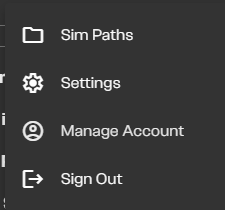
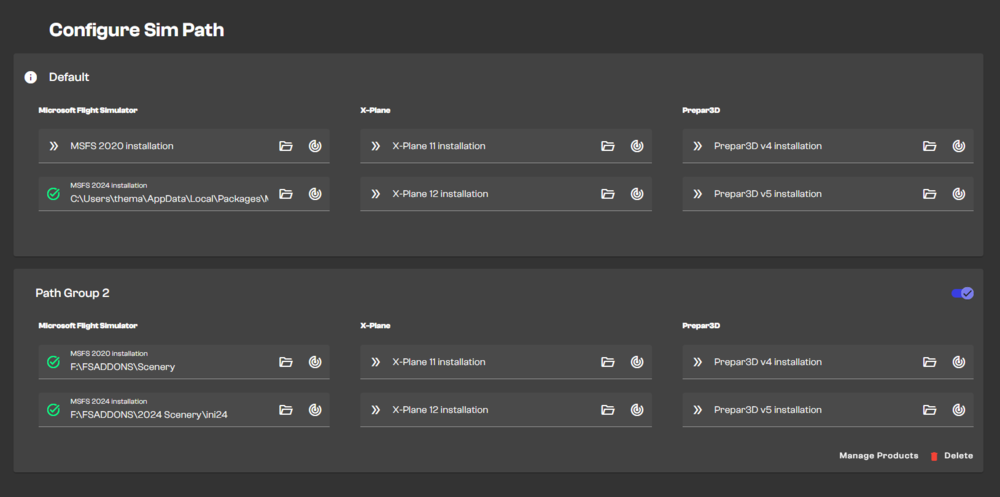
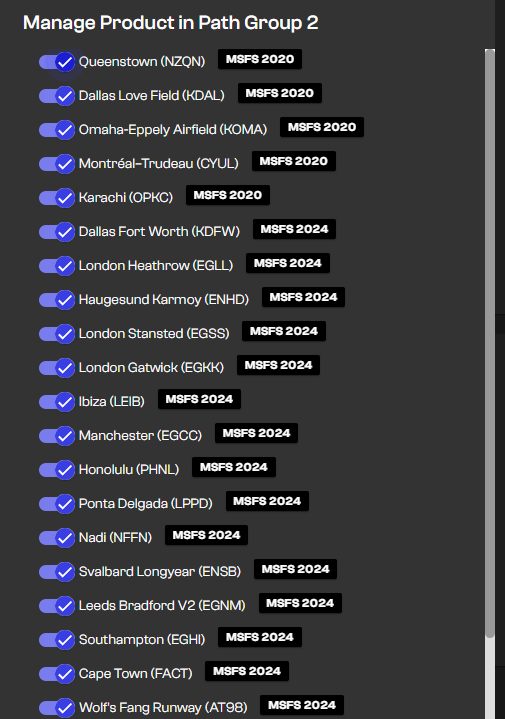
Hi, There are two things you can try first, one is logging in and out of the IniManager, the second is to clear the IniManager cache by deleting the relevant folders in %appdata%/Local & /Roaming. Has uninstalling everything worked in the past? If so that is an option but I understand that reinstalling every scenery is not in anyway convenient or time considerate so I am hoping the first two options will solve this. An additional question? Did you use the Sim Path System provided in the IniManager or Addon Linker per chance? I've attached the images below as you can navigate to this section in the IniManager by clicking on your username in the top left. Here as you can see I have my addons installed externally and then manually enabled. Hopefully this information helps. Thank you 🙂
-
Hi, When you say the FMS keyboard inputs are not working properly, what do you mean by this, do you have any footage of what isn't working that way we can better understand and assist? When I was in last night I wasn't having issues typing in the 350 MCDU, however other users are reporting issues; so if we can get more recorded instances of this happening, that would help us greatly. Thank you.
-
Lists specific to Xbox aren't going to be included for the PC patch notes of 1.2.1. The issue has been raised to the team and I hope to have more information for you all soon, rest assured you are not going unheard. If I can ask one thing, it's that anyone in this thread that can, attach videos of the issues happening to this thread so I can give that to the team as well. Thank you.
-
Hi, Do you have any videos that can be attached to the thread that way I can pass it along to the developers? Thank you.
-
Hello, First and foremost I want to say both thank you for your dedication, and thank you for taking the time to write this. Whilst I can't answer to everything in this post immediately as some things are just not possible for me to comment on currently as I am new to the position and have a decent amount of catching up to do, I hear both your frustrations and your compliments and I am grateful for both as much as I am grateful for the time and dedication you have put into your efforts to test our products and log issues that you find on the forums for the developers to view. As stated prior I can't speak on "What's going on with the A340 and A350?", but I can tell you that work is being done to bring more improvements to these airframes and I hope to be a better bridge for communications between the developers and you all in the community; whether it be feedback or bugs, suggestions or looking for support; the feedback that is left here in the forums is invaluable and I hope that as time goes on I will be able to improve the quality of communication both here and on the IniBuilds Official Discord. I've taken note of the issues you have listed with the MCDU Keyboard Entries Affecting the Aircraft as well as the HUD, (If you could make new entries for these I'll be happy to press them forward as well), and many of the other issues I've come across as I scroll through the backlog of forum issues that are still prominent today. All in all I'll leave it with this, improvements are coming on both fronts Development and Community, and I look forward to improving your experience here in the forums whether it be through bug sharing or feedback; everything here will be communicated with the team however I will be locking this thread as it's a prime example of insightful feedback and I don't want this thread to become bloated. Thank you once again for your dedicated support.
-
-
Hello, It seems you are not the only person who has begun to encounter this issue. There is another thread that I am going to split your post above here into and then relocate into the IniManager Section. This issue is being raised to the team currently, thank you.
-
Hi, These pictures are perfect for what I needed to be able to share with the devs. Thank you!
-
Hi, Glad it was able to be resolved, I will still push this issue to the team as it seems to be a quirk of the Manger, thank you.
-
Hello all, I have merged the thread as it is a pressing issue and I want to make sure it is addressed properly to all that are affected. I will press this issue with the team and respond once I know more, thank you.
-
Hi, Are you able to provide media (either screenshots or videos) of this happening that way I can send the instances to the team? Thank you.
-
Hi, I will push this issue to the team, thank you.
-
Darn, I will push this issue to the team, I am sorry for the inconvenience at this time. If it is any consolation, YBBN is one of the less intensive sceneries as all of the configuration options are low impact, but I do understand the frustration of not being able to fully control the product you paid for.
-
Hi, Sorry this is still happening, I'll push this to the team and see what I can find out, sorry for the delay.
-
Hi, No need to worry, we've sent the update to Microsoft. Thank you 🙂
-
The update has been sent to Microsoft
-
I'll pass this along to the team.
-
-
Hello, Sorry for the delay in response, I will raise this to the team. Thank you.
-
Hello, Due to the way the update system works in the Marketplace works and how it handles updates, we had to label the Inibuilds A340 Marketplace Version as 1.0.8 whereas on the IniManager it is 1.0.7. That being said both aircraft are on versions 1.0.7 and with the release of 1.0.9, both Marketplace and Inibuilds Manager Versions will be synchronized with each other as 1.0.9. The v.1.0.7 changelog is current to the v.1.0.8 version which you are seeing on the Marketplace currently, sorry for any confusion this may have caused. Thank you.
-
Hi, Thank you for the kind words and for the suggestions, I will pass these along to our team for consideration.
-
Hi, This has been noted and will be passed along to the team, thank you.
-
Glad you were able to get it sorted out 🙂
-
Hi, I tested this with my own equipment (I don't have a Honeycomb) and I wasn't able to reproduce any failures/state changes when unplugging and re-plugging in any of my peripherals. Now that being said in most cases simulators don't like to be plugged and unplugged during operations and can result in simply nothing happening or the entire simulator crashing. I will still forward this along to the team but my strongest recommendation is to mitigate the chances of the simulator detecting a controller change/unplugging. Thank you.
-
Hi, Sorry for the delayed response, I will raise this to the team. Thank you.


