





Eddie
Member
-
Joined
-
Last visited
Everything posted by Eddie
-
Hi there, I've passed your feedback on to the team 😊 Thank you!
-
Hello, I've passed your feedback on to the team 🙂 Thank you
-
Hello, Please check your in-game FPS counter (Accessed via demoed menu). Post a screenshot of it as it will give clues to your performance. You can also try using the iniManager to disable some of the airport features, that should save performance. All in all, it does sound like your computer is having trouble keeping up with the demanding environment, turning down settings (TLOD, LOD, iniManager features etc) is probably your best bet. Thank you
-
Hello, This is a suggestion best suited for the MSFS Forums as MS has the say on what should be included/excluded etc on default aircraft. Thank you
-
Hi there, I can pass the suggestion on to the team. Full GSX integration is currently not planned. Thank you
-
Hi there, We've logged this and should be resolved in a future updated. Thank you!
-
@Jackhoppkkins Hi, no current plans on implementing that functionality unfortunately. May change in the future but for now that's how it is. Thank you
-
That could be the issue as well indeed.
-
Hello, Apologies for the delayed reply! That does indeed not look right, shared with the team. Thank you for the report!
-
Hi again, @Dudley Henriques While I understand your frustration, these forums are not meant for addressing concerns or such. We have a contact page that takes you directly to support that is able to help you a lot more hands on; https://inibuilds.com/pages/contact. These forums are to share issues/suggestions/feedback for the community and we do our best to respond and help/address whatever the topic may be. I am not a developer, nor is the rest of the moderation/community team. Our job on most issues is to forward concerns or issues to the developers, that's how it works in most studios. Regardless, I apologize for any inconvenience you may have endured but again, please use our contact page for direct contact with the team. Thank you @Marko93 Thank you for your kind words, Marko. I assure you we hear you. Our team is VERY busy with a lot of projects at the moment; that may give off the impression that we've given up on certain products. Unless directly communicated, that isn't the case. We hope you'll continue to enjoy our products going forward! Thank you gentlemen.
-
Hi there, What exactly do you mean by "commands"? Are the switches that control said lights not functioning?
-
Hi again, Have you made sure the X-Plane path you've put into iniManager is correct? If you're unsure, use the "Scan Now" feature instead of manually inputting anything. Thank you
-
Hi, Does sound like some kind of livery issue. Are you able to reproduce the issue with a different livery?
-
Hello, Not sure I understand what the problem is. Where is it bleeding "through"? Looks like the prompt is just behind the tablet and shows through the hole. Apologies if I'm missing anything here! Thank you
-
Hello, What do you mean by "error". Is the iniManager returning said error when you try installing? If so, try the alternate download as it may resolve the problem. You can find that option by clicking your name in the top left and scrolling down until you see "alternate downloader" at the bottom. Enable that and try again. Let me know if that resolves the issue! Thank you
-
-
Hi there, Apologies if you have felt its been radio silent. We will make sure to ramp up responses to T-33 inquires, however like mentioned before, we do read everything and take it into account for future iterations of the product, so rest assured that whatever feedback is given is being relayed to the developers despite the lack of a response. But like mentioned, I'll personally try to respond a lot more. Thank you!
-
Hi everyone, Apologies for the late reply. There is a fix in the works and all lighting-related bugs have been acknowledged and noted. Can't really give a timeline unfortunately but rest assured, as soon as possible. Thank you
-
Hi there, This is actually intentional. Powering up from C&D immediately displays values when ECAM comes alive. As seen in this video (timestamped for convenience, ignore the title too 😆 The older airbuses (EIS1) however display XXs until FADEC powers up.
-
Hello Mitchell, Apologies, we've must've missed your initial inquiry. As for the issue, please ensure no inputs are being detected (aileron, elevator or rudder axis). Going from the video, I notice your left elevator being triggered by a manual input in this case. If what is mentioned above doesn't work, please make sure the overhead mode switches are active: Thank you!

-
Hi there, Unfortunately this ends up being a MSFS limitation. How it works is that GSX will send a "Toggle Jetway" command to the simulator which then leads to MSFS deciding on its own which jetway to use and what door to dock it to. It sounds very silly I know, but this is unfortunately out of our hands. A lot of times the jetways connect normally however this behaviour is very much unpredictable. Apologies for the inconvenience regardless! Thank you
-
Looks awesome!
-
Hi johna, This is a known bug and will be fixed in a future patch; as soon as possible. We apologize for the inconvenience! Thank you
-
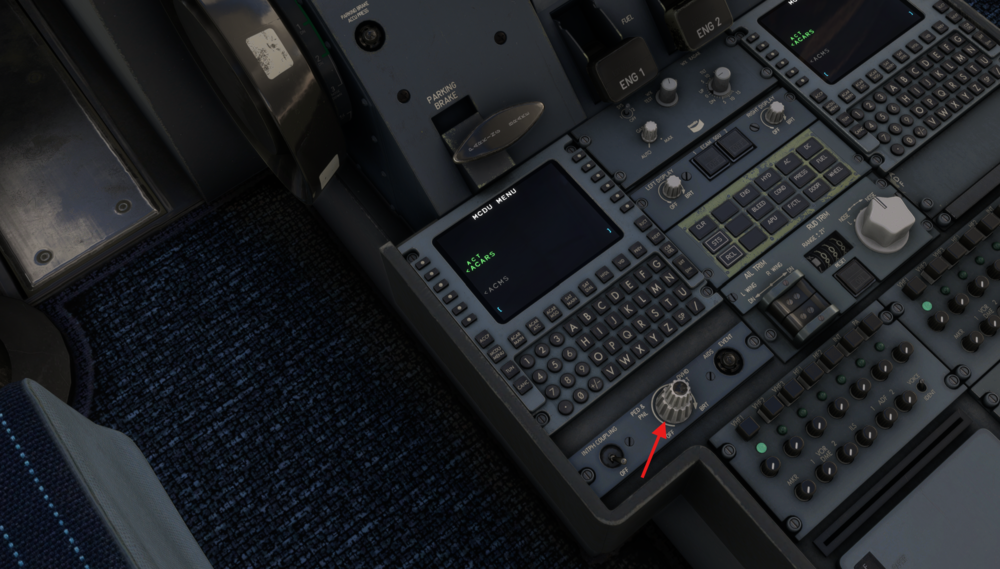
Oh, apologies. We've received a lot of feedback about the A320 lights lately so I assumed this was regarding that without reading what category this was in haha. Anyway, you can find what you are looking for here: Again, apologies and hope this helps. Thank you!
-
Hi! Apologies, must've missed your reply to my message. But happy to see it improved. We'll take a look at the 310 for future reference as well, must've sneaked through our fixes this time around. Thank you for your patience throughout all this! 😉


