iniSteven
Staff
-
Joined
-
Last visited
Everything posted by iniSteven
-
-
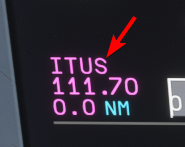
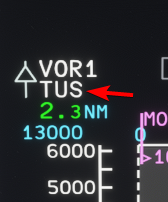
Hi, in the A340 and A350 there is no need under normal operation to listen to nav radio morse tones in order to identify them. They are automatically identified by the aircraft - when the LS or VOR identifier is shown on the screen, the navaid has been tuned and identified by the avionics.
-
Hi Mikai, regarding the GPWS sounds, there are actually several different soundsets that are used depending on the airline and specific equipment installed. We have even heard a boeing style "TWENTY-FIVE hundred" call in some recordings. The current recording are the highest quality and cleanest samples we have from an actual aircraft, so for now they are what we will stick with. Best, Steven
-
So what I'm asking is did the plane fly within RNP .3nm or did it deviate too far? For clarity the radius of that curve is approx .1nm, so again it depends on what exactly is in the database the aircraft is reading from, but for that specific leg it's within the approach specifications. Did you actually fly the approach?
-
I'd be curious what the leg is coded as in the Navigraph database, as what is depicted on the chart is not always what actually gets exported into the database - I will take a look. Regarding the actual approach, did the aircraft fly the procedure within acceptable limits?
-
Hi, this is correct - these gates are a hastily constructed concourse meant to replace Terminal 2; which was demolished last year to make room for the construction of the new Terminal 1.
-
Most likely you had the aircraft selected on the free flight screen when trying to update. It would be nice if the sim could give a warning notifying this when you try to install, but naturally it can't update an aircraft that's currently loaded!
-
You do not need to switch cockpit interactions to legacy, I use lock mode and am able to push and pull knobs without issue. You just need keys bound to COCKPIT INTERACTION - SECONDARY and TERTIARY ACTION. -Steven


-
As per the real aircraft, the IAS and MACH modes on the MCP are Pitch modes - they will pitch the aircraft to hold a selected IAS or MACH speed while the throttles are operated manually to adjust climb/descent rate. Again as per the real aircraft, AT mode can only hold an IAS dialed into the window, and TM mode can only hold the Mach value calculated by the PMS. If you want to hold a specific mach value, you have to do it via entering the corresponding IAS in AT mode.
-
Mach is a pitch mode, not an autothrottle mode. You can only hold a mach speed in cruise with the autothrottle by using "TM" mode through the PMS. The standard AT mode can only hold an indicated airspeed.
-
Hi Florian, the lights are all working on our end (and various screenshots posted on our discord also confirm that this is not a universal issue) so this is most likely caused by a conflicting addon on your end. I would start by loading the A350 with a clean community folder and seeing if the issue persists.
-
-
Please don't report bugs that occur when loading an autosave from a previous version. As the previous version had an error causing DES mode to activate prematurely, it's likely the descent flag had already been triggered and this was baked into the save. We did multiple full flights in 1.2.4 testing both the cruise step descent behavior and the final descent behavior.
-
Hi, this is what I have from art: We have confirmed the wing livery model provided in our paintkit is working as intended. Please make sure you are using the livery template project provided in the paintkit as it already contains the necessary models to create a livery. Open the xml inside the project with the latest version of the sdk and follow the instructions inside the readme to make your livery. If you are unsure on how to use this template project please refer to the sdk documentation. There is no need to use a model from one of our custom liveries Please make sure as well that your "A343_WINGREG_ALBD.PNG" is a transparent png file and not an opaque one

-
Having this many simconnect events (one for each pixel the mouse moves) is going to be a huge problem. Simconnect has trouble handling even double-click events like the Autopilot Disconnect, so I doubt this would even work. Plus, having this many events would significantly increase the chances of Simconnect crashing/hanging entirely.
-
The OIS is a JS gauge - all the rest are core avionics and are part of the WASM package.
-
It's not possible at this time. Popped out WASM gauges cannot receive mouse click or scroll events, so it is impossible to make them clickable.
-
It means that it's not something we even can plan because it's not a decision we can make.
-
Hi, this is incorrect. 1: The winwing MCDU *is* compatible with the A340, which is the only aircraft that uses these grouped instruments. Given the feedback we have received we do not plan to continue using this method for future releases. That said, the graphical display of the instruments has nothing to do with compatibility with Winwing peripherals. Regarding the disconnection issue, we are in contact with Winwing to solve this as many of us on the testing team use these peripherals and want them to work. 2: The A320, A321, and A330 are Microsoft products built by us under contract. As such, the scope and featureset of these aircrafts is determined by Microsoft.
-
-
Hi Dectenor, We know of this behavior, it is an exception that can happen when there is a mandatory level off segment during the approach. But it's not as simple as simply increasing the descent rate, because we are simulating the CDA function of the A350. As you know, the A350 descent profile is calculated backward from 50ft AGL up to TOD, and as part of this calculation the aircraft seeks to remove all level-off segments and achieve VAPP and configured for Landing at 1000ft AGL. It's important to remember that our goal isn't to make a VNAV system that hits every restriction, we're attempting to make a VNAV system that behaves like the real aircraft. Airbus pilots will tell you that the real aircraft VNAV system isn't perfect, it doesn't always hit every restriction, and can sometimes have odd behavior as well. As mentioned before we are working on improvements to the LNAV and VNAV systems to better reflect the real aircraft behavior, but in the meantime you sometimes have to give the aircraft a little extra guidance, as sometimes happens in reality as well 🙂
-
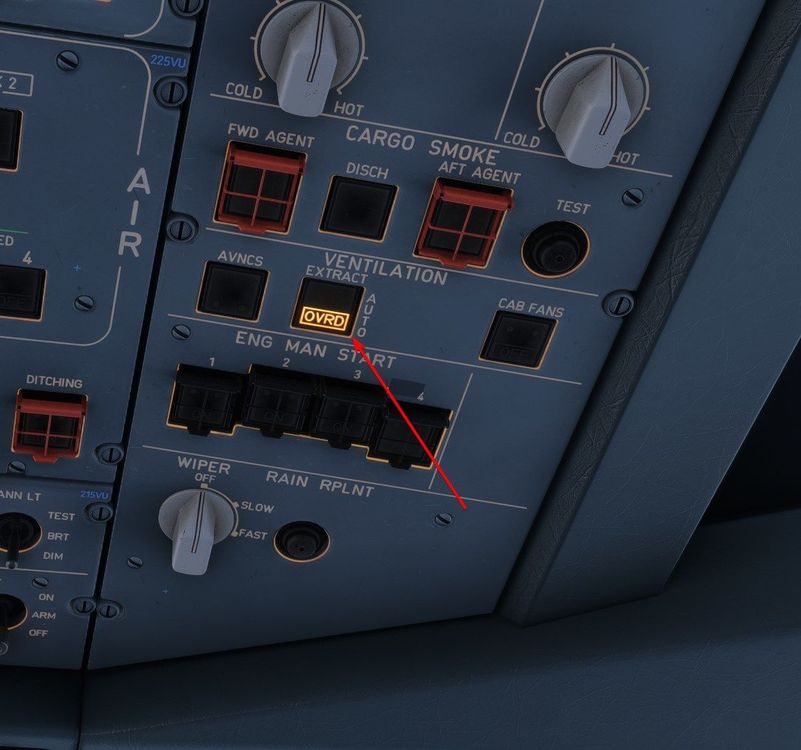
Hi, the issue is that your vent extraction is on manual override. This should be closed in flight, but the manual override opens it, which is why you cannot reduce your cabin altitude.
-
Thanks, forwarded to the scenery team who will take a look 🙂
-
Hi, I think the issue is that the runway at Queenstown is only 5,800' long and surrounded by mountains. I don't think an A350 is capable of taking off in such a situation! 🙂
-
Hi, has this happened multiple times or just once? Could you take a screenshot of what you input so we can test the same values? I've just done a calculation to test and it seems to work, so I'm curious if it's related to a specific input. -Steven