iniSteven
Staff
-
Joined
-
Last visited
Everything posted by iniSteven
-
Hi Bert, can you confirm that you have Photogrammetry on in your Data/Online settings?
-
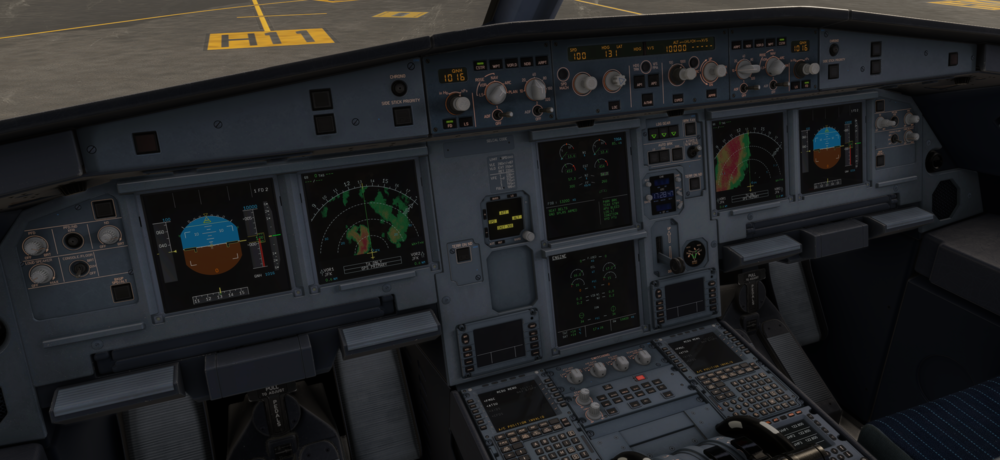
It is unreasonable to expect someone to answer a question within 24 hours on a holiday. We have families too 🙂 The Default MSFS2024 airbuses have weather radar but not terrain radar. You can see here:
-
There's Terrain and Weather radar in the A300, A340, and A350 as mentioned on the product pages. I am confused as to why that is considered unclear or inconsistent. I apologize for not getting to this topic sooner, that said though I think expecting an answer within 24 hours on December 24th is a bit unreasonable. We are all humans here on the other side of the screen after all 🙂
-
Hi, I don't think there's anything we can do on our end to fix the issue here, as we can only define start and endpoints for taxiways and runways. All logic regarding routing is handled by BATC's AI.
-
Hi, you would need to recenter the rudder in order to re-engage the autopilot. I would suggest unbinding any keybinds attached to control movements if you don't need them, they will only cause problems. -Steven
-
Hi, are you on 2020 or 2024? The 1.0.3 update was for 2024 only.
-
Hi, the current version of Innsbruck for MSFS2024 is v1.0.3, the changelog for that version is here: v1.0.3 Reconfigured LOJO heliport; removed trees/clutter, added lights and replaced fence and markings.,, Replaced low resolution airside vehicles,, Helipad 03 spawns inside of building, Runway centreline not straight, Trees and ground poly bleed through POI_Stadium, Adjusted alignment of dark patches on main apron, Most airside 3d manhole covers replaced with HD decals, Removed fence at stadium
-
Disabling it from the content manager is all you should need to do.
-
Hi Kanye, what is your discord profile name?
-
Hi - Both of you were banned for being active members of a piracy discord. Best, Steven
-
I've been flying quite a bit and have not had a BRAKES HOT ecam on any landings recently - are you having it on every flight?
-
Try clearing your WASM folder entirely @LizzArd - you can find a guide here:
-
Well the BRAKES HOT message comes on when the brakes go above 300c. How heavy is the plane? Depending on the weight it can be very easy to end up with hot brakes after landing.
-
-
Are you using EIS1 or EIS2? EIS1 symbology does have less contrast than on EIS2 - maybe that can help.
-
Well, what's the temperature of your brakes when the warning comes up?
-
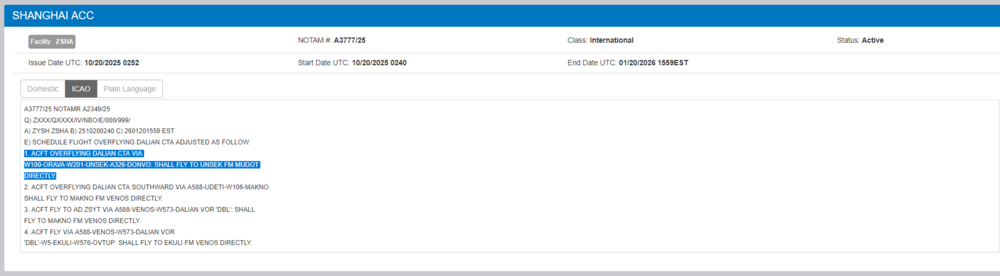
Yes, this causes issues for real aircraft as well, there's a NOTAM about it:
-
-
Hi, I would also suggest clearing your caches if you're having CTD issues - you can do this from the options -> data page and clicking "delete" Best, Steven
-
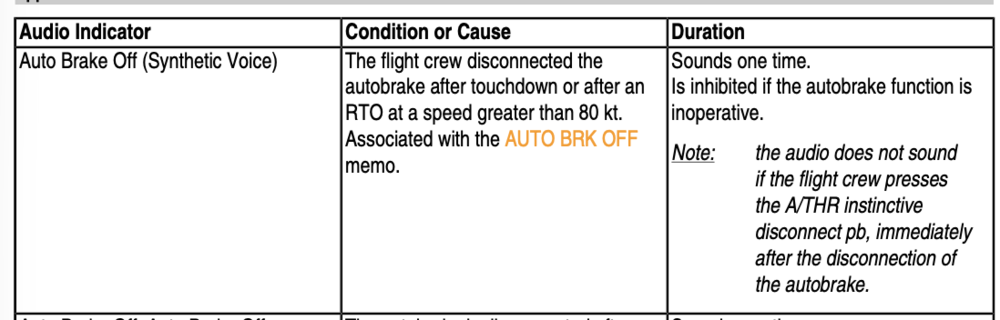
Hi, the AUTOBRAKE OFF callout only sounds when the Autobrakes are disengaged at a speed greater than 80kts - see here:
-
Thanks, I've forwarded to the scenery team 🙂
-
Hi, unfortunately there's no way to choose doors in MSFS at this time - hopefully it's something that can be added to the sim in the future 🙂
-
Gotcha, thanks for the clarification - What platform are you on? Is this PC or Xbox?
-
Hi Sirup, your other issue is a traditional WASM crash - again we are working hard to reduce these but as we've mentioned it's not an easy thing to fix, most crashes are unique in the sense that there isn't one fix for all of them, so it's a game of trying to recreate each report to see if we can replicate it, and from there prevent that specific crash from happening. Your issue in this thread though is one we have identified a consistent issue, and are working with MS on a fix as we've been able to recreate this issue with other addons. Currently we are trying to identify exactly what it is about our implementation that seems to cause this to happen more frequently with our products.
-
Hi, we are aware of this issue (not a WASM crash but an issue where the sim and aircraft seem to lose connection with each other) - we are in discussion with Microsoft about the cause/remedies to the issue. We haven't been able to identify a fix yet but we are working on it 🙂